The Spanish version is the authoritative reference. View in Spanish
Mexico: Methods for Document Cancellation
The API in Mexico offers the option to automate the cancellation process for approved documents that do not have a pending cancellation request.
Once the document has been issued and has an accepted status, the cancellation process can be started whenever one of the following reasons applies, represented by the corresponding key according to the following table:
| Key | Reason | Description | Action |
|---|---|---|---|
| 01 | Receipt issued with errors, with relation. | Applies when the generated invoice contains an error in the product key, unit value, discount, or any other data, so it must be reissued. | First, the invoice is generated with the correct data, and then cancellation of the invoice with the error is requested; the request includes the folio (UUID) of the new invoice. |
| 02 | Receipt issued with errors, without relation. | Applies when the generated invoice contains an error in the product key, unit value, discount, or any other data and does not need to be related to another generated invoice. | No additional action required. |
| 03 | The operation was not carried out. | Applies when an operation that does not go through was invoiced. | No additional action required. |
| 04 | Regulatory operation related to the global invoice. | Applies when a sale is included in the global invoice for operations with the general public and, afterward, the customer requests their formal invoice — that is, in their name and with their RFC. | The global invoice is canceled, reissued without including the operation for which the invoice is requested. The formal invoice is issued. |
If the receipt is being substituted, key "01" (Receipt issued with errors, with relation) must be indicated, and the tax folio of the receipt that replaces it must be stated.
Once the cancellation request has been sent, two scenarios can occur:
- The request requires the receiver's acceptance, which will be sent to their Tax Mailbox.
- The receiver's acceptance is not required.
- Issuers send the invoice cancellation request through the Gosocket API.
- The receiver receives a notification in their Tax Mailbox informing them that a cancellation request exists.
- The receiver must accept or reject the cancellation through the SAT Portal, within the following three business days, counted from receipt of the request. If no response is issued, it is considered as acceptance and the document is canceled.
- If the cancellation request does not require the receiver's acceptance, the document is canceled immediately.
Cancellation request modalities
Cancellation without acceptance
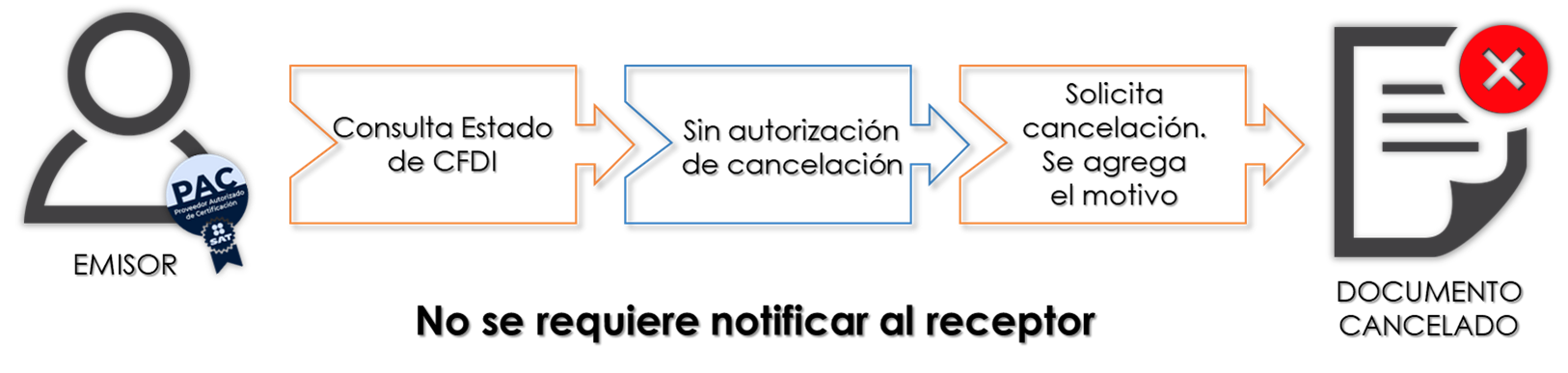
There are cases where the Issuer requests the cancellation and the CFDI is canceled instantly. These cases are considered Canceled without acceptance. These are the CFDIs that do not need to send any request through the Tax Mailbox.
The issuer of an invoice may cancel it without requiring the receiver's acceptance, under the scenarios established in rule 2.7.1.35 of the current Miscellaneous Fiscal Resolution.
There are exceptions under which invoices can be canceled without the receiver's confirmation.
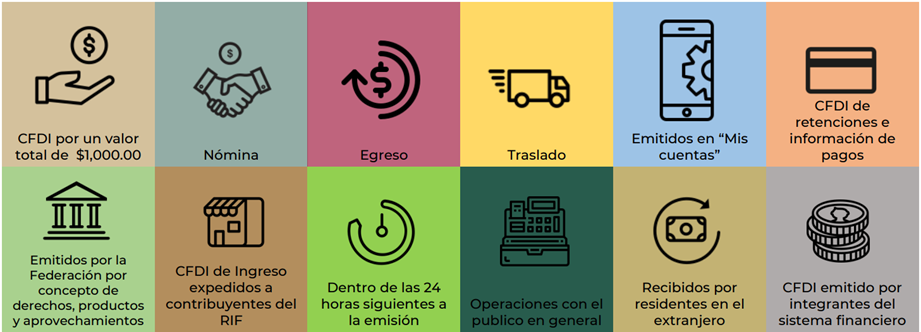
Invoices can be canceled without the receiver's acceptance when:
a. They cover income up to $1,000.00
b. For payroll purposes.
c. For expense purposes.
d. For transfer purposes.
e. For income issued to RIF taxpayers.
f. Issued through the "Mis cuentas" electronic tool.
g. They cover payment withholdings.
h. Issued for operations carried out with the general public.
i. Issued to foreign residents for tax purposes under rule 2.7.1.26.
j. When cancellation occurs within the day following (calendar day) its issuance.
k. For income purposes, issued by taxpayers who dispose of property, use or temporarily enjoy real estate, grant the use, enjoyment, or encumbrance of land, property, or rights — including real, ejidal, or communal rights referred to in rule 2.4.3, sections I through VIII — as well as taxpayers exclusively engaged in agricultural, forestry, livestock, or fishing activities under rule 2.7.4.1, and who, for issuance purposes, use the services of a CFDI issuance certification provider or issue CFDI through the legal entity authorized to operate as a certification and CFDI generation provider for the primary sector.
l. Issued by members of the financial system.
Cancellation with acceptance
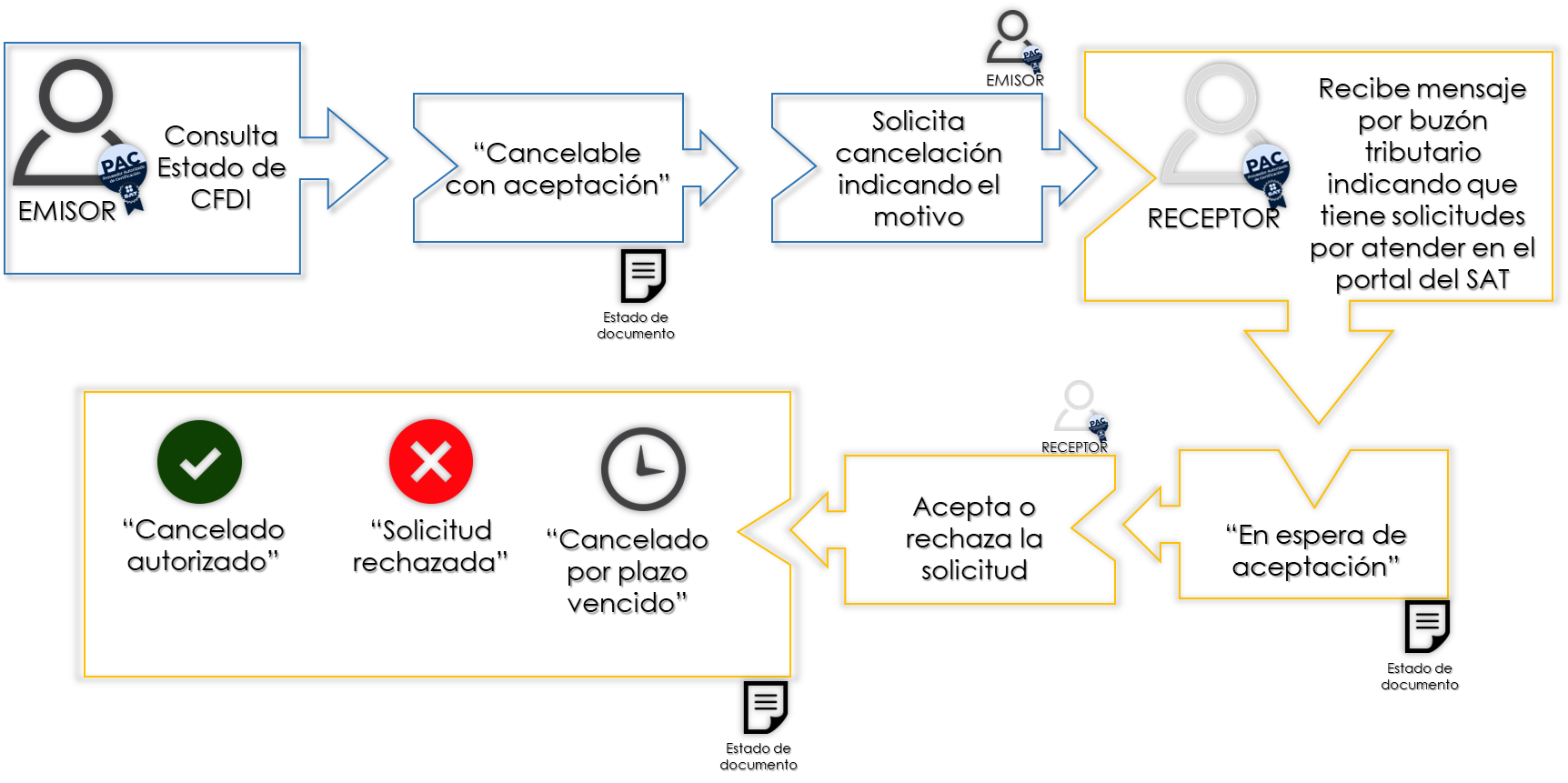
The receiver of the tax receipt will receive a message through the Tax Mailbox to address the CFDI cancellation request, and must state through the SAT Portal, no later than within the following three days, counted from receipt of the CFDI cancellation request, their acceptance or denial of the CFDI cancellation.
The cancellation process will be as follows:
a. Issuers must send the invoice cancellation request through the SAT Portal or through the services of a certification provider.
b. When acceptance is required for cancellation, the invoice receiver will receive a notification message in their Tax Mailbox, informing them that a cancellation request exists.
c. The receiver must state their acceptance or rejection of the cancellation through the SAT Portal or via the Certification Provider, within the following three business days counted from receipt of the request. If no response is issued, it is considered a deemed acceptance and the invoice will be canceled.
Once the issuer has requested the cancellation of an invoice and the receiver has stated their rejection of it, if the issuer submits a new cancellation request for the same CFDI (for a second or subsequent time), and the receiver does not expressly accept that request once the three business days have elapsed (counted from receipt of the cancellation request), the tax authority will deem this request rejected and the receipt will continue with an active status (expired deadline).
There is no maximum number of cancellation requests
d. The issuer receives the receiver's response (accepted or rejected), or, if the receiver did not respond, will be informed that the invoice was canceled due to an expired deadline, unless it is a second or subsequent request.
Non-cancelable document
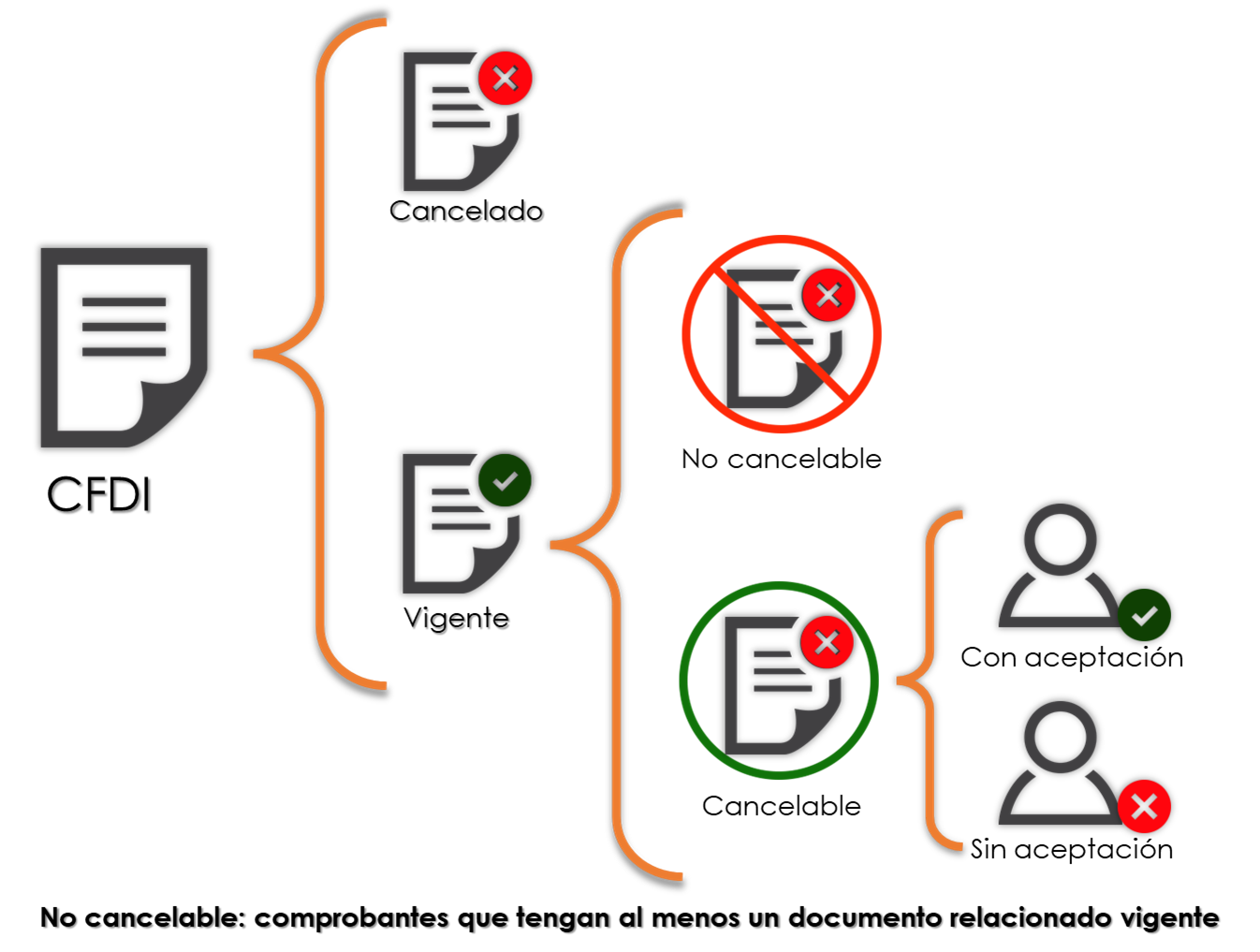
A CFDI is considered Non-cancelable when it is related to another CFDI.
To cancel it, the CFDI to which it is related must be canceled first.
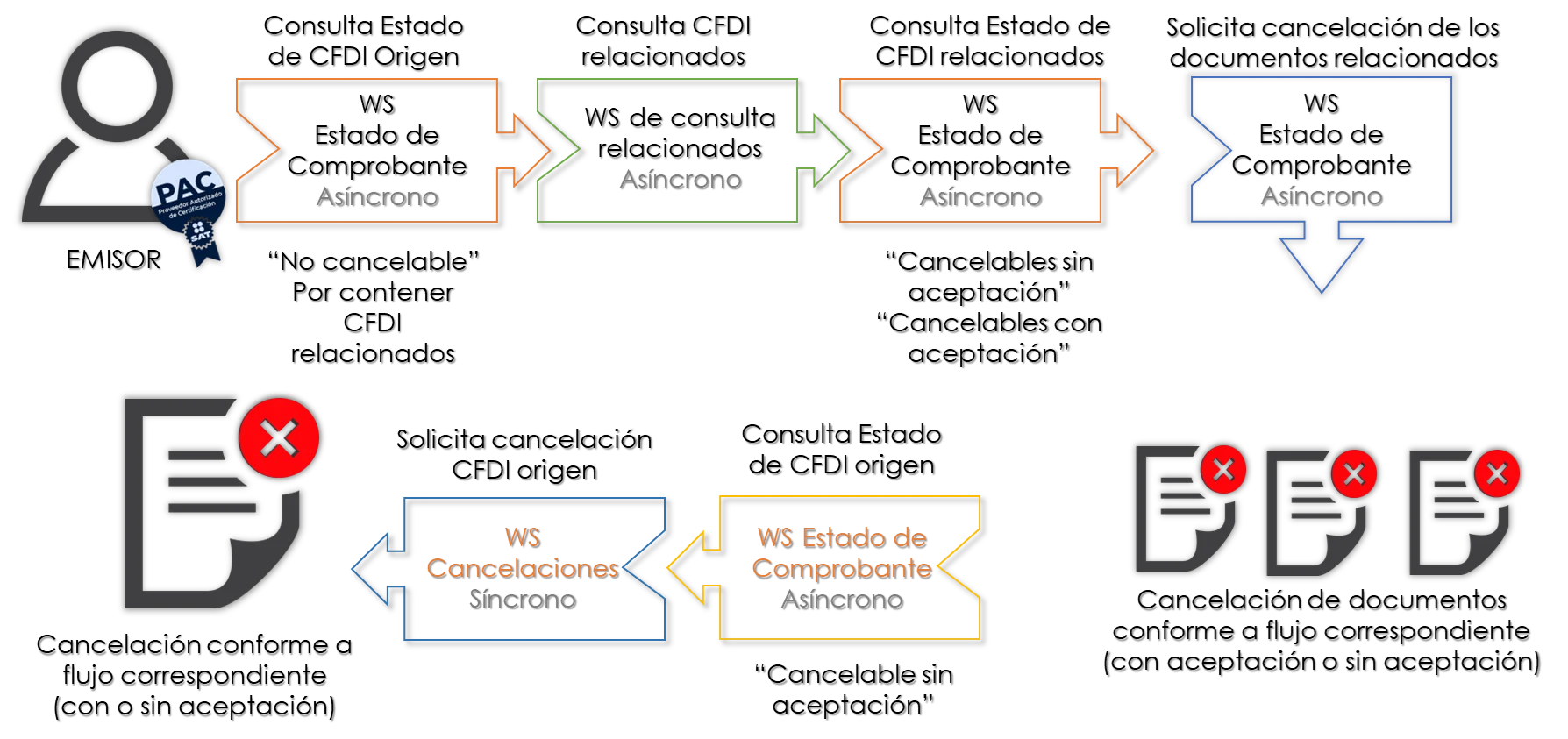
If the invoice to be canceled has active related receipts, the issuer may only cancel it once the related invoices are canceled first and the source invoice is canceled afterward, except for those in which the cancellation reason key "01" (Receipt issued with errors, with relation) is recorded. Cancellation requests, invoice status queries (active or canceled), acceptance or rejection of cancellation, and queries of related documents can be performed through the SAT portal or through the services of a certification provider, either one by one or in bulk.
Prior configuration
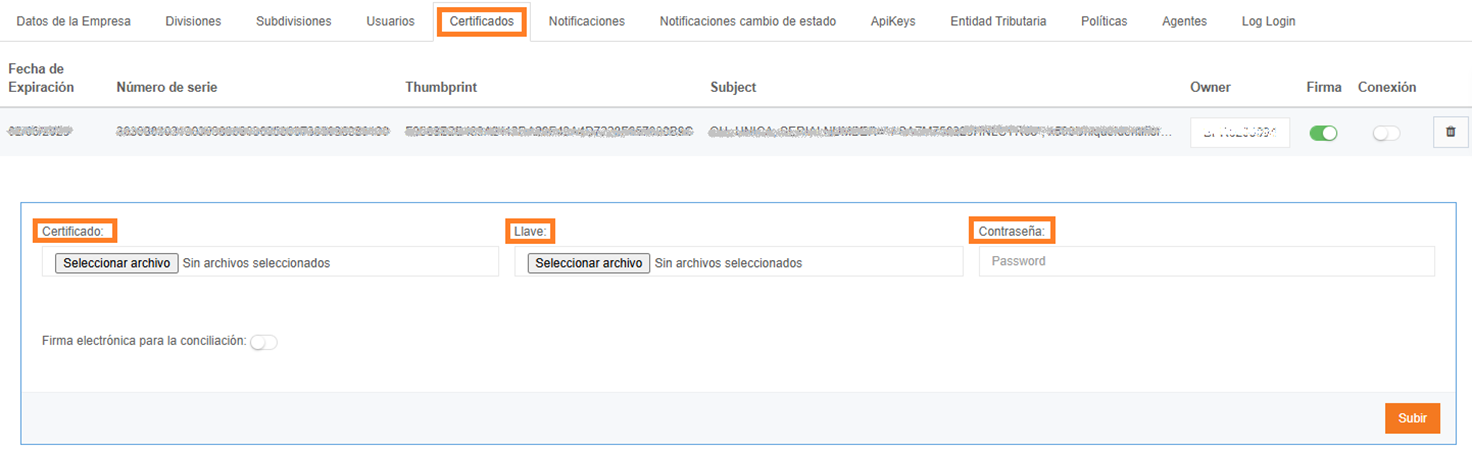
Certificate
It is necessary to upload the certificate in .cert, .key format with its password to use the cancellation services:
Enable Functionality per Company
The Cancellation functionality in MX has an additional cost, which depends on the number of requests to the API consumed by the company per month. This means the functionality must be enabled per company.
To do this, the "CancelFunction" functionality must be enabled for the company:
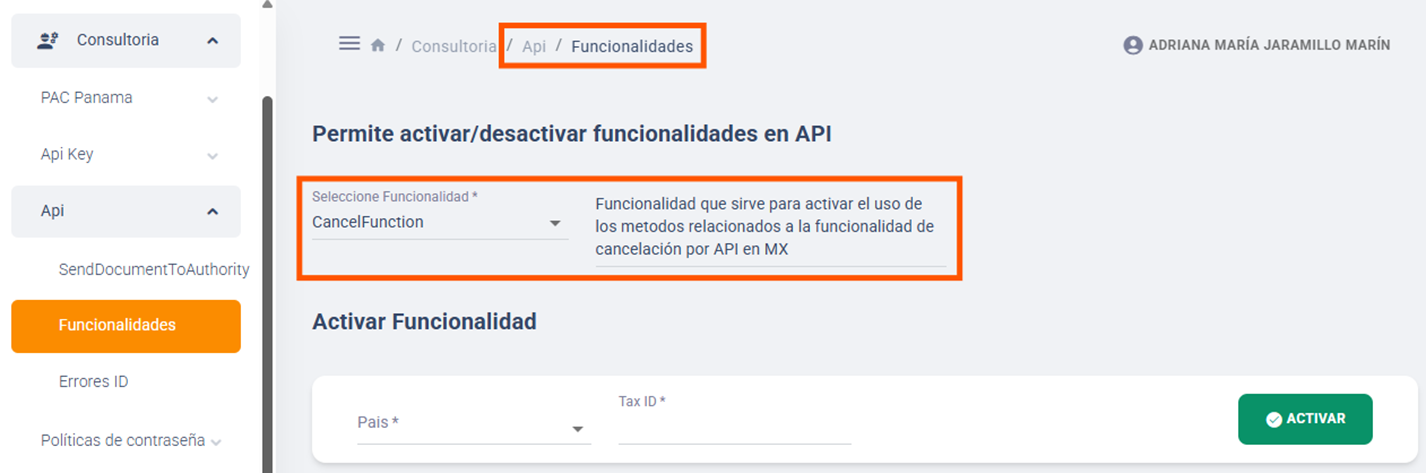
Companies that have this functionality active are allowed to use the 5 methods related to cancellation:
- Method to send a Cancellation request (ChangeDocumentStatus)
- Method to Check the status of the document and the Cancellation (GetStatusDocument)
- Method to Query related documents (GetRelatedDocuments)
- Method to Query documents pending Cancellation (GetPendingCancelRequest)
- Method to Respond to pending cancellation requests (ResponseCancelRequest)
Requests consumed by the company for the cancellation functionality are counted individually per method:
| Description | API Method | Identifier for the Counter | Activate Functionality |
|---|---|---|---|
| Send Cancellation request | ChangeDocumentStatus | CancelFunction | CancelFunction |
| Check receipt and cancellation status | GetStatusDocument | GetStatusDocument | CancelFunction |
| Query related documents | GetRelatedDocuments | GetRelatedDocuments | CancelFunction |
| Query pending Cancellations | GetPendingCancelRequest | GetPendingCancelRequest | CancelFunction |
| Respond to Pending Cancellations (Acceptance or Rejection) | ResponseCancelRequest | ResponseCancelRequest | CancelFunction |
Test environment
There is no test environment for document queries at SAT, therefore it is not possible to perform cancellations of test documents. All documents must be real.
If a production document is canceled from the test environment, it will actually be canceled with SAT.