The Spanish version is the authoritative reference. View in Spanish
Method to Send a Cancellation Request (ChangeDocumentStatus)
To start the cancellation process through the API, you must use the POST ChangeDocumentStatus method, whose purpose in MX is to send the document's cancellation request to SAT, using the URL according to the environment to be consumed. The document must be in approved status and must not have a pending cancellation request.
https://developers.gosocket.net/api/v1/Document/ChangeDocumentStatushttps://developers-sbx.gosocket.net/api/v1/Document/ChangeDocumentStatusThe method has the following parameters:
| ChangeDocumentStatus for cancellation (request) | |||
|---|---|---|---|
| Parameter | Type | Description | Allowed values |
| countryDocumentId* | String | Tax identifier (UUID) of the approved document. | UUID (36 alphanumeric characters) |
| accountCode* | String | Tax ID of the issuing company | Alphanumeric characters |
| status* | String | Cancellation code: 4 | Numeric characters, always 4 |
| reason* | String | Cancellation reason code | * 01: Receipt issued with errors, with relation * 02: Receipt issued with errors, without relation * 03: The operation was not carried out * 04: Nominative operation related to the global invoice |
| stampNumber | String | Tax folio of the replacing document. *Required when reason = 01 | UUID |
* Required
Request example
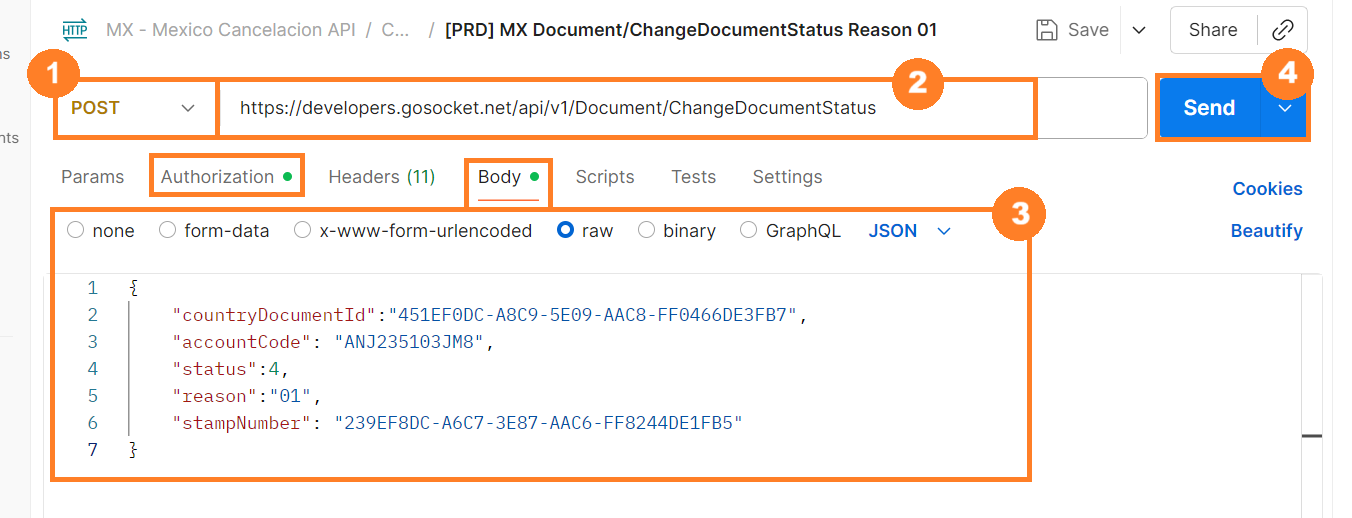
For this method we use Postman's Body tab.
- Select the method type. In this case, you must select POST.
- Enter the method URL.
- Enter the parameters shown in the table above with their corresponding values.
{
"countryDocumentId":"451EF0DC-A8C9-5E09-AAC8-FF0466DE3FB7",
"accountCode": "ANJ235103JM8",
"status":4,
"reason":"01",
"stampNumber": "239EF8DC-A6C7-3E87-AAC6-FF8244DE1FB5"
}- Press Send.
Note: Remember that before using the method, you must authenticate within the Authorization tab and enable the company to consume it.
If the event is generated successfully, it is then sent to the Tax Authority for validation and acceptance
Response example
The Tax Authority responds through the API as follows.
{
"Success": true,
"GlobalDocumentId": "00000000-0000-0000-0000-000000000000",
"CountryDocumentId": null,
"OtherData": {
"Country": "mx",
"Certifier": "SAT",
"AuthorityTimeStamp": "17/06/2025 11:40:47"
},
"Messages": [],
"ResponseValue": null,
"Code": "201",
"Description": "Solicitud de Cancelación enviado correctamente",
"ErrorException": null
}
If the sending result is NOT successful, the Inbox API will respond with an error message:
{
"Success": false,
"GlobalDocumentId": "00000000-0000-0000-0000-000000000000",
"CountryDocumentId": "3EAAFBAB-89B5-47AF-A204-E5502346461A",
"OtherData": null,
"Messages": null,
"ResponseValue": null,
"Code": "400",
"Description": "Document Not Found",
"ErrorException": null
}
If the document has been previously canceled, the following response will be shown:
{
"Success": true,
"GlobalDocumentId": "00000000-0000-0000-0000-000000000000",
"CountryDocumentId": null,
"OtherData": {
"Country": "mx",
"Certifier": "SAT",
"AuthorityTimeStamp": "17/06/2025 11:40:47"
},
"Messages": [],
"ResponseValue": null,
"Code": "202",
"Description": "Folio Fiscal Previamente Cancelado",
"ErrorException": null
}
To correctly interpret the response, take into account the following criteria:
| ChangeDocumentStatus (response) | |||
|---|---|---|---|
| Parameter | Type | Description | Allowed values |
| Success | Boolean | Indicates whether the request executed successfully. | true: The request executed successfully. false: The request executed with some inconsistency. |
| GlobalDocumentId | String | Document identification in Gosocket. | 00000000-0000-0000-0000-000000000000 |
| CountryDocumentId | String | Tax identifier (UUID) of the approved document. | null When the document is not found, the response will be a UUID (36 alphanumeric characters). |
| OtherData | String | Additional properties depending on the country. | Example: "Country": "mx", "Certifier": "SAT", "AuthorityTimeStamp": "17/06/2025 11:40:47" |
| Messages | String | Rules validated for the document according to SAT | Example: " Regla: Evento no puede ser registrado ya que el documento no se encuentra en estado aprobado." |
| ResponseValue | String | Response from the authority, base64 encoded. | |
| Code | String | Response code for the process | See the SAT Response Codes table |
| Description | String | Description of the response of the process performed | Example: "Solicitud de Cancelación enviado correctamente" |
| ErrorException | String | Description of the exception when an error occurs. |
| SAT Response Codes | |
|---|---|
| Code | Description |
| 201 | Cancellation request received. |
| 202 | The receipt has already been previously canceled. |
| 203 | The issuer's RFC does not match. |
| 204 | Tax Folio Not Applicable for Cancellation |
| 205 | Tax Folio Does Not Exist |
| 206 | UUID does not correspond to a Primary Sector CFDI |
| 207 | No cancellation reason was specified or the reason is not valid |
| 208 | Invalid Substitution Folio |
| 209 | Substitution Folio Not Required |
| 210 | The cancellation request date is later than the filing date |
| 211 | The cancellation request deadline for global invoices |
| 212 | Invalid or nonexistent relation |
| 300 | Invalid User |
| 301 | Malformed XML: This error code is returned when the request has invalid information, e.g., an invalid receiver RFC |
| 302 | Malformed Seal |
| 304 | Revoked or Expired Certificate: The certificate may be invalid for multiple reasons such as type, validity, etc. |
| 305 | Invalid Certificate: The certificate may be invalid for multiple reasons such as type, validity, etc. |
| 309 | Invalid Certificate: The certificate may be invalid for multiple reasons such as type, validity, etc. |
| 310 | Invalid CSD |
How is the cancellation of a document shown in Inbox?
Once the cancellation request has been sent, the following data will be shown within the document preview in Inbox:
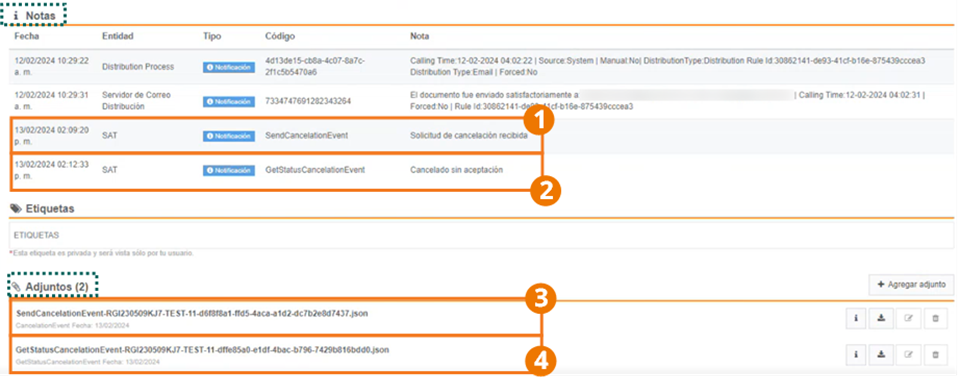
- Within Notes we can see the date and time when the Tax Authority received the document's cancellation request.
- In this case, since it is a document that is cancelable without acceptance, it shows that the document has already been canceled.
- Within Attachments two files are shown. The first of these is the json of the document status query.
- Additionally, the SAT response json is shown.
Once the document has been canceled, it is shown as voided in the Inbox query screen:

Example notes for:
-
Request received:

-
Cancelable without acceptance:

-
Cancelable with acceptance - waiting for a response to the request:

-
Cancelable with acceptance - Request Rejected:

-
Cancelable with acceptance - Request Accepted:

-
Cancelable with acceptance - Deadline expired:

-
Non-cancelable Document:
