The Spanish version is the authoritative reference. View in Spanish
Accept the Credit Invoice
Acceptance Event is the event that produces the acceptance of the Credit Invoice and the Current Account balance. In other words, the recipient accepts the transaction.
There are two types of Acceptance:
- Express Acceptance, which is the acceptance of the transaction without reporting full payment.
- Acceptance with Full Payment, which is the acceptance of the transaction while reporting full payment.
Accepting the Invoice implies accepting all associated documents that modified the Current Account balance and were not rejected.
When it is “Express Acceptance“ the following can be reported:
- Partial payment, adjustments, withholdings and/or garnishments
- Acceptance or rejection of each associated document (debit notes or credit notes).
- The resulting negotiable balance.
Depending on the invoice transfer option:
- “Open Circulation System“ option: A payer CBU can be reported. The invoice with its accepted balance is made available to the Open Circulation System, so the buyer cannot report full payment.
- “Collective Deposit Agent“ option: As long as the stipulated acceptance period has not expired, the buyer can report full payment, provided the seller has not yet requested that the invoice be reported to the Collective Deposit Agent.
When it is “Acceptance with Full Payment“:
- The transaction balance must be reported as the amount to be paid, together with the payment method.
- The withholding amount does not need to be reported.
- The Invoice cannot be reported to the Collective Deposit Agent.
- A payer CBU must not be reported in the case of the Open Circulation System.
Acceptance of MiPyME electronic credit invoices is unconditional and irrevocable, and protest is not allowed.
After an express acceptance, the buyer can report full payment or the seller can report the invoice to the Collective Deposit Agent, whichever happens first.
The request parameters for issuing these events are the following:
ChangeDocumentStatus (request)
| Parameter | Type | Description | Allowed values |
|---|---|---|---|
| globalDocumentId* | String | Document identifier in Gosocket. Required if countryDocumentId is not provided | 36-character alphanumeric UUID xxxxxxxx-xxxx-xxxx-xxxx-xxxxxxxxxxxx |
| countryId* | String | Code of the country where the document was issued | ar |
| status* | Integer | Event code: - Express Acceptance: 033 or 33 - Acceptance with Full Payment: 35 or 035 | 033 or 33 or 35 or 035 |
| Description* | String | Acknowledgment comments | Free text |
| balanceAccepted* | Decimal | Accepted balance | |
| currencyCode* | String | Currency code | Example: PES |
| currencyRate* | Decimal | Currency exchange rate | Example: 1 |
| paymentType | String | Payment type: - PAR (partial) - TOT (total) | PAR or TOT |
| paymentAmount | Decimal | Amount paid | |
| retentionTotalAmount | Decimal | Total Withholding Amount in PESOS | |
| embargoAmount | Decimal | Garnishment amount applied (if any) | |
| CBUinform | String | Reports CBU: - S (yes) - N (no) | S or N |
| CBUnumber | String | CBU number reported by the buyer | |
| confirmNDC | Array | Array of notes to confirm | See the Detailed Parameters for the Arrays (request) table |
| paymentMethod | Array | Array of payment methods | See the Detailed Parameters for the Arrays (request) table |
| retention | Array | Array of withholdings | See the Detailed Parameters for the Arrays (request) table |
| adjustment | Array | Array of adjustments to the transaction | See the Detailed Parameters for the Arrays (request) table |
*Required
Detailed Parameters for the Arrays (request)
| Parameter | Type | Description |
|---|---|---|
| Array confirmNDC | ||
| confirmNDC.accept | String | Accepts the Debit or Credit Note: - S (yes) - N (no) |
| confirmNDC.DocumentSenderCode | String | CUIT of the document issuer |
| confirmNDC.DocumentTypeId | String | Document Type |
| confirmNDC.billingPort | Integer | Point of Sale |
| confirmNDC.Number | Long | Document Number |
| Array paymentMethod | ||
| paymentMethod.code | String | Payment method code. See the Payment Methods example table |
| paymentMethod.description | String | Payment method description |
| Array retention | ||
| retention.retentionTypeCode | String | Withholding Type code See the Withholding Types example table |
| retention.retentionAmount | Decimal | Withholding amount |
| retention.retentionRate | Decimal | Withholding percentage |
| retention.retentionReason | String | Description of the reason why a withholding percentage different from the one in the table applies. |
| Array adjustment | ||
| adjustment.adjustTypeCode | String | Adjustment type code See the Transaction Adjustment Types example table |
| adjustment.adjustAmount | Decimal | Adjustment amount |
Payment Methods
| Code | Description |
|---|---|
| 1 | Offset |
| 2 | Bank Transfer |
| 3 | Check |
| 4 | Assignment |
| 5 | Other payment methods authorized by the BCRA |
| 6 | Real Estate Lease |
Withholding Types
| Code | Description | Percentage |
|---|---|---|
| 1 | Withholding for national taxes | 15% |
| 2 | Withholding for provincial taxes and the Autonomous City of Buenos Aires | 4% |
| 3 | Withholding for municipal taxes | 1% |
Transaction Adjustment Types
| Code | Description |
|---|---|
| 1 | Exchange rate difference adjustment |
Request Example
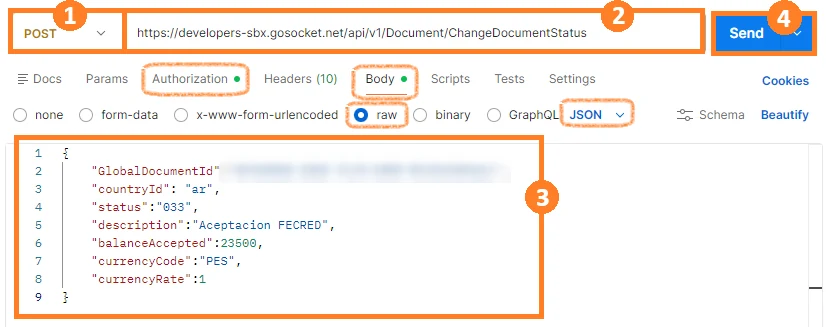
Note: Remember that before using the method, you must authenticate in the Authorization tab.
For this method we use the Body tab, select raw, and verify or select JSON in Postman.
- Select the method type. In this case, select POST.
- Enter the method URL.
- Enter the parameters shown in the table above with their corresponding values.
- Click Send.
Request Example with some optional and Array-type parameters:
{
  "GlobalDocumentId":"00000000-0000-0000-0000-000000000000",
  "countryId": "ar",
  "status":"033",
  "description":"Aceptacion FECRED",
  "balanceAccepted":100000000.00,
  "currencyCode":"PES",
  "currencyRate":1,
  "paymentMethod":[
      {
          "code": "3",
          "description": "cheque"
      }
  ],
  "paymentType":"PAR",
  "paymentAmount":1191284.81
}
Response Example
{
  "Success": true,
  "GlobalDocumentId": "00000000-0000-0000-0000-000000000000",
  "CountryDocumentId": "00000000000000",
  "OtherData": {
      "ResponseARCA": "PGFjZXB0YXJGRUN...Nwb25zZT4=",
      "RequestARCA": "PHNvYXBlbnY6...OkVudmVsb3BlPg=="
  },
  "Messages": [],
  "ResponseValue": "PHNvYXBlbnY...kVudmVsb3BlPg==",
  "Code": "A",
  "Description": "Evento registrado correctamente, Evento de Aceptación",
  "ErrorException": null
}
Acceptance Event Tracking
In the document properties, the document will be tagged with the DocumentTags “ACD“:
{
  "Code": "ACD",
  "TimeStamp": "2026-06-04T19:18:54.9853098Z",
  "Value": "A",
  "Complement": "Evento de Aceptación"
}
and when the Acceptance was with Full Payment, it will additionally be tagged with the DocumentTags “payment“:
{
"Code": "payment",
"TimeStamp": "2026-06-15T16:30:05.0334759Z",
"Value": "TP",
"Complement": "Aceptación con Cancelación Total"
}
This event will be shown in the document preview under the notes section, and the XML of the event sent to the Tax Authority will be shown under attachments:


Likewise, the Acceptance Event will be shown in the document status icons:
Express Acceptance:

Acceptance with Full Payment:

When the event has an error and is rejected by the Tax Authority, this information can be seen in the notes section, like this:
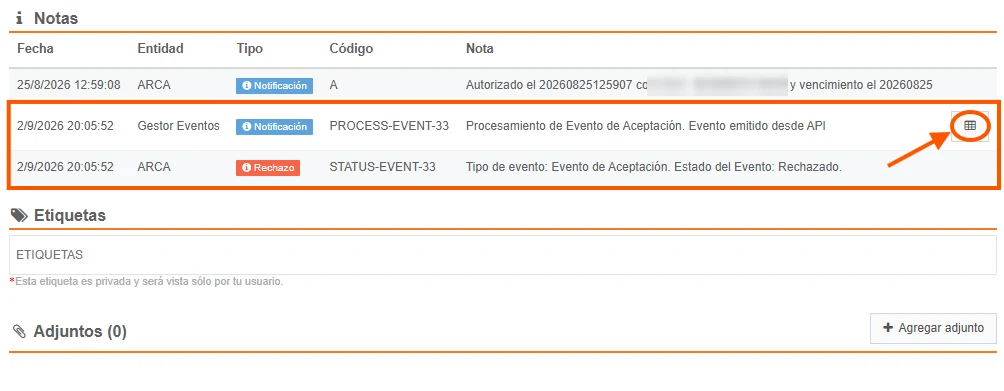
and in the detail of the processing note, the reason for the rejection can be seen:

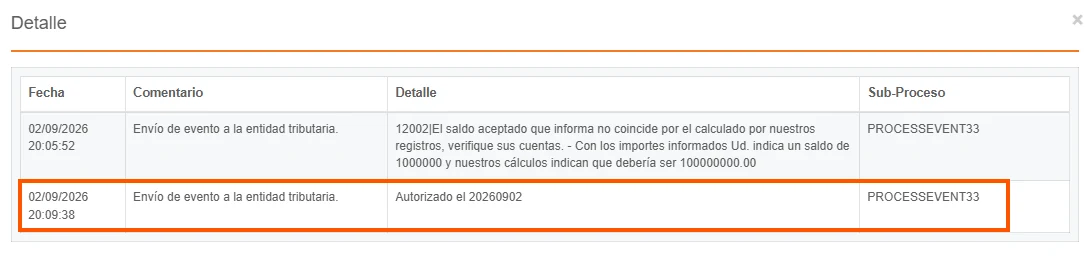
Then, if the event changes to approved status by the Tax Authority, the document notes are overwritten to indicate the new status, and the detail is updated while preserving the traceability of the previous actions: