The Spanish version is the authoritative reference. View in Spanish
Report Full Payment
Report Full Payment event is the option available to the buyer so that, after having previously accepted the invoice, they can report that they have fully paid (settled) the debt to the seller within the stipulated period, indicating the payment method.
If full payment was already reported in the invoice acceptance event itself, there is no need to issue this event.
The Tax Authority does not allow reporting full payment for invoices with the “Open Circulation System“ transfer option
The request parameters to issue these events are as follows:
ChangeDocumentStatus (request)
| Parameter | Type | Description | Allowed values |
|---|---|---|---|
| globalDocumentId* | String | Document identifier in Gosocket. Required if cuntryDocumentId is not provided | 36-character alphanumeric UUID xxxxxxxx-xxxx-xxxx-xxxx-xxxxxxxxxxxx |
| countryId* | String | Code of the country where the document was issued | ar |
| status* | Integer | Event code: 45 or 045 | 45 or 045 |
| Description* | String | Acknowledgment comments | Free text |
| paymentAmount* | Decimal | Amount paid | |
| paymentMethod* | Array | Array of payment methods | See the Payment Methods example table |
| paymentMethod.Code* | String | Payment method code | |
| paymentMethod.Description* | String | Payment method description |
*Required
Payment Methods
| Code | Description |
|---|---|
| 1 | Offset |
| 2 | Bank Transfer |
| 3 | Check |
| 4 | Assignment |
| 5 | Other payment methods authorized by the BCRA |
| 6 | Real Estate Lease |
Request Example
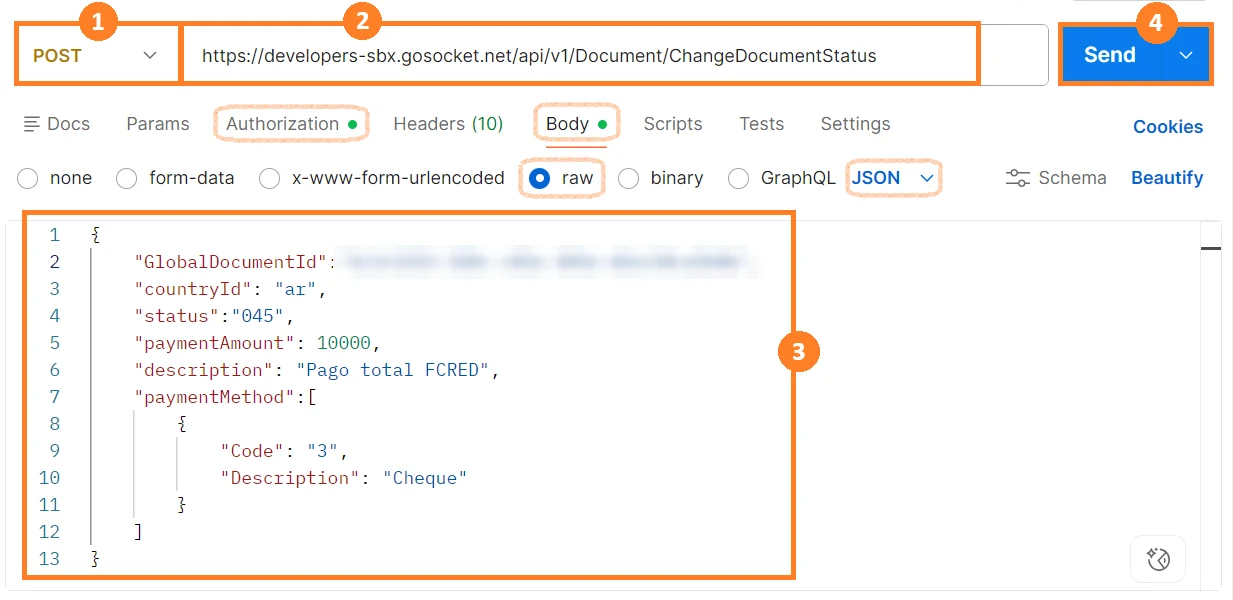
Note: Remember that before using the method, you must authenticate in the Authorization tab.
For this method, we use the Body tab, select raw, and verify or select JSON in Postman.
- Select the method type. In this case, select POST.
- Enter the method URL.
- Enter the parameters shown in the table above with their corresponding values.
- Click Send.
Request Example with Array-type parameters:
{
  "GlobalDocumentId":"00000000-0000-0000-0000-000000000000",
  "countryId": "ar",
  "status":"045",
  "paymentAmount": 10000,
  "description": "Pago total FCRED",
  "paymentMethod":[
      {
          "Code": "3",
          "Description": "Cheque"
      },
      {
          "Code": "2",
          "Description": "Transferencia Bancaria"
      }
  ]
}
Response Example
{
  "Success": true,
  "GlobalDocumentId": "00000000-0000-0000-0000-000000000000",
  "CountryDocumentId": "00000000000000",
  "OtherData": {
      "ResponseARCA": "PGFjZXB0YXJ...WRSZXNwb25zZT4=",
      "RequestARCA": "PHNvYXBlbnY6RW52ZWxvcGUg...VudmVsb3BlPg=="
  },
  "Messages": [],
  "ResponseValue": "PHNvYXBlbnY6RW5...ZW52OkVudmVsb3BlPg==",
  "Code": "A",
  "Description": "Evento registrado correctamente, Evento de Cancelación total",
  "ErrorException": null
}
Tracking the Report Full Payment event
In the document properties, it will be tagged with the DocumentTags “payment“:
{
  "Code": "payment",
  "TimeStamp": "2026-06-04T19:18:54.9853098Z",
  "Value": "TP",
  "Complement": "Evento de informe de Cancelación Total"
}
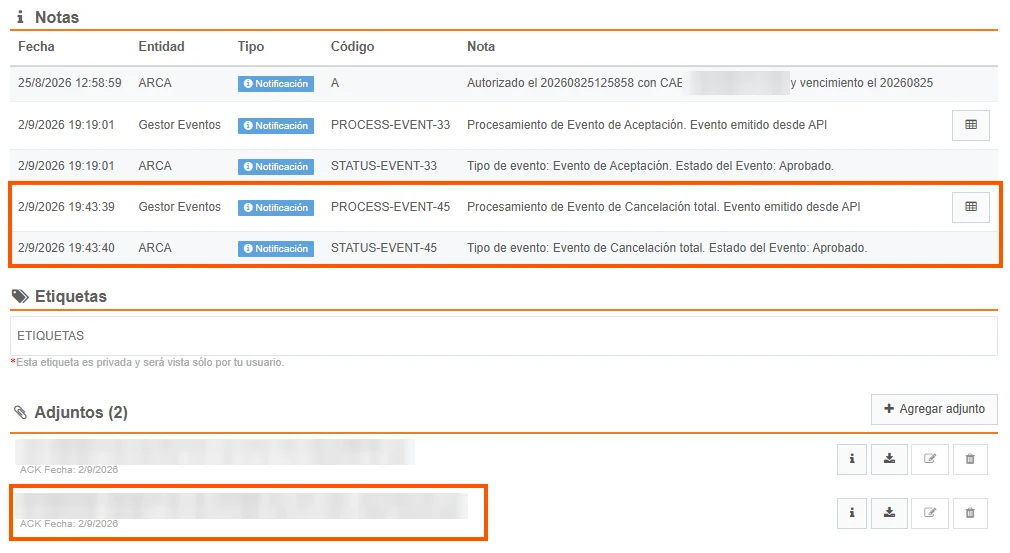
This event will be shown in the document preview under the notes section, and the XML of the event sent to the Tax Authority will be shown under attachments:
Likewise, the Report Full Payment event will be shown in the document status icons:.

When the event has an error and is rejected by the Tax Authority, this information can be seen in the notes section, as follows:
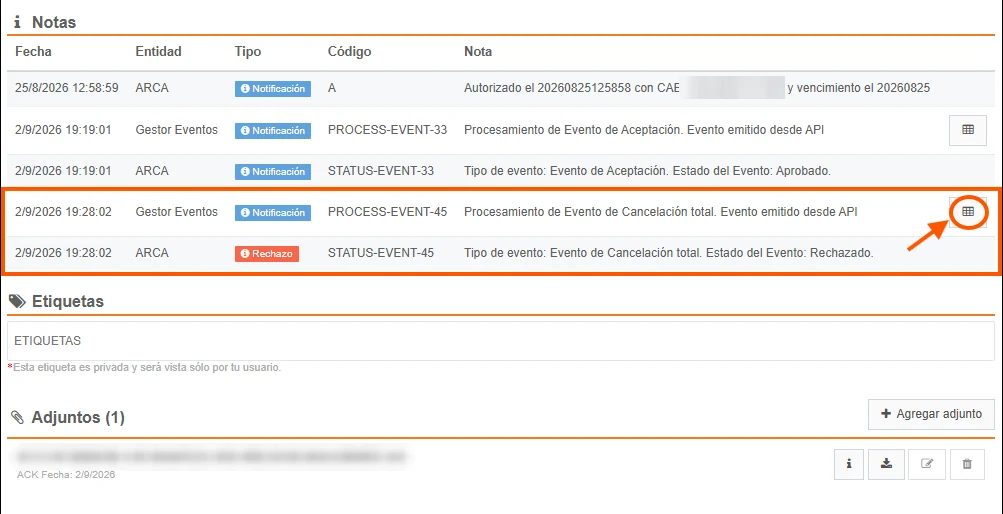
and the rejection reason can be seen in the processing note details:

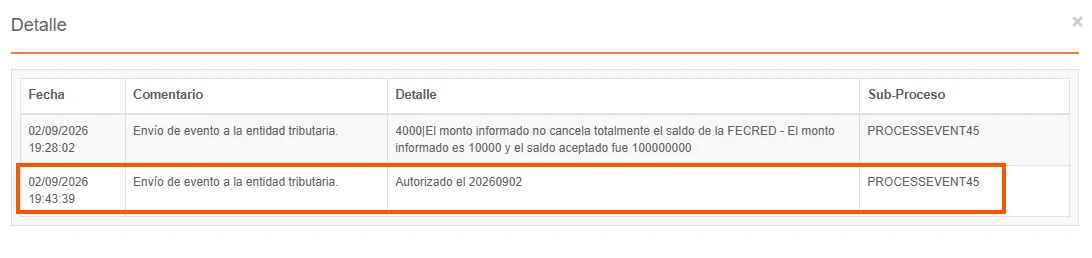
Then, if the event is approved by the Tax Authority, the document notes are overwritten to indicate the new status, and the details are updated while preserving the traceability of the previous actions: