The Spanish version is the authoritative reference. View in Spanish
Reject the Credit Invoice
Rejection Event is the option available to the buyer to reject the Credit Invoice and the Current Account balance within the stipulated period, stating the reason for the rejection.
If the Credit Invoice is rejected, it and all associated Debit Note and Credit Note documents are rejected.
Debit Note and Credit Note documents can also be rejected individually, as long as the Credit Invoice has not been Accepted or Rejected, stating at least one justified rejection reason.
Rejecting the invoice prevents the seller from reporting it to the Collective Deposit Agent.
The request parameters for issuing these events are as follows:
ChangeDocumentStatus (request)
| Parameter | Type | Description | Allowed values |
|---|---|---|---|
| globalDocumentId | String | Document identifier in Gosocket. Required if cuntryDocumentId is not provided | 36-character alphanumeric UUID xxxxxxxx-xxxx-xxxx-xxxx-xxxxxxxxxxxx |
| countryId* | String | Code of the country where the document was issued | ar |
| status* | Integer | Event code 031 or 31 | 031 or 31 |
| rejectionReason | Array | Array of rejection reasons | |
| rejectionReason.reason* | String | Justification for the rejection | Free text |
| rejectionReason.code* | String | Rejection reason code | See the Rejection Reasons example table |
| rejectionReason.Description* | String | Description of the rejection reason | See the Rejection Reasons example table |
*Required
Rejection Reasons
| Code | Description |
|---|---|
| 1 | Damage to the goods, when they were not shipped or delivered at the buyer's own risk. |
| 2 | Duly verified defects, flaws and differences in quality or quantity. |
| 3 | Discrepancies in the stipulated terms or prices. |
| 4 | Mismatch with the services or work actually contracted. |
| 5 | Formal defects that render it invalid both as an enforceable instrument and non-certificated security, and as a commercial document. |
| 6 | Failure to deliver the goods or provide the service. |
Request Example
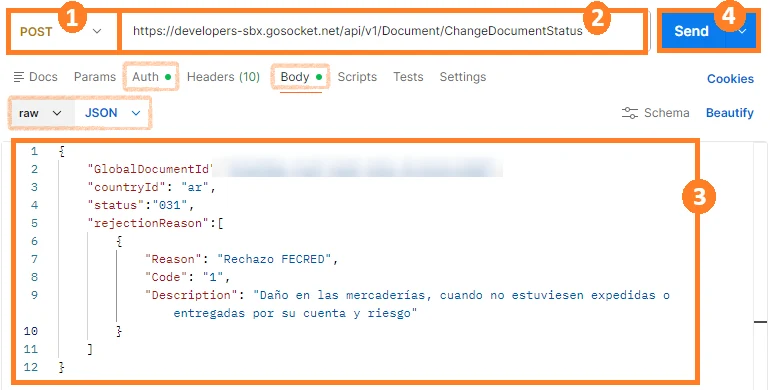
Note: Remember that before using the method, you must authenticate in the Authorization tab.
For this method, we use the Body tab, select raw, and verify or select JSON in Postman.
- Select the method type. In this case, select POST.
- Enter the method URL.
- Enter the parameters shown in the table above with their corresponding values.
- Click Send.
Example Request with Array-type parameters:
{
  "GlobalDocumentId":"00000000-0000-0000-0000-000000000000",
  "countryId": "ar",
  "status":"031",
  "rejectionReason":[
      {
          "Reason": "Rechazo FECRED",
          "Code": "1",
          "Description": "Daño en las mercaderías, cuando no estuviesen expedidas o entregadas por su cuenta y riesgo"
      },
      {
          "Reason": "Rechazo de la FECRED",
          "Code": "2",
          "Description": "Vicios, defectos y diferencias en la calidad o en la cantidad debidamente comprobados"
      }
  ]
}
Response Example
{
  "Success": true,
  "GlobalDocumentId": "00000000-0000-0000-0000-000000000000",
  "CountryDocumentId": "00000000000000",
  "OtherData": {
      "ResponseARCA": "PHJlY2hhemFyR...bnNlPg==",
      "RequestARCA": "PHJlY2hhemFyRkVD...F1ZXN0Pg=="
  },
  "Messages": [],
  "ResponseValue": "PHJlY2hhemFyRkV...3BvbnNlPg==",
  "Code": "A",
  "Description": "Evento registrado correctamente, Evento de Rechazo",
  "ErrorException": null
}
Rejection Event Tracking
In the document properties, the document will be tagged with the DocumentTags “ACD“:
{
  "Code": "ACD",
  "TimeStamp": "2026-06-04T19:18:54.9853098Z",
  "Value": "R",
  "Complement": "Evento de Rechazo"
}
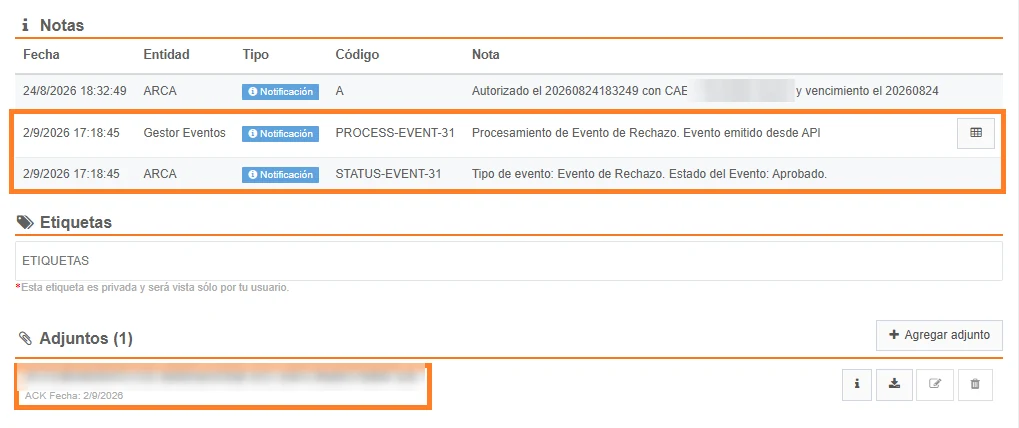
This event will be shown in the document preview under the notes section, and the XML of the event sent to the Tax Authority will be shown under attachments:
The Rejection Event will also be shown in the document status icons:

When the event has an error and is rejected by the Tax Authority, this information can be seen in the notes section, as follows:
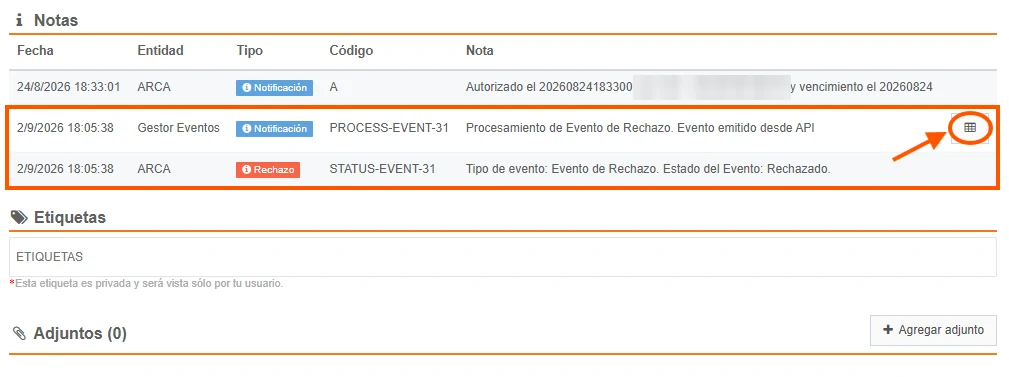
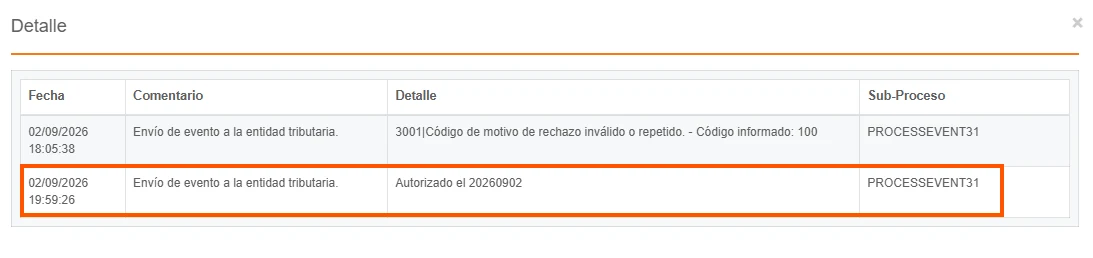
and the rejection reason can be seen in the processing note details:

Then, if the event is approved by the Tax Authority, the document notes are overwritten to indicate the new status, and the details are updated while preserving the traceability of the previous actions: