The Spanish version is the authoritative reference. View in Spanish
Non-conformity and disavowal event
Non-conformity event is the event that helps the receiver show that they do not agree with the information shown in the document.
To start the request for this event, take the following criteria into account:
| ChangeDocumentStatus for non-conformity (request) | |||||
|---|---|---|---|---|---|
| Parameter | Parameter type | Data type | Description | Allowed values | Length |
| countryDocumentId | String | Numeric | Country-level tax identifier of the document, also known as CUFE, CLAVE, UUID, ID | See the Country Document ID Structure table | 44 characters |
| status* | Integer | Numeric | Code of the event to generate. | 31 | 1-2 characters |
| code* | String | Numeric | Event type. | 1 | 1 character |
| description* | String | Alphanumeric | Description of the event. | Example: Non-conformity of the document. | 5-500 characters |
*Required
Disavowal event will help you notify that the receiver does not recognize the charge of the previously selected document.
To start the request for this event, take the following criteria into account:
| ChangeDocumentStatus for disavowal (request) | |||||
|---|---|---|---|---|---|
| Parameter | Parameter type | Data type | Description | Allowed values | Length |
| countryDocumentId | String | Numeric | Country-level tax identifier of the document, also known as CUFE, CLAVE, UUID, ID | See the Country Document ID Structure table | 44 characters |
| status* | Integer | Numeric | Code of the event to generate. | 31 | 1-2 characters |
| description* | String | Alphanumeric | Description of the event. | Example: Non-conformity of the document. Disavowal of the document. | 5-500 characters |
| code* | String | Event type. | 2 | 1 character |
*Required
Request example
POST https://developers.gosocket.net/sandbox/api/v1/Document/ChangeDocumentStatus
  ?countryDocumentId=00000000000000000000000000000000000000000000
  &status=31
  &description=disconformidad del documento
  &code=1
The identifiers in the examples on this page are fictitious.
Note: Remember that before using the method, you must authenticate within the Authorization tab.
For this method we use the Params tab in Postman.
- Select the method type. In this case, you must select POST.
- Enter the method URL.
- Enter the parameters shown in the table above with their corresponding values.
- Click Send.
Response example
{
"Success": true,
"GlobalDocumentId": "00000000-0000-0000-0000-000000000000",
"CountryDocumentId": "00000000000000000000000000000000000000000000",
"OtherData": {
"Country": "py",
"Certifier": "SIFEN",
"AuthorityTimeStamp": "10/10/2023 19:31:51"
},
"Messages": [],
"ResponseValue": "PD94bWwgdmVyc2lvbj0iMS4wIiBlbmNvZGluZ...",
"Code": "0600",
"Description": "Evento registrado correctamente, Evento Disconformidad",
"ErrorException": null
}
Note: the ResponseValue value is shown truncated; it corresponds to the authority's response encoded in base 64.
Tracking the non-conformity event
This event will be shown within the document preview in the notes section, and the XML of the event sent to the Tax Authority will be shown in the attachments section, as shown below:
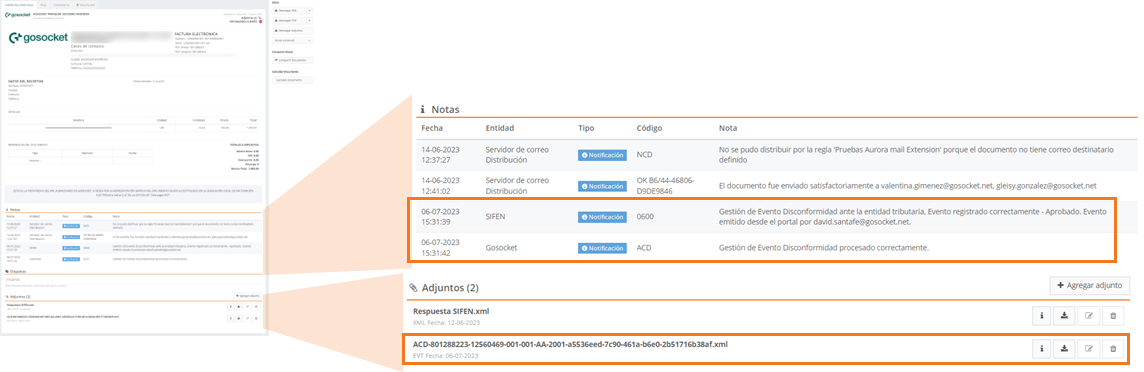
Likewise, the Non-conformity Event will be shown in the document's status iconography.

Tracking the disavowal event
This event will be shown within the document preview in the notes section, and the XML of the event sent to the Tax Authority will be shown in the attachments section, as shown below:
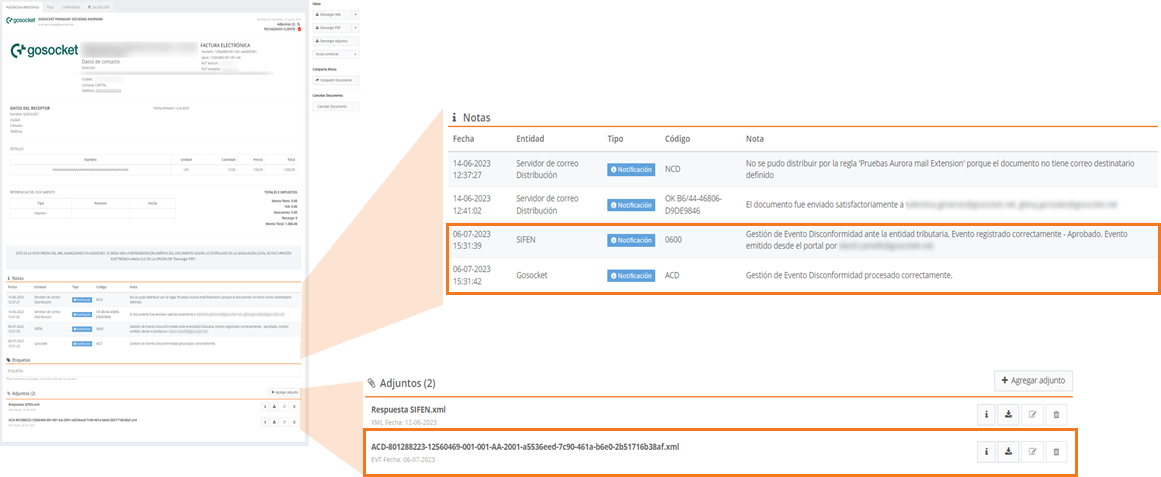
Likewise, the disavowal event will be shown in the document's status iconography.
