The Spanish version is the authoritative reference. View in Spanish
Uruguay: Acceptance and Rejection of Documents
Through the ChangeDocumentStatus method, we can also issue acknowledgments of acceptance or rejection for received documents through the API.
Let's see how to issue these events.
The request parameters to issue these events are as follows:
| ChangeDocumentStatus (request) | |||
|---|---|---|---|
| Parameter | Type | Description | Allowed values |
| globalDocumentId | String | Document identification in Gosocket. Required if countryDocumentId is not provided | 36-character alphanumeric UUID xxxxxxxx-xxxx-xxxx-xxxx-xxxxxxxxxxxx |
| countryDocumentId | String | Country-level tax identifier of the document, also known as CUFE, CLAVE, UUID, ID Required if globalDocumentId is not provided | See the Country Document ID Structure table |
| countryId* | String | Country code of the document's country of issuance | uy |
| status* | Integer | Acceptance or rejection code | Acceptance: 033 or 33 Rejection: 31 or 031 |
| Description* | String | Acknowledgment comments | Free text |
| code* | String | Rejection code (required only in case of rejection) | See the Rejection Codes table |
*Required
| Rejection Codes | |
|---|---|
| Code | Description |
| E20 | Expired purchase order |
| E21 | Goods in poor condition |
| E22 | Supplier disabled by controlling body |
| E23 | Consideration not received |
| E24 | Difference in prices and/or discounts |
| E25 | Invoice with calculation error |
| E26 | Difference in terms |
Request example
The tax identifier (countryDocumentId) in these examples is fictitious; replace it with the real identifier of the received document.
POST https://developers-sbx.gosocket.net/api/v1/Document/ChangeDocumentStatus
{
  "countryDocumentId": "210000000019-111-A-18",
  "countryId": "uy",
  "status": 33,
  "description": "Acuse Aceptado"
}
Note: Remember that before using the method, you must authenticate within the Authorization tab.
For this method we use the Body tab, select raw, and check or select JSON in Postman.
- Select the method type. In this case, you must select POST.
- Enter the method URL.
- Enter the parameters shown in the table above with their corresponding values.
- Press Send.
Response example
{
  "Success": "true",
  "GlobalDocumentId": "00000000-0000-0000-0000-000000000000",
  "CountryDocumentId": null,
  "OtherData": null,
  "Messages": [],
  "ResponseValue": null,
  "Code": "200",
  "Description": "Evento procesado correctamente",
  "ErrorException": null
}
Once the acknowledgment has been generated, the following elements are shown within the document preview, which can be viewed from the Gosocket Inbox:
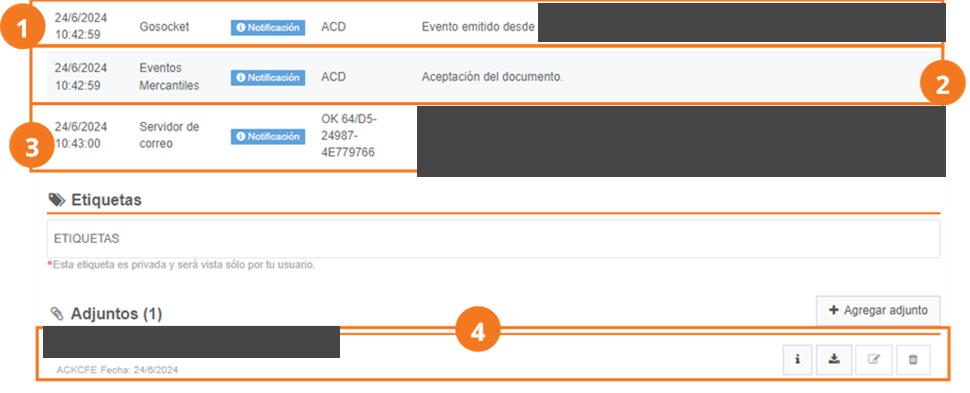
In the notes section of the preview we will find:
- Event generation, along with the user who generated it.
- The commercial event generated, which can be acceptance or rejection.
- A list of the email addresses to which the email was sent, or a note with the error explaining why the email could not be sent.
Additionally, within the Attachments section, we see the following:
- XML of the event generated for the document.
From the received documents query screen within the Inbox, the acceptance () or rejection () icon is shown among the statuses on the Received documents query screen.

Characteristics
- Acknowledgments can only be generated for documents approved by the ET (AuthorityStatus=2)
- Acknowledgments can only be generated for documents when the document's issuance date does not exceed 20 calendar days from the current date.
- The event is sent with the acknowledgment XML attached via email.
- The acknowledgment is not sent to the Tax Authority.