The Spanish version is the authoritative reference. View in Spanish
Paraguay: Method to query the RUC with the Tax Authority (GetAccount)
This method allows you to query information about a given RUC by making a direct query to SIFEN's records, in order to know the status of a RUC and determine whether it is possible to issue documents to it. The method reports whether the queried RUC exists or not in SIFEN's records, and if it exists, reports whether it is Active, suspended, blocked, or canceled, and whether or not it is an electronic biller.
To connect to this functionality, you will need to enter the URL according to the environment you want to use:
https://developers.gosocket.net/api/v1/Account/GetAccounthttps://developers-sbx.gosocket.net/api/v1/Account/GetAccountHow does the GetAccount method work?
It is important to note that this method must be enabled by Gosocket in order to use it.
Request access from the Gosocket sales team.
To make the request, the method has the following parameters with the following structure:
GetAccount (request)
| Parameter | Type | Description | Allowed values |
|---|---|---|---|
| AccountCode | String | Tax ID to query | See the Tax ID Structure table |
| countryId | String | Country code of the company making the query | py |
Request example
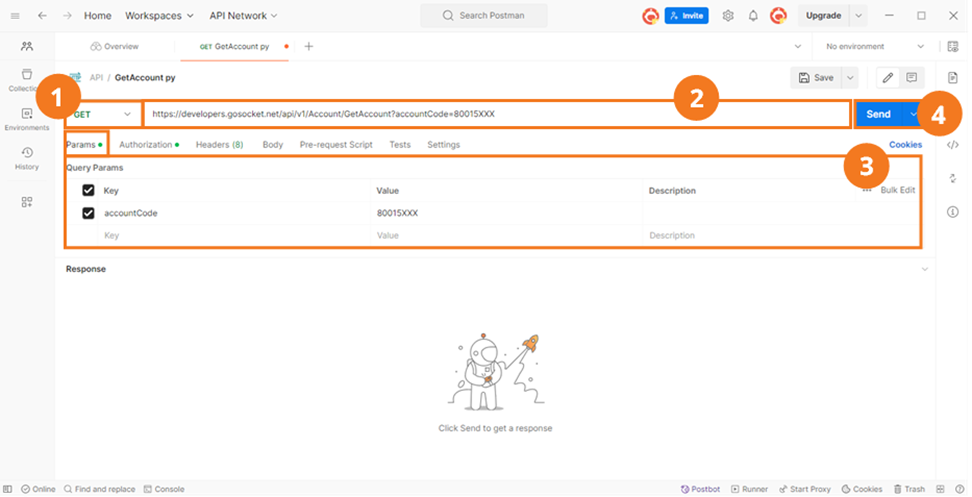
Remember that before using the method, you must authenticate within the Authorization tab.
For this method, we use the Postman Params tab.
- Select the method type. In this case, you must select GET.
- Enter the method's URL.
- Enter the parameter shown in the table above with its corresponding value.
- Press Send.
Response examples
{
  "ErrorMessage": null,
  "IsValid": false,
  "StatusCode": "500",
  "StatusDescription": "Empresa no activa para utilizar el evento GetAccount",
  "StatusMessage": "Empresa no activa para utilizar el evento GetAccount",
  "XmlBase64Bytes": null,
  "XmlBytes": null,
  "XmlDocumentKey": null,
  "XmlFileName": null,
  "ResponseType": null,
  "OtherData": null,
  "GlobalDocumentId": "00000000-0000-0000-0000-000000000000",
  "Timestamp": null,
  "Response": null,
  "TaxDocument": null,
  "PrinterXml": null
}
To properly interpret this response, take into account the following parameters:
GetAccount (response)
| Parameter | Type | Description | Allowed values |
|---|---|---|---|
| errorMessage | String | code | description as applicable, returned error messages | |
| isValid | Boolean | - true when the RUC is valid - false when it is not valid | - True - False |
| statusCode | String | Response code | See the response codes table below. |
| statusDescription | String | Description of the code | |
| StatusMessage | String | Response code statusCode - statusDescription | |
| xmlBase64Bytes | String | Base64-encoded XML returned by SIFEN | |
| xmlBytes | String | null | |
| XmlDocumentKey | String | Queried Tax ID | |
| XmlFileName | String | null | |
| ResponseType | String | Response type: Synchronous | Sync |
| OtherData | String | Only when the query has completed successfully is it returned with the parameters below: - BusinessNameRUC - StatusCodeRUC - StatusDescriptionRUC - IsBillerElectronicRUC | |
| OtherData.BusinessNameRUC | String | dRazCons | "CLIENT NAME" |
| OtherData.StatusCodeRUC | String | dCodEstCons | Example: "ACT" |
| OtherData.StatusDescriptionRUC | String | dDesEstCons | Example: "ACTIVO" |
| OtherData.IsBillerElectronicRUC | String | dRUCFactElec | Example: "S" |
| GlobalDocumentId | String | Query TrackId | UUID |
| Timestamp | String | Query date-time | 2025-05-02T21:50:31.7268377Z |
| Response | String | null | |
| TaxDocument | String | null | |
| PrinterXml | String | null |
Response codes
| Code | Description |
|---|---|
| 0460 | Input data message of the siConsRUC WS exceeds 1000 KB |
| 0500 | RUC does not exist |
| 0501 | RUC does not have permission to use the WS |
| 0502 | Query successful |