The Spanish version is the authoritative reference. View in Spanish
Uruguay: Method to query a taxpayer with the DGI (GetAccount)
Allows querying denomination and fiscal address data by specifying the taxpayer's type and number. The GET GetAccount method reports whether the queried document exists or not in the DGI's records, and if it exists, reports the denomination, the fiscal address, or the certificate status.
To connect to this functionality, you will need to enter the URL according to the environment you want to use:
https://developers.gosocket.net/api/v1/Account/GetAccounthttps://developers-sbx.gosocket.net/api/v1/Account/GetAccountHow does the GetAccount method work?
Before explaining how it works, it is important to note that this method must be enabled by Gosocket in order to use it.
If you want to use the method, get in touch with the Gosocket sales team.
To make the request, the method has the following parameter in JSON format with the following structure:
GetAccount (request)
| Parameter | Type | Description | Allowed values |
|---|---|---|---|
| AccountCode* | String | Tax ID of the company making the query. Required to verify that the company can use the service. | See the Tax ID Structure table |
| identificationType* | String | Type of identification document of the taxpayer to query: 1: NIE 2: RUC 3: CI | 1, 2, or 3 |
| receiverCode* | String | Identification number of the taxpayer to query | See the Tax ID Structure table |
| typeId* | String | Type of query to perform: 1: Query unique certificate 2: Query the entity's data 3: Query the entity's name | 1, 2, or 3 |
| countryId* | String | Country code of the company making the query | uy |
* All parameters are required
Request example
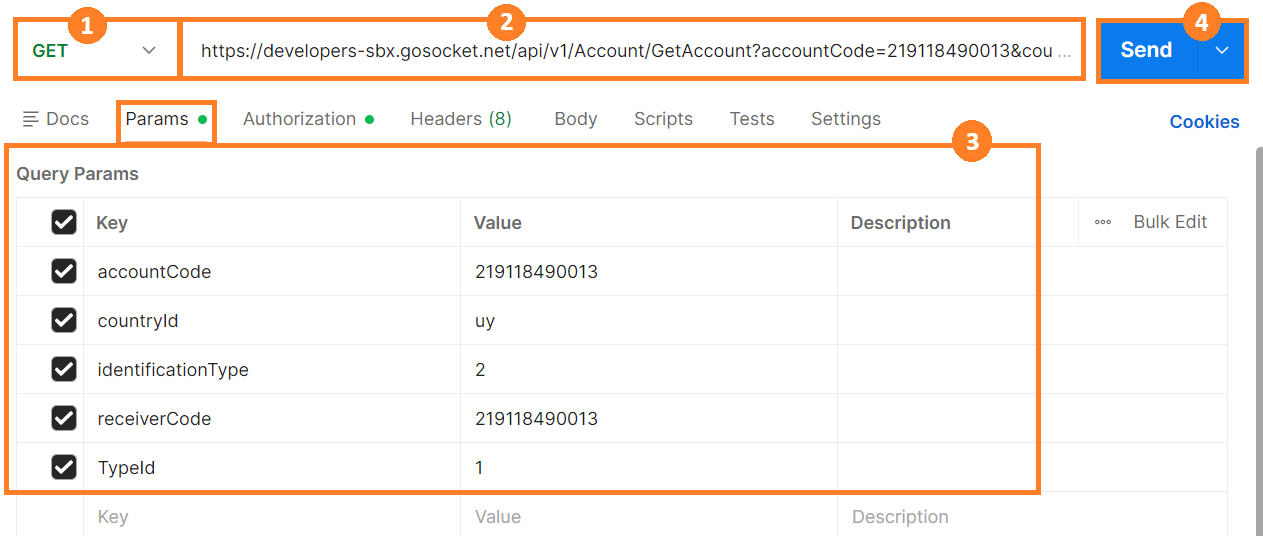
Remember that before using the method, you must authenticate within the Authorization tab.
For this method, we use the Postman Params tab.
- Select the method type. In this case, you must select GET.
- Enter the method's URL.
- Enter the parameters shown in the table above with their corresponding values.
- Press Send.
Response example
The examples use fictitious data (test RUT, company name, address, and contact details); the structure and fields are the method's real ones.
{
  "ErrorMessage": null,
  "IsValid": false,
  "StatusCode": "500",
  "StatusDescription": "Empresa no activa para utilizar el evento GetAccount",
  "StatusMessage": "Empresa no activa para utilizar el evento GetAccount",
  "XmlBase64Bytes": null,
  "XmlBytes": null,
  "XmlDocumentKey": null,
  "XmlFileName": null,
  "ResponseType": null,
  "OtherData": null,
  "GlobalDocumentId": "00000000-0000-0000-0000-000000000000",
  "Timestamp": null,
  "Response": null,
  "TaxDocument": null,
  "PrinterXml": null
}
To properly interpret this response, take into account the following parameters:
GetAccount (response)
| Parameter | Type | Description | Allowed values |
|---|---|---|---|
| errorMessage | String | [ ] | |
| isValid | Boolean | Request result: true when the client exists false when the client does not exist | True False |
| statusCode | String | Response code | Examples: null 200 500 |
| statusDescription | String | Description of the code | Examples: null 200: RUT queried correctly 200: Certificate of Annual Validity Enabled 500: Company not active to use the GetAccount event |
| StatusMessage | String | Description of the response | Examples: null "Query completed successfully." |
| xmlBase64Bytes | String | Base64-encoded XML of the response returned by the Tax Authority. | null Base64-encoded XML |
| xmlBytes | String | null | |
| XmlDocumentKey | String | null | |
| XmlFileName | String | null | |
| ResponseType | String | Response type of the queried service: synchronous | Sync |
| OtherData | String | Only when the query has completed successfully and the taxpayer has been found is it returned with the information according to the type of query performed: 1 - Query unique certificate: RUT, Numero, Denominacion, DomicilioFiscal, TipoContribuyente, Estado, Emision, Vencimiento 2 - Query the entity's data: RUC, RazonSocial, Local_Fec_Canc, Local_Fec_Ini, TipoDom_Id, CalOcup_id, TerCod_Id, Calle_id, Calle_Nom, Dom_Pta_Nro, Dom_Ap_Nro, Loc_Id, Loc_Nom, Dpto_Id, Dpto_Nom, Dom_Pst_Cod, Dom_Err_Cod, DomCtt_Val_TELEFONO_FIJO, DomCtt_Val_CORREO_ELECTRONICO 3 - Query the entity's name: RazonSocial | |
| GlobalDocumentId | String | 00000000-0000-0000-0000-000000000000 | 00000000-0000-0000-0000-000000000000 |
| Timestamp | String | Query date-time | 2025-05-02T21:50:31.7268377Z |
| Response | String | null | |
| TaxDocument | String | null | |
| PrinterXml | String | null |