The Spanish version is the authoritative reference. View in Spanish
Manual report download from the DIAN
To upload the Excel with the report of the documents to reconcile, one of the options is to upload it manually. To obtain it, you must access one of the following environments of the DIAN portal, as appropriate:
PRODUCTION
https://certificate-vpfe.dian.gov.co/User/CertificateLoginSTAGING
https://certificate-vpfe-hab.dian.gov.co/User/CertificateLogin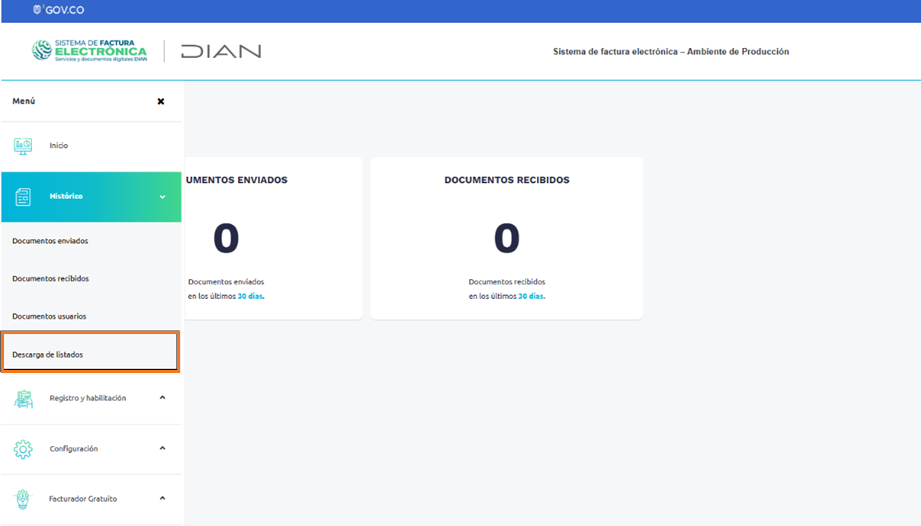
From the DIAN portal menu, select Download listings.
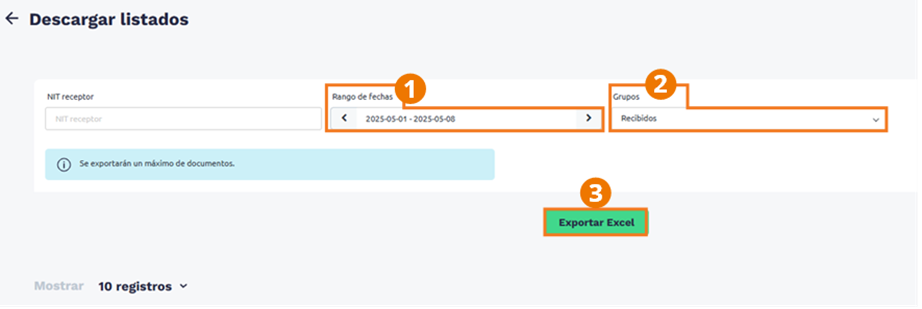
- Enter the date range in which the documents in the listing to download were issued.
- Select the Received document group.
- Press the Export Excel button.
Then the list of exports will be displayed.
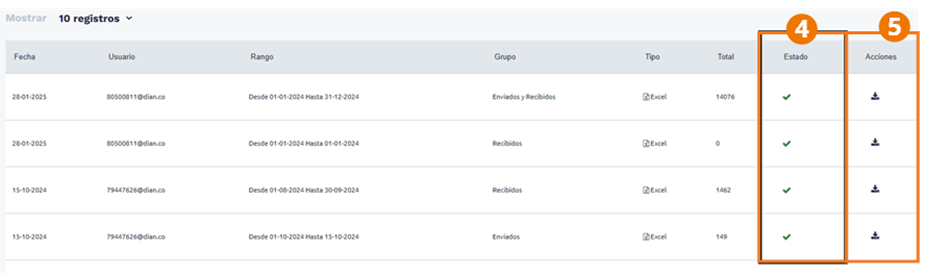
- Wait until a green check is shown within the Status column.
- Select the download icon to obtain the previously generated Excel.