The Spanish version is the authoritative reference. View in Spanish
Enabling Reconciliation in Colombia
To use the Reconciliation feature, our team needs to enable it.
Then, in our portal, you must make the following configurations, if you are going to use the option to download the report of documents from the DIAN automatically.
Once this process is complete, the feature will be available for use.
Legal representative and certificate configuration
For the system to automatically download the report of received documents from the DIAN website, it is necessary to:
- Configure the company's Legal Representative.
- Upload and configure the corresponding Digital Certificate and mark it for Reconciliation.
This information is essential for the portal to be able to connect securely to the DIAN platform and automatically download the report in Excel format.
To configure the company's legal representative, follow the instructions:
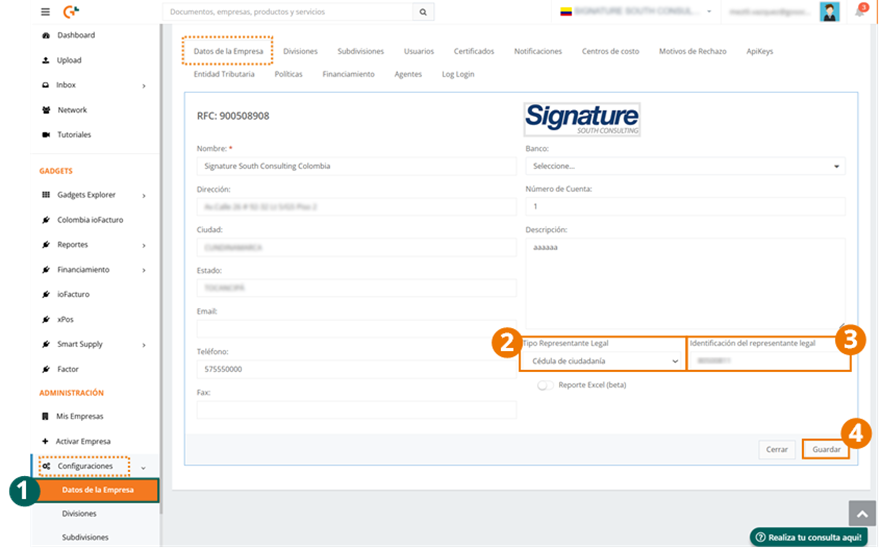
- Go to Company Data within the Settings module.
- Select Citizenship ID as the type of identification the legal representative uses.
- Enter the legal representative's identification number.
- When finished, press Save.
The upload and configuration of the company's certificate is done as follows:
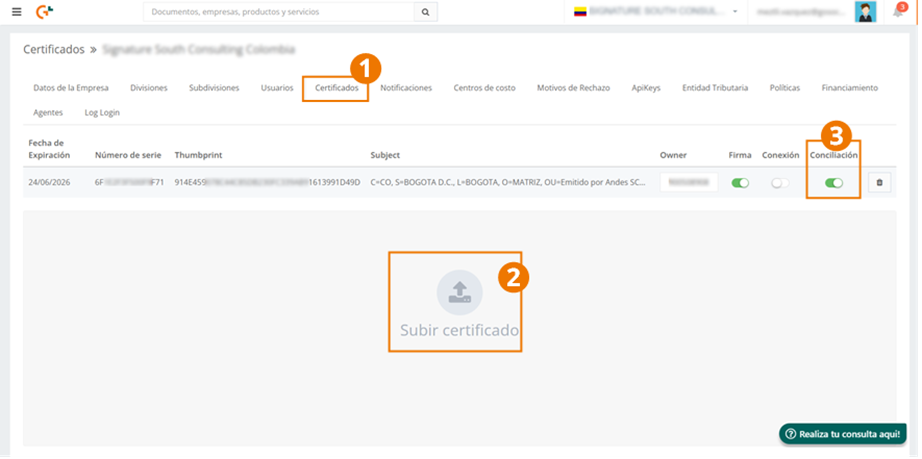
-
Go to the Certificates tab from the Settings module.
-
Press Upload certificate and select the file that contains the company's certificate.
-
Once the certificate is uploaded, activate the Reconciliation toggle.