The Spanish version is the authoritative reference. View in Spanish
Billers GF 3.0
Module: Billers
General description
The Billers screen allows you to view and manage all billers created in Folio Manager 3.0 (GF).
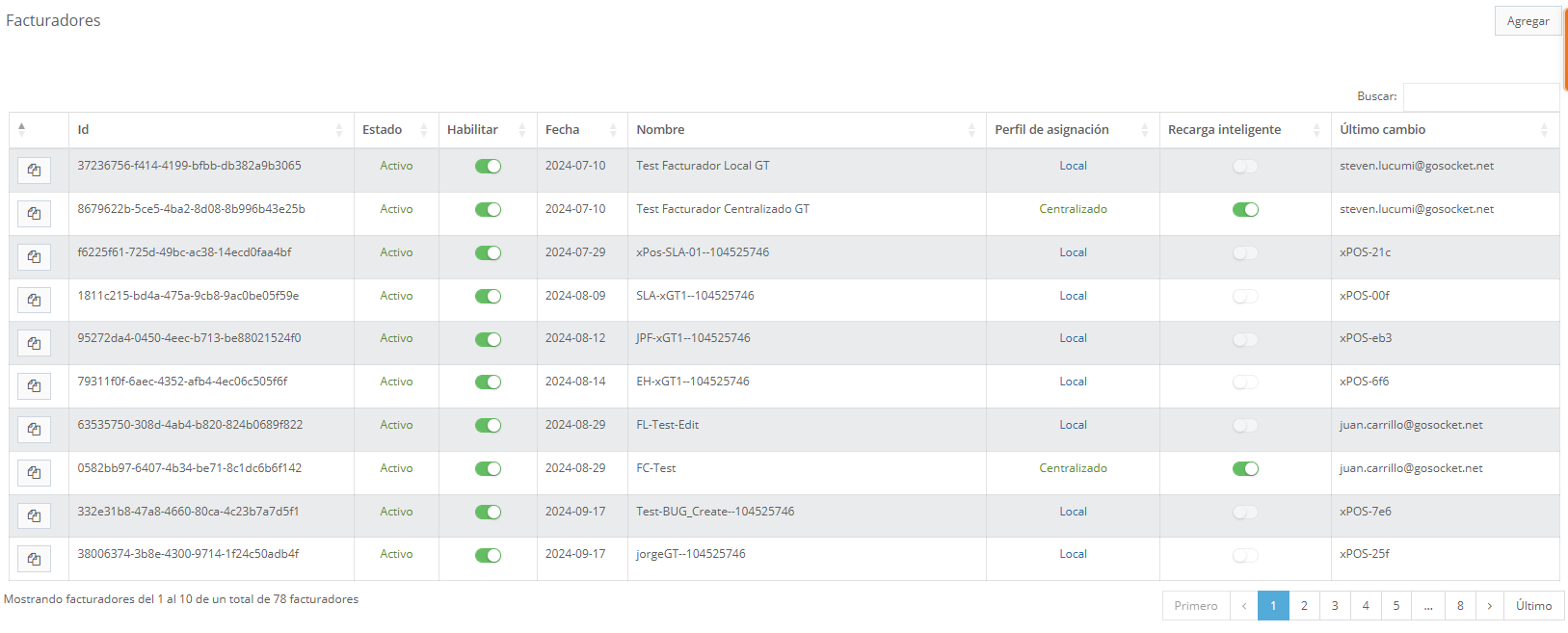
A biller corresponds to a point, system, or device that needs to request numbering or fiscal numbering ranges from the GF for document issuance.
Examples of billers include: xPOS devices, API SDTA, Kiosk, among others.
From this screen you can:
- View the status and configuration of each biller.
- Enable or disable its operation within the GF.
- Identify the type of folio assignment it uses.
- Quickly copy the biller's unique identifier (UUID).
Biller list
The screen displays a paginated list with all billers registered in the system.
Each record contains the following information:
| Column | Description |
|---|---|
| Id | Unique biller identifier (UUID), automatically assigned by the system at the time of creation. |
| Status | Indicates whether the biller is Active or Inactive within the system. |
| Enable | Toggle that allows enabling or disabling the biller's operation in the GF. When disabled, the biller cannot request folios. |
| Date | Biller creation date. |
| Name | Descriptive name assigned to the biller for easy identification. |
| Assignment profile | Defines how the biller receives fiscal numbering: * Local: the biller receives folio sub-ranges (xPOS case). * Centralized: the biller requests and receives a single number per operation (API SDTA case). |
| Smart refill | Indicates whether the biller has automatic reloading of primary ranges from the tax authority enabled. |
| Last change | User who made the last modification to the biller. |
Available actions
- Add
Allows creating a new biller in the system. - Copy UUID
Each row has a button that allows copying the biller's UUID to the clipboard, making it easier to use in external configurations or integrations. - Search
Allows filtering billers using a search field to locate specific records. - Pagination
The list is paginated to facilitate navigation when there are many registered billers.
Important considerations
- A biller must be enabled to be able to request numbering from the GF.
- The assignment profile defines the folio delivery behavior and must be selected according to the integration type of the consuming product.
- Smart refill allows automating the retrieval of primary ranges, reducing manual intervention.