The Spanish version is the authoritative reference. View in Spanish
Create Primary Range GF 3.0
Primary Ranges
Primary ranges represent the official folio numbering authorized for the issuance of electronic documents.
They are the main source from which billers consume folios.
Each primary range:
- Defines a valid numerical interval.
- Is associated with a document type.
- Is identified by a series.
- Can be used by one or more billers.
Create Primary Ranges
General description
This screen allows you to create and register a primary folio range, defining its interval, document type, and series, and assigning it to one or more billers.
The created range will be used by the selected billers for the issuance of electronic documents.
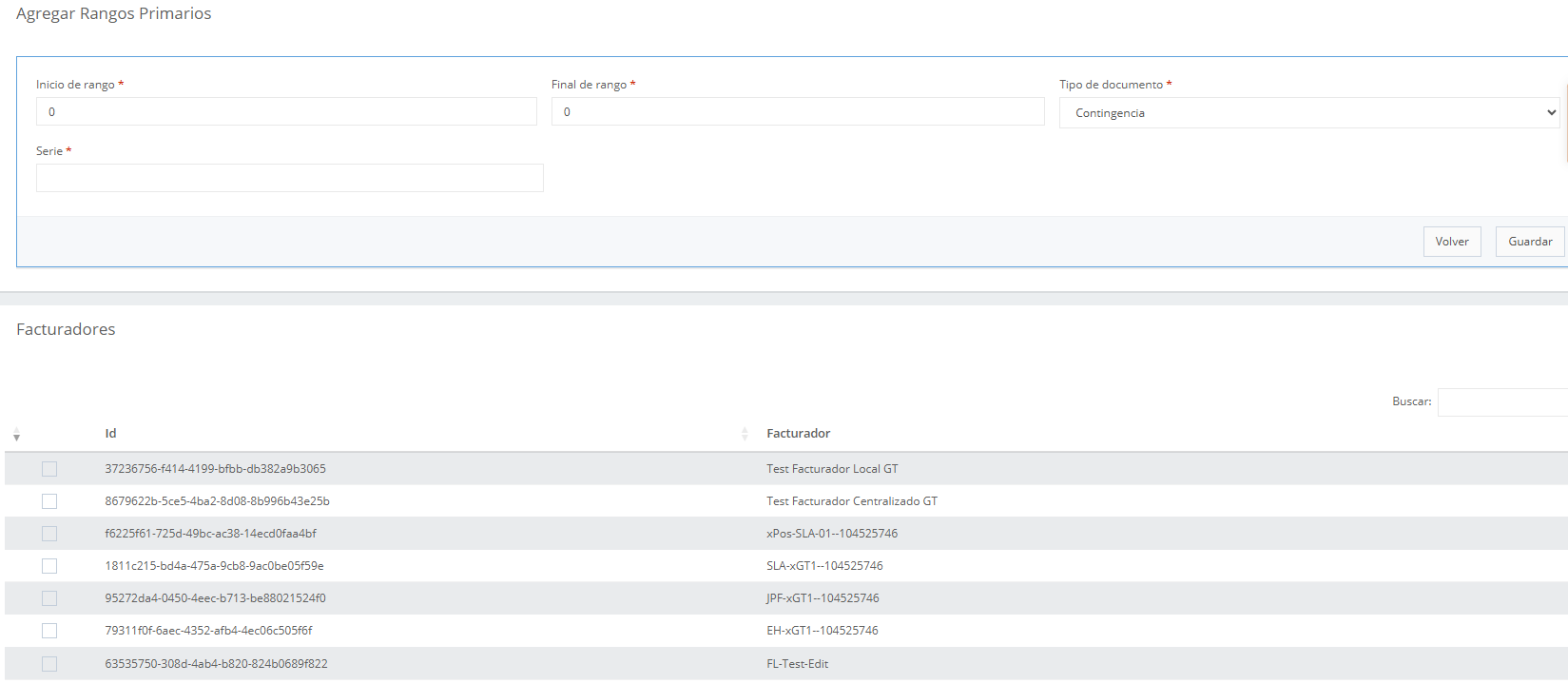
Screen structure
The screen is divided into two sections:
- Add Primary Ranges
- Billers
Both sections are part of the same creation process.
Fields and actions
Section 1: Add Primary Ranges
::: note
Fields may vary by country.
Country-specific details are documented in a dedicated section of the manual.
:::
| Field | Description |
|---|---|
| Range start | First authorized numerical folio of the range |
| Range end | Last authorized numerical folio of the range |
| Document type | Document type associated with the range (Invoice, Ticket, Contingency, etc.) |
| Series - Billing Point - Point of Sale | Range identifier according to the country's regulations |
Section 2: Billers
In this section, the billers that will be able to consume folios from the range are selected.
| Action | Description |
|---|---|
| Biller checkbox | Allows assigning the range to the selected biller |
| Search | Allows filtering billers by name or identifier |
✔ One or several billers can be selected
✔ The assignment is confirmed only upon saving
Available actions
| Button | Description |
|---|---|
| Save | Creates the primary range and assigns the selected billers |
| Back | Cancels the operation without saving changes |
Important notes / validations
- The range start must be less than the range end
- Overlapping ranges with existing ones are not allowed
- The series must be unique within the range context
- A primary range cannot be modified once it starts being used
- If at least one biller is not assigned, the range will not be consumed
Common use cases
Range assignment
- Create the primary range
- Select the corresponding billers
- Save the configuration
- The biller is enabled to consume folios
Step-by-step walkthrough
- Go to Create Primary Ranges
- Fill in the range data in the upper section
- Select the billers in the lower section
- Press Save
- Verify that the range is available for consumption
Expected result
The system will have an active primary range, correctly associated with the selected billers and ready to be used by Folio Manager 3.0.