The Spanish version is the authoritative reference. View in Spanish
🇨🇴 Colombia
This sheet assumes you know the generic FM 3.0 screens (FM 3.0 modules) and the local/centralized operation model (Methods and parameters). Here we only document what is specific to Colombia.
Summary
| Tax authority | DIAN (Dirección de Impuestos y Aduanas Nacionales) |
| Numbering authorization | Billing resolution: numbering ranges authorized by the DIAN, with prefix and technical key |
| Obtaining ranges | Download from the tax authority (DIAN) |
| Automatic reload | Yes — smart refill + thresholds per document type |
The primary range in Colombia
In Colombia, each primary range in FM corresponds to a numbering range authorized by the DIAN through a billing resolution. In addition to the generic fields on the Primary ranges screen, in Colombia the range is identified by its resolution data:
- Resolution number → identifier of the DIAN resolution that authorizes the range.
- Resolution date → date on which the DIAN issued the authorization.
- Technical key → key associated with the range, used in calculating the CUFE.
- Prefix (series) → prefix authorized for the numbering.
- Term → validity period during which the range can be used.
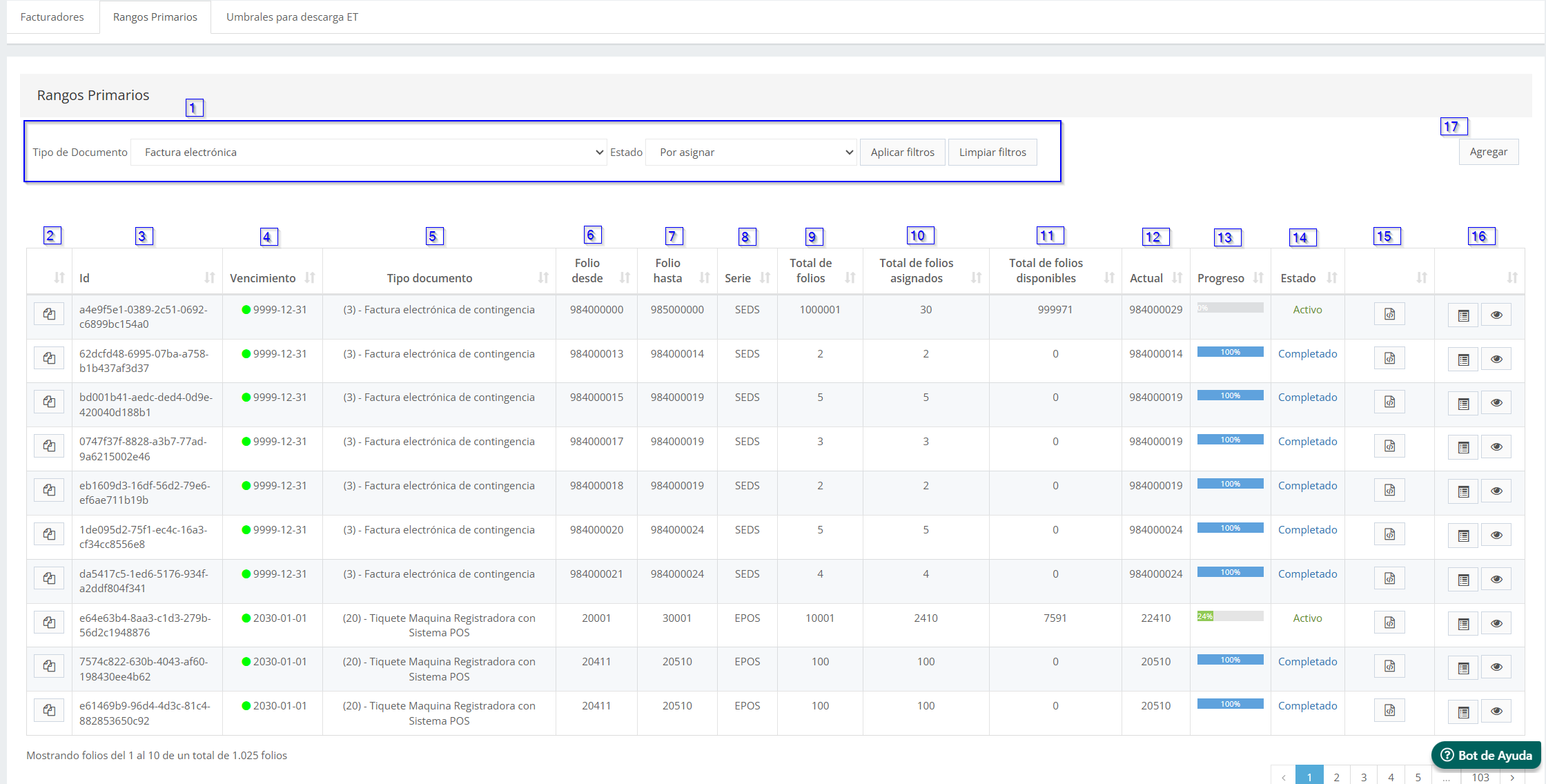
Actions on the range
- The
 action lets you view the authorization document associated with the range, when it exists.
 - The action to void folios before the tax authority is not available in Colombia: it is exclusive to Chile (voiding before the SII). In Colombia a range ends its cycle through consumption or expiration of the resolution.
Obtaining folios
Ranges authorized by the DIAN resolution are incorporated into FM through file upload from the Primary ranges screen, or through the automatic reload described below.
Smart refill and thresholds
In Colombia the thresholds screen is called Thresholds for reload and defines, per document type:
- Limit → folio threshold that, when reached, triggers the reload of the primary range.
- Prefix → prefix of the DIAN resolution whose authorized numbering will be used in the reload.
Unlike Chile, no number of folios to request is captured: the reload takes the numbering already authorized by the current resolution for that prefix.
The exact mechanism of the automatic reload (where the service obtains the numbering authorized by the DIAN) is pending validation with the product team.
Terminology
| Term | Meaning |
|---|---|
| Billing resolution | Administrative act of the DIAN that authorizes a numbering range with prefix, validity, and technical key. |
| Technical key | Key associated with the resolution, required to calculate the CUFE of issued documents. |
| CUFE | Código Único de Factura Electrónica (Unique Electronic Invoice Code). |
The generic FM terms (sub-range, threshold, primary range) are defined in the general model.