The Spanish version is the authoritative reference. View in Spanish
Invoices
The Invoices module lets you start the document issuance process and consult the issued documents.
Document lookup
On this module's initial screen you will find the following information:
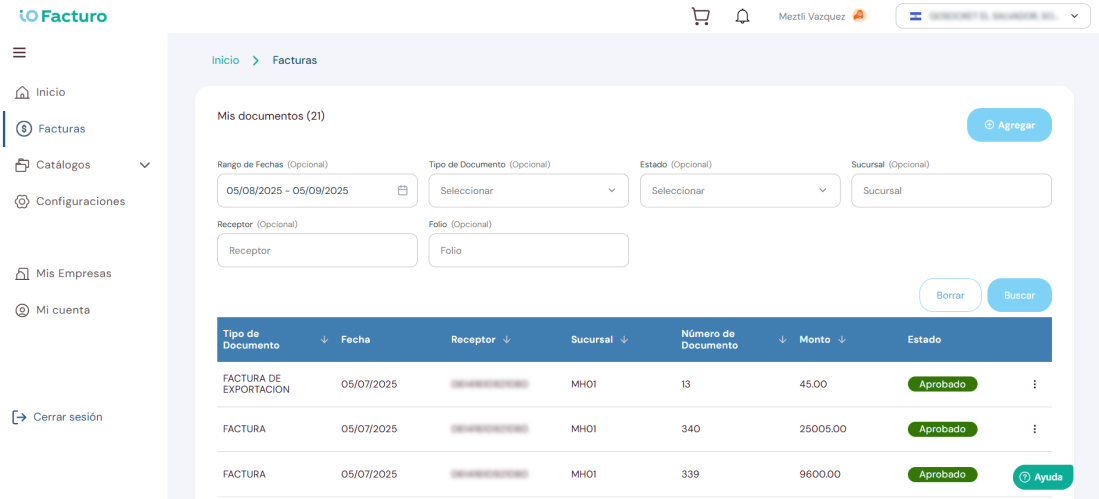
1
Number of issued documents that meet the search criteria.2
Filters section to search for previously issued documents. You can use one or several filters; press Search to consult and Clear to reset.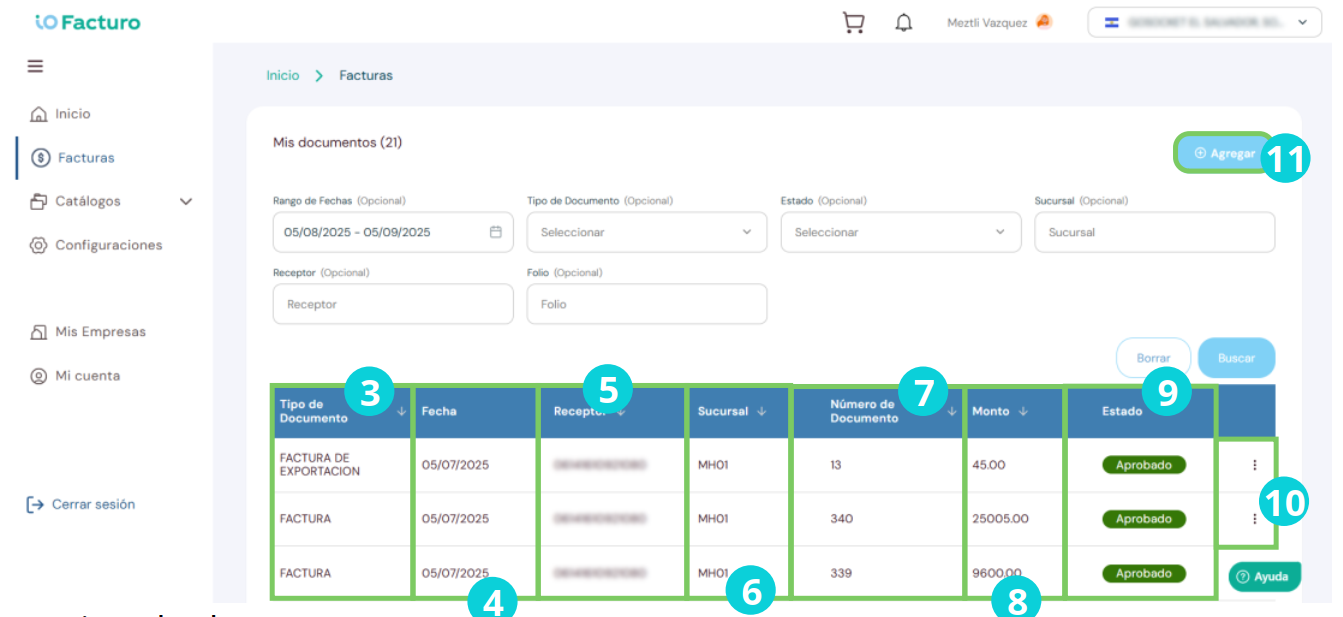
3
Document type.4
Document issue date.5
Receiver to whom the document was issued.6
Branch where the document was issued.7
Number that identifies the document.8
Amount of the document value.9
Document status: issued, pending or rejected.10
From the status column you can download PDF/XML or invalidate the document.11
Press Add to start issuing a document.Document statuses
IssuedAcceptedThe document was validated and accepted by the tax authority
PendingIn processThe document is being processed. It may take a few minutes
RejectedErrorThe document was rejected. Review the error detail in the document row
Document issuance
Once you have selected the new document button, you will see a form that you must fill in as indicated below:

1. Document type
Select the type of document to issue according to the operation you need to record:
a
Invoice. Document that taxpayers of the Tax on the Transfer of Movable Goods and on the Rendering of Services are required to issue and deliver for each operation carried out with final consumers.b
Electronic Tax Credit Receipt. Document issued in sale or purchase operations carried out between taxpayers; it can be issued both for transfers of ownership of corporate movable goods and for the rendering of services they perform, whether taxed, exempt or non-subject operations.c
Electronic Dispatch Note. Document used when there is a purchase relationship between two parties; it can be issued and delivered before or after an Invoice or Tax Credit Receipt to cover movable goods or merchandise in transit, and acts as proof of delivery and receipt, even when there is no transfer of ownership.d
Electronic Credit Note. It mainly serves the function of partial or total correction; the seller (issuer) issues it to the buyer (receiver) when, after the issuance of the Tax Credit Receipt, adjustments are made to prices, discounts, allowances, refunds of money, or when operations carried out are voided or rescinded.e
Electronic Debit Note. Document issued to the buyer or customer indicating an increase in the value of the goods or services invoiced on a Tax Credit Receipt when, by mistake, a price lower than the established one was charged.f
Electronic Withholding Receipt. It must be issued by acquirers and recipients of services when withholding of the Tax on the Transfer of Movable Goods and Rendering of Services is carried out. The 1% VAT withholding, established in article 162 of the Tax Code, aims to extract in advance a percentage of the tax incurred in the operation, to guarantee its full payment when filing the corresponding return.g
Electronic Settlement Receipt. Document issued when a taxpayer carries out operations on behalf of third parties, consolidating the tax credit and debit of those transactions.h
Electronic Accounting Settlement Document. Document issued by a credit and debit card issuing institution to an affiliate for the sale of merchandise. According to the Tax Code, an affiliate is the taxpayer of the Tax on the Transfer of Movable Goods and on the Rendering of Services who accepts payments through the credit or debit card system (Art. 162-A, final paragraph).i
Electronic Export Invoice. For export operations, an Export Invoice must be issued and delivered. It must be issued and granted according to legal regulations to taxpayers abroad when any of these situations occurs: i) definitive transfers of ownership of corporate movable goods intended for use and consumption abroad, or rendering of services to users without domicile or residence in the country intended exclusively for abroad, mainly subject to a zero percent rate; ii) when acting as a commission agent, consignee or auctioneer, selling, transferring or auctioning goods, or rendering services on behalf of third parties in export operations; iii) when an amount corresponding to commissions or remuneration for the rendering of services as a third party or principal in export operations must be documented.2. Form fields
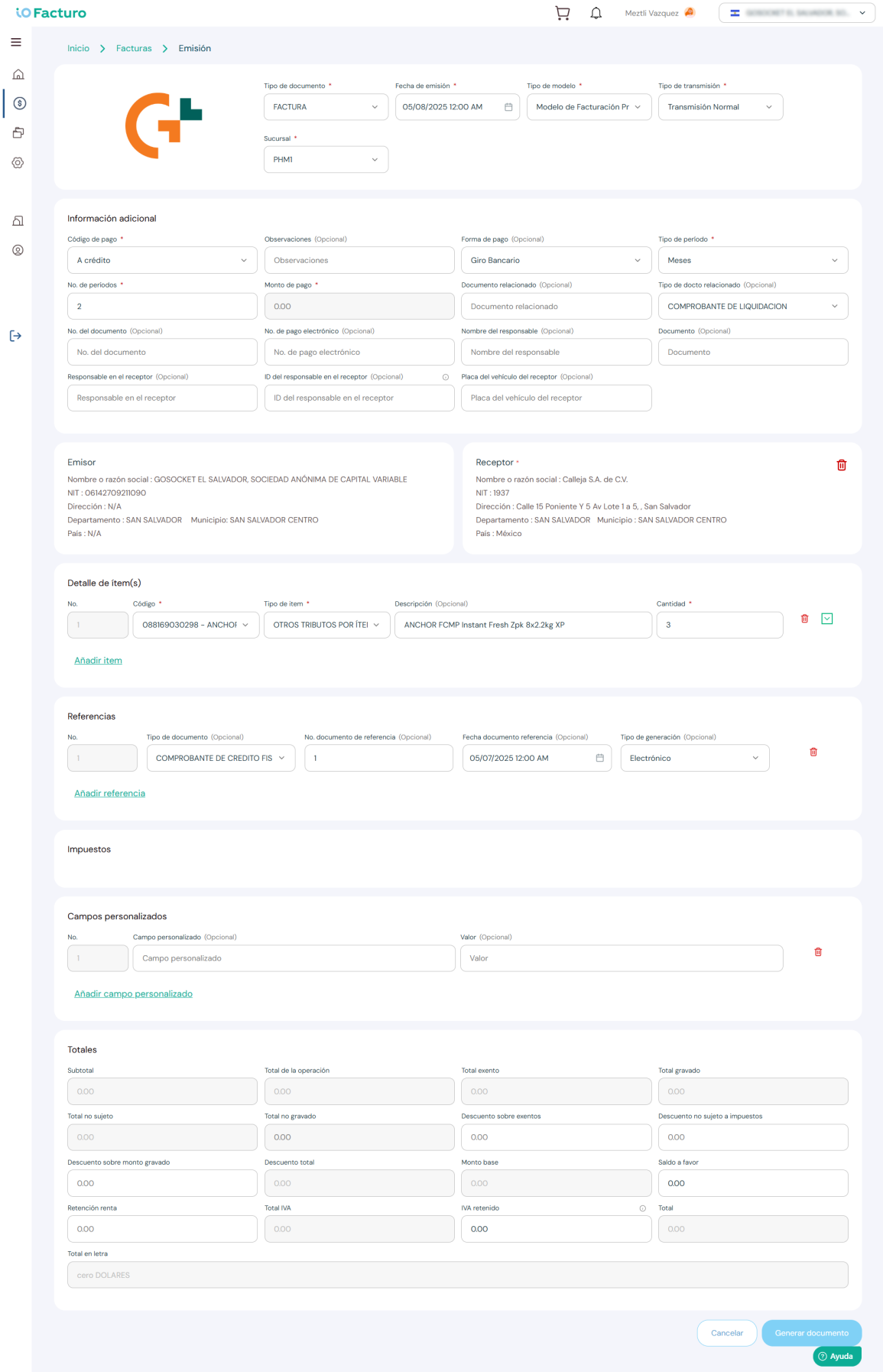
2
Select the document date from the calendar.3
Indicate whether the document is issued in a prior or deferred model.4
Define whether the issuance will be normal or by contingency.5
Select the branch where the sale was made.6
Enter the corresponding payment method and information.7
If applicable, complete the linked document data.8
If applicable, record the responsible receiver data.9
Verify that the issuer data is correct.10
Select the customer to whom the document will be issued.11
Use the Delete option when you need to remove a record or section.12
Select the product that will be included in the document.13
Indicate the item type corresponding to the product.14
Review the description brought from the catalog.15
Enter the quantity to invoice for the selected product.16
Use the expansion icon to edit more item details.17
Add more products to the DTE with the Add item button.18
Enter additional document references if necessary.19
The system calculates taxes automatically based on the items.20
Complete additional fields if your operation requires it.21
Review the calculated totals before issuing.22
Finish the process by pressing Generate document.Before issuing
Make sure you have your customers registered in Catalogs → Customers and your products in Catalogs → Products to speed up the issuance process.