The Spanish version is the authoritative reference. View in Spanish
Invoices
The Invoices module lets you start the document issuance process and look up the documents you have issued.
Document lookup
On the initial screen of this module you will find the following information:
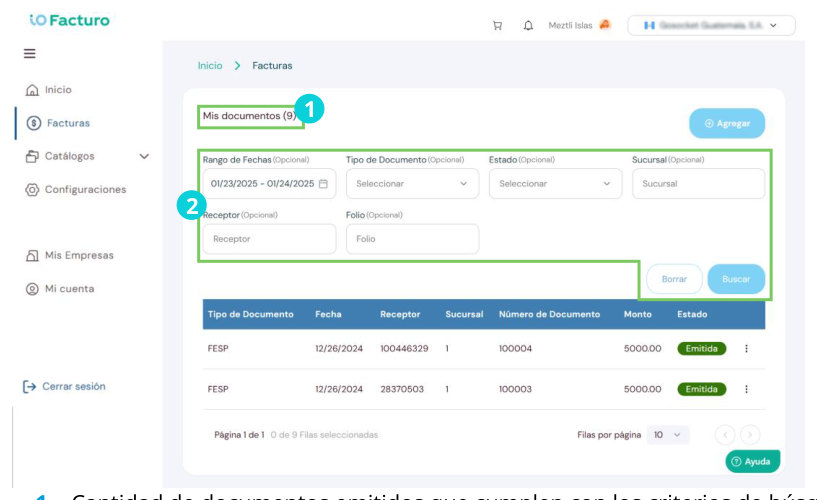
1
Number of issued documents that match the search criteria.2
Filters section to search for previously issued documents. You can use one or several filters; press Search to look up and Clear to reset.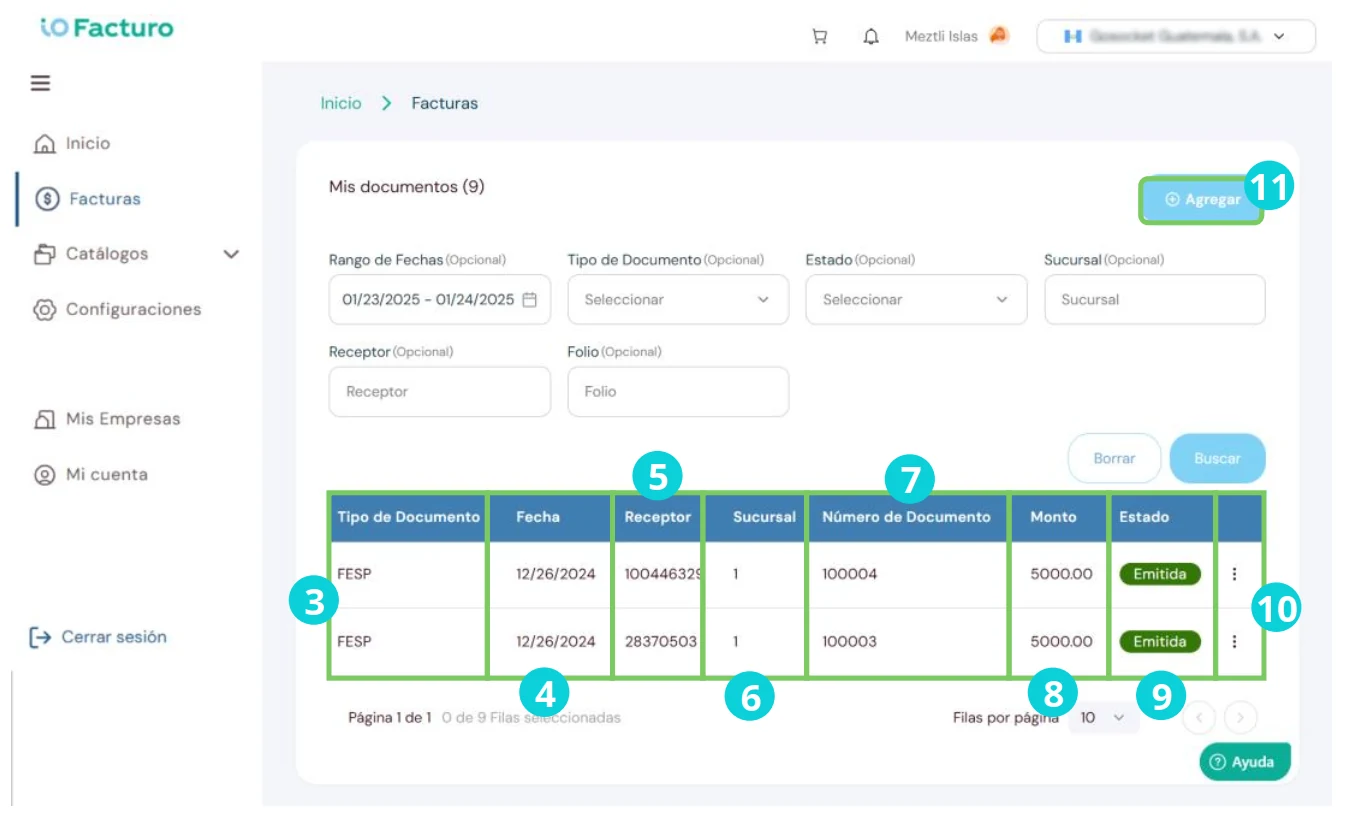
3
Document type.4
Document issue date.5
Receiver to whom the document was issued.6
Branch where the document was issued.7
Number assigned to the document.8
Amount of the document value.9
Document status: issued, pending or rejected.10
From the status column you can download PDF/XML.11
Press Add to start issuing a document.Document issuance
Once you have selected the new document button, you will see a form that you must fill in as indicated below:
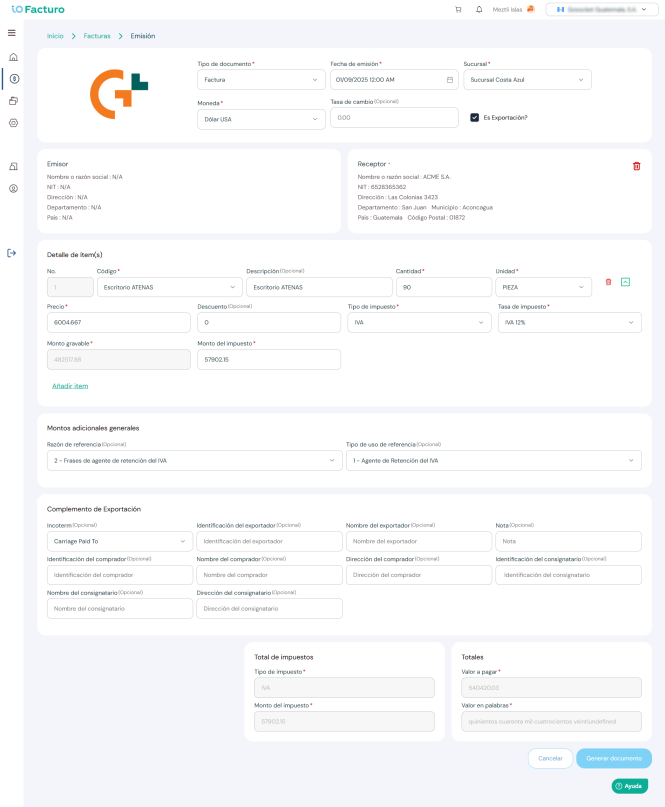

1. Document type
Select the document type according to the transaction to be recorded:
Invoice
Document that taxpayers subject to VAT are required to issue and deliver to the buyer, for sales, exchanges, leases, withdrawals, destruction, loss, or any event that implies an inventory shortage when it constitutes a taxable event for this tax, and for the services provided by subject taxpayers, including exempt transactions or transactions with exempt persons.Bill of Exchange Invoice
Document issued by a seller of merchandise. The buyer returns it duly accepted, becoming obligated to pay the agreed sum upon maturity. It is a credit instrument in favor of the seller.Bill of Exchange Invoice — Agricultural Taxpayer
Document issued by a seller of merchandise enrolled in the Special Agricultural Taxpayer Regime. The buyer returns it duly accepted, becoming obligated to pay the agreed sum upon maturity. It is a credit instrument in favor of the seller.Bill of Exchange Invoice — Agricultural Taxpayer — Special Electronic Regime
Document issued by a seller of merchandise enrolled in the Special Electronic Agricultural Taxpayer Regime. The buyer returns it duly accepted, becoming obligated to pay the agreed sum upon maturity. It is a credit instrument in favor of the seller.Bill of Exchange Invoice — Small Taxpayer
Document issued by a seller of merchandise enrolled in the Small Taxpayer Regime. The buyer returns it duly accepted, becoming obligated to pay the agreed sum upon maturity. It is a credit instrument in favor of the seller.Bill of Exchange Invoice — Small Taxpayer — Electronic Regime
Document issued by a seller of merchandise enrolled in the Electronic Small Taxpayer Regime. The buyer returns it duly accepted, becoming obligated to pay the agreed sum upon maturity. It is a credit instrument in favor of the seller.Agricultural Taxpayer Invoice
Document issued by a taxpayer enrolled in the Special Agricultural Taxpayer Regime.Agricultural Taxpayer Invoice — Special Electronic Regime
Document issued by a taxpayer enrolled in the Special Electronic Agricultural Taxpayer Regime.Special invoice
i) Document issued by a buyer on behalf of the seller or service provider, who, due to the nature of their activities or any other circumstance, does not issue the corresponding invoice.ii) Document issued by an exporting buyer when the seller is not registered with the SAT as an authorized producer of agricultural, artisanal and recycled products. The exporting buyer must withhold the respective taxes and remit them to the SAT, or in the case of VAT offset it when applicable.
iii) In both cases the buyer must withhold the respective taxes and remit them to the SAT, or in the case of VAT offset it when applicable.
Small Taxpayer Invoice
Document issued by a taxpayer enrolled in the Small Taxpayer Regime.Small Taxpayer Invoice — Electronic Regime
Document issued by a taxpayer enrolled in the Electronic Small Taxpayer Regime.Provisional invoice
Document that supports export transactions in order to issue a document when the final export is not available.Credit Note
Document issued by intermediaries of agricultural, artisanal or recycled products intended for export, to make purchases from persons not registered with the SAT as suppliers of those products. It may also be used, with prior SAT authorization, to reduce inventory when the period for issuing the credit memo or debit memo has elapsed for any reason.Credit Memo
Document used for returns, cancellations or discounts on already invoiced transactions.Debit Memo
Document used for price increases or surcharges on already invoiced transactions.Shipping Note
Document that supports the transfer of goods from one place to another; issuing this type of document does not replace the obligation to issue the Electronic Tax Document.Receipt
Document issued by associations, foundations and educational, welfare or social-service institutions, religious ones, and others, for the exempt services they provide.i) It is also issued by educational centers for exempt services (enrollment fees, tuition and examination fees, for courses authorized by the competent authority), universities authorized to operate in the country for exempt sales and services, and Entrepreneurship Companies for the contributions they receive.
ii) Other documents that, in specific and duly justified cases, the Tax Administration authorizes to facilitate the timely fulfillment of tax obligations are also included.
Advance payment receipt
Document that supports the payments known as advances in commercial transactions; this type of document does not replace the obligation to issue the Electronic Tax Document.Donation receipt
Document that non-state entities must issue to certify the receipt of donations.2. Form fields
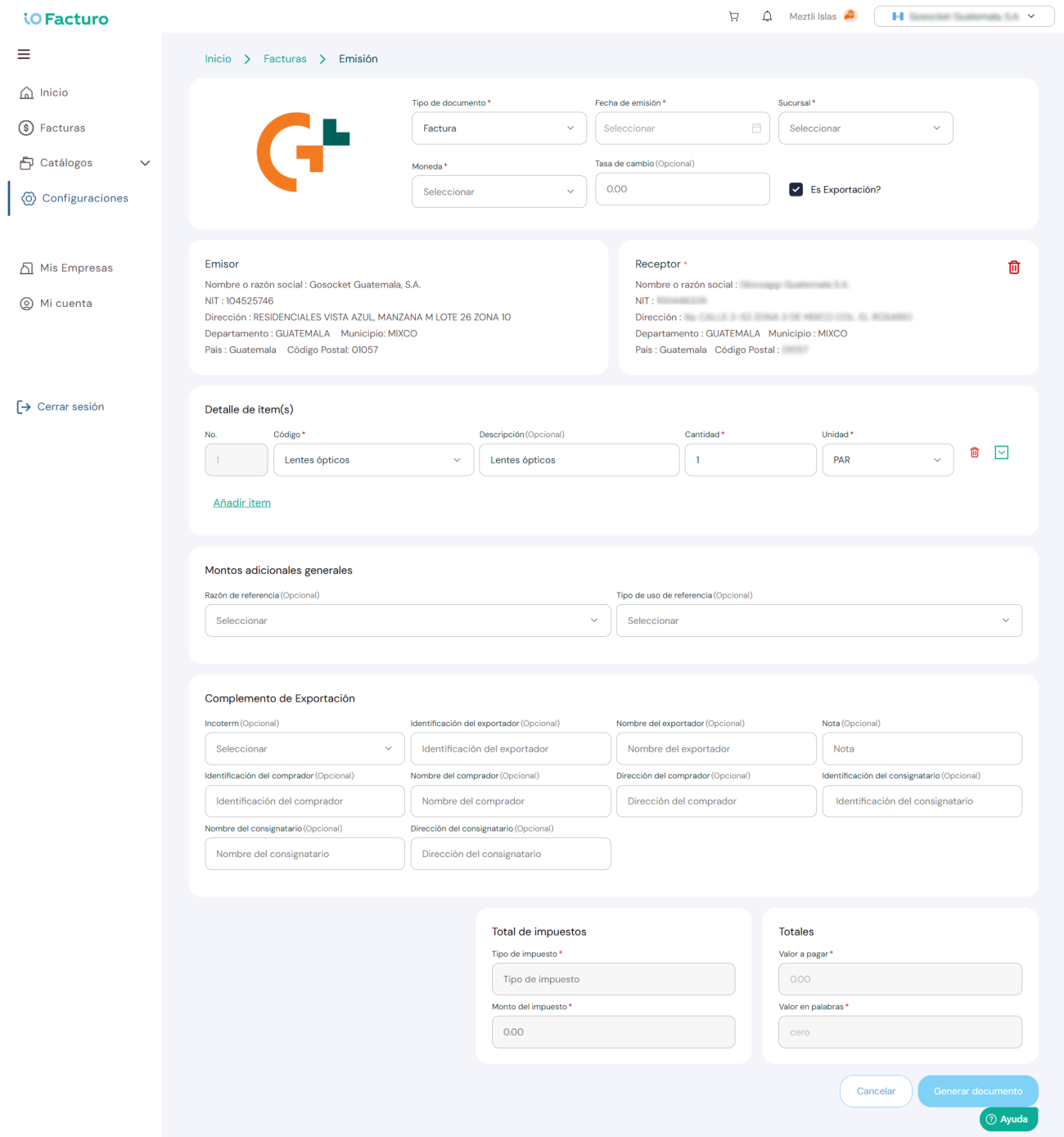
2
With the help of the calendar, press the date on which the document is issued.3
Select the branch from which the document is issued.4
Select the currency in which the document will be paid.5
You can enter the exchange rate. However, this is not a required field.6
To enable the export fields, press the checkbox in the Is it an export? field.7
The issuer name and their tax identification details will be shown.8
Press inside the Receiver field and select one of the customers you previously registered in the customer catalog.9
To clear the receiver details, press the Delete icon.10
Select the product or service to invoice and then you will be able to modify the quantity sold. The options in the code field will be those previously registered in the product catalog; the rest of the fields will be completed automatically based on that catalog.11
To add another product or service to this invoice, press Add item.12
To clear the details of a good or service, press the delete icon.13
When you select the expand button for the first time, additional product information will be shown. Then press the button to collapse the item.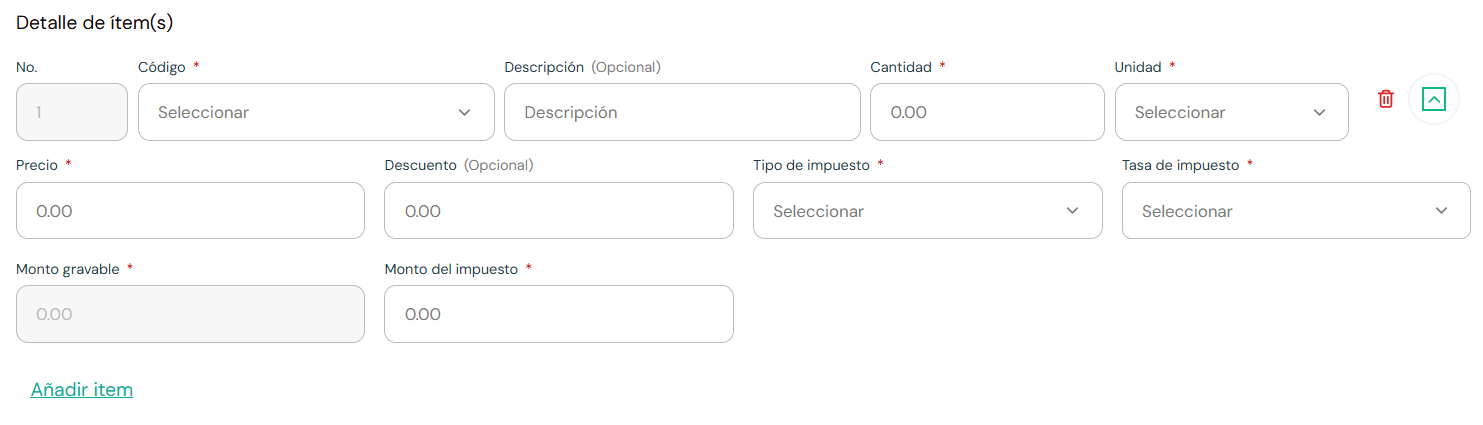
Press the collapse button to hide.
14
If required, select the type of reference that applies to the tax document.15
Choose the type of reference use that will be applied to the document.16
When you select the export checkbox mentioned in point 6, you will have to fill in the fields of the export supplement.17
A calculation of the sum of the taxes payable will be shown.18
The amount payable will be shown.19
When finished, press Generate document.20
To discard the changes, press Cancel.Before issuing
Make sure you have registered your customers in Catalogs → Customers and your products in Catalogs → Products to speed up the issuance process.