The Spanish version is the authoritative reference. View in Spanish
Synchronous Sending
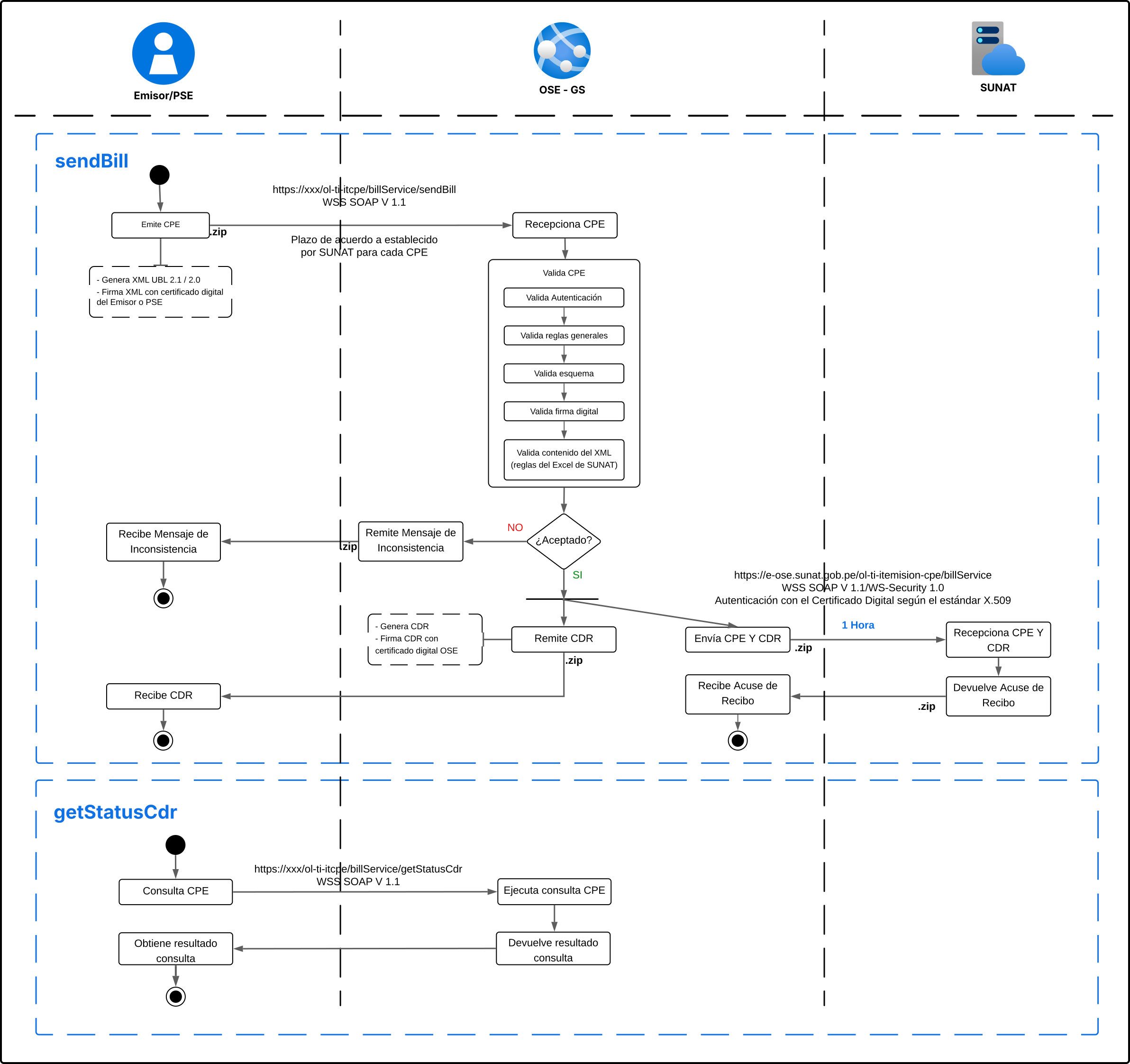
Synchronous sending is the flow used for receipts that require immediate confirmation: invoices, sales tickets, credit and debit notes, withholdings, perceptions and DAE. The issuer sends the document via sendBill and receives the CDR in the same response.
Step by step
1. Issuance and sending (Issuer → OSE)
The issuer generates the XML of the receipt in UBL 2.1 format, signs it with its digital certificate (its own or a PSE's), compresses it into a ZIP file following the file naming convention, and sends it to the OSE via the sendBill method.
2. Validation (OSE)
The Gosocket OSE runs a chain of sequential validations on the received receipt:
- Validates authentication — verifies the issuer's credentials (RUC + username + password assigned by Gosocket).
- Validates general rules — verifies the general structure of the submission (file naming, ZIP format).
- Validates XML schema — verifies that the XML complies with the UBL 2.1 schema defined by SUNAT.
- Validates digital signature — verifies that the receipt is signed correctly with a valid digital certificate.
- Validates XML content — applies the content validation rules defined by SUNAT (IGV calculations, totals, series, correlatives, etc.).
3. Validation result
If the receipt is not accepted, the OSE rejects the submission and the issuer receives an inconsistency message indicating the reason for the rejection (see sendBill — Error response).
If the receipt is accepted, the OSE generates the CDR (Receipt Acknowledgment), signs it with its own digital certificate, and returns it to the issuer in the same sendBill response.
4. Forwarding to SUNAT
In parallel, the OSE forwards the receipt together with the generated CDR to SUNAT. SUNAT receives both documents and returns an acknowledgment to the OSE. This forwarding occurs within a maximum period of 1 hour from the acceptance of the receipt, and is transparent to the issuer: it requires no action on their part.
Subsequent query
If the issuer needs to obtain the CDR of an already-processed receipt again (for example, after a network error while receiving the original response), it can use getStatusCdr indicating the RUC, receipt type, series and number. The OSE returns the corresponding CDR in Base64, without needing to resend the receipt.
Use synchronous sending for every document that represents an individual operation (a sale, a credit note, a one-off withholding) and that requires immediate confirmation of acceptance or rejection. For deferred-processing documents such as daily summaries or void communications, see asynchronous sending.
The validation and generation of the CDR occurs synchronously within the same SOAP call. If your integration has configured timeouts, make sure they are wide enough to cover the OSE's processing time.