The Documents screen allows you to view all electronic vouchers sent to the OSE: Invoices, Sales Vouchers, Credit Notes, Debit Notes, Withholdings, Perceptions and DAE (Operator and Acquirer).
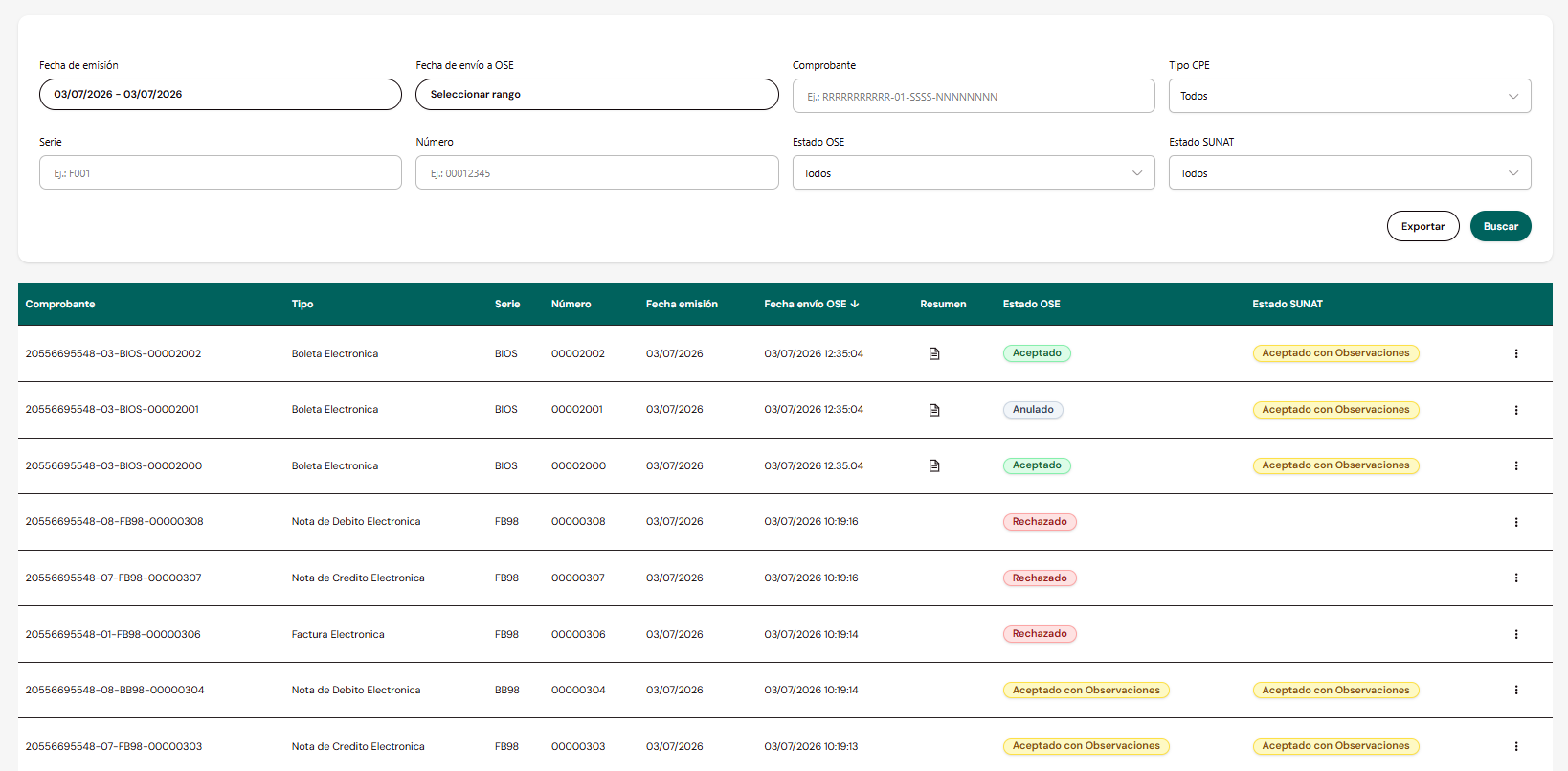
This screen is for viewing only. Voucher issuance is performed through Web Service integration — see OSE Web Service.
Search filters

Issuance DateDate rangeIssuance date contained in the voucher XML.
OSE Submission DateDate rangeDate and time the voucher was sent to the OSE.
VoucherTextFull identifier: RUC-type-series-number (e.g.: RRRRRRRRRRR-01-SSSS-NNNNNNN).
CPE TypeSelectorAll, Electronic Invoice, Electronic Sales Voucher, Electronic Credit Note, Electronic Debit Note, Electronic Withholding, Electronic Perception, DAE Operator, DAE Acquirer.
SeriesTextE.g.: F001.
NumberTextE.g.: 00012345.
OSE StatusSelectorAll, Accepted, Accepted with Observations, Rejected, Voided.
SUNAT StatusSelectorAll, Accepted, Accepted with Observations, Rejected, Voided, Pending.
SUNAT Status includes the value Pending: indicates that the document has not yet received a response from SUNAT — the OSE has not yet forwarded it (queued at the OSE) or SUNAT has not yet responded (queued at SUNAT).
Results table
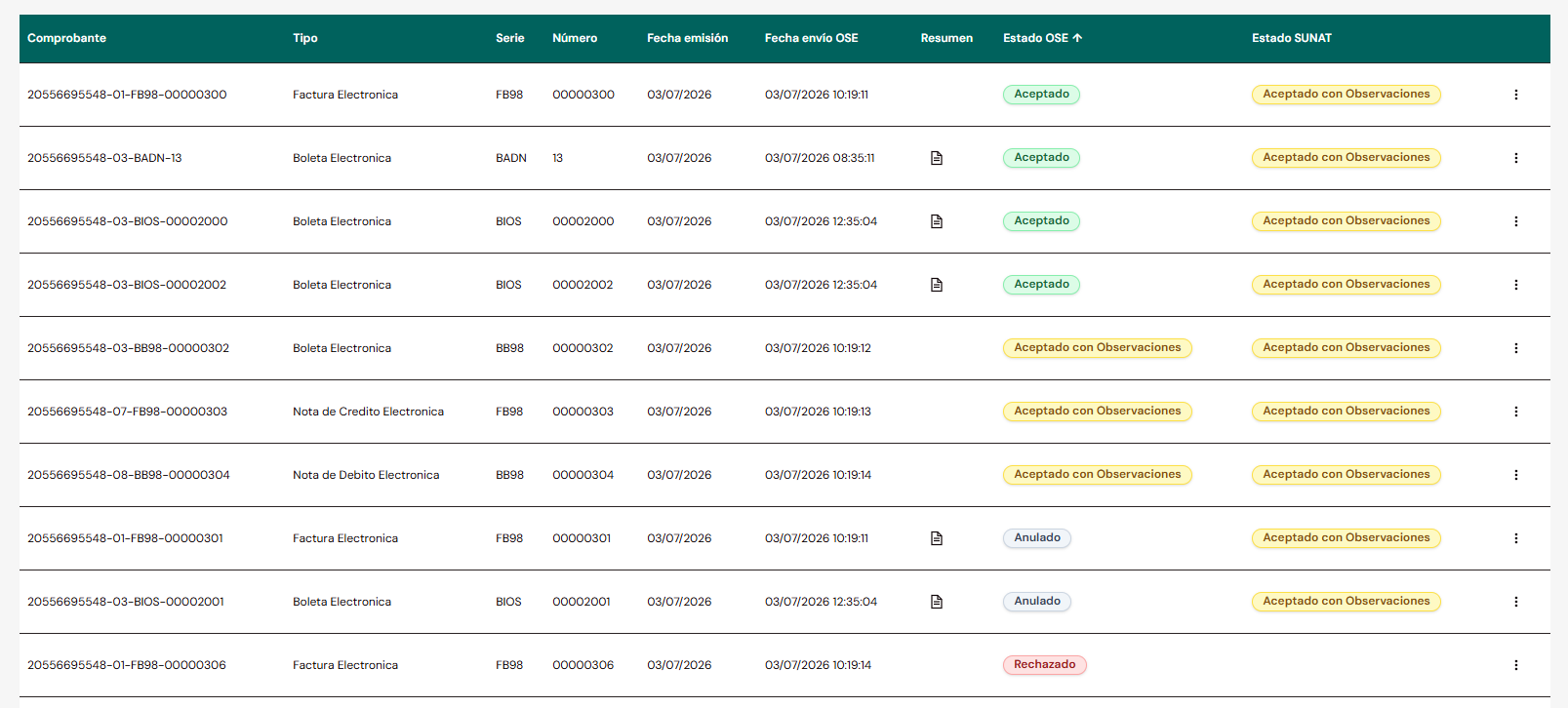
VoucherTextFull voucher identifier.
TypeTextType of electronic voucher.
SeriesTextVoucher series.
NumberTextVoucher sequential number.
Issuance DateDateIssuance date contained in the XML.
OSE Submission DateDate/TimeDate and time the voucher was sent to the OSE.
SummaryIconVisible only if the voucher was created, modified, deleted or voided via a summary. Opens the list of related summaries.
OSE StatusBadgeAccepted, Accepted with Observations, Rejected or Voided. Hovering shows the event date/time; clicking opens the validation detail.
SUNAT StatusBadgeAccepted, Accepted with Observations, Rejected, Voided or Pending. Hovering shows the event date/time; clicking opens the validation detail (only populated if OSE Status is Accepted or Accepted with Observations).
Voucher statuses
Accepted
The voucher passed validation without observations.Accepted with Observations
The voucher passed validation, but with recorded observations.Rejected
The voucher did not pass validation (if the OSE status is Rejected, it is not sent to SUNAT).Voided
The voucher was voided via a Cancellation Notice, Reversal Summary or Daily Summary.Pending
Applies to SUNAT Status only. Indicates the document has not yet received a response from SUNAT — the OSE has not yet forwarded it (queued at the OSE) or SUNAT has not yet responded (queued at SUNAT).
If the document is rejected by the OSE, it is not sent to SUNAT and therefore has no SUNAT Status — that column remains empty.
Issuance models and status origin
All voucher types can be sent individually (synchronous model). However, Sales Vouchers, Credit Notes and Debit Notes associated with a sales voucher have an additional path:
- They can be sent within a Daily Summary of Vouchers, to create, modify or delete them.
- Even if sent via summary, the voucher still appears on this screen.
- Its OSE Status / SUNAT Status is not the voucher's own: it inherits the status from the summary that processed it.
For Invoices, Notes associated with Invoices, Withholdings, Perceptions and DAE, voiding is done via a Cancellation Notice (not a daily summary).
The Summary icon on the row gives access to the complete history of summaries that affected that voucher — see Related summaries.
OSE validation detail
Clicking the OSE Status badge opens a modal with the validation detail. Its content varies by status.
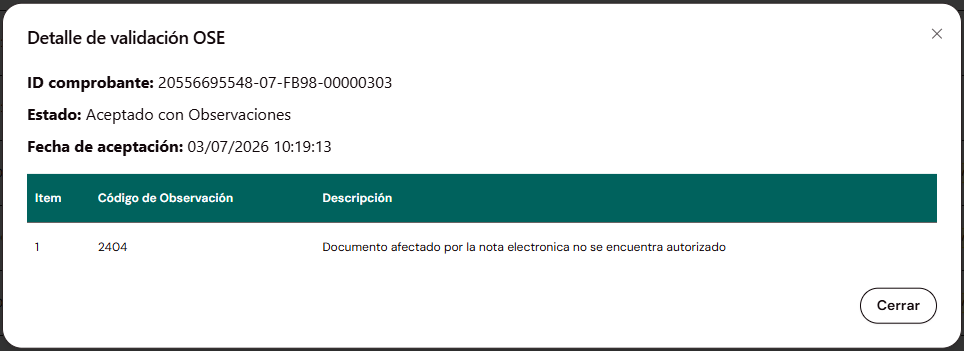
For individual vouchers, the modal shows the document's own information. For Sales Vouchers/Notes created, modified or deleted via a Daily Summary, it shows the information of the summary that processed them — not the individual document. This same rule applies to the four statuses described below.
- Accepted
- Accepted with Observations
- Rejected
- Voided
Voucher IDTextIdentifier of the queried voucher.
StatusTextAccepted.
Acceptance DateDate/TimeMoment the OSE accepted the voucher.
Voucher IDTextIdentifier of the queried voucher.
StatusTextAccepted with Observations.
Acceptance DateDate/TimeMoment the OSE accepted the voucher.
Also includes an observations table:
ItemNumberObservation sequential number.
Observation CodeCodeOBS code per the SUNAT catalog. See error and observation codes.
DescriptionTextObservation detail.
Voucher IDTextIdentifier of the queried voucher.
StatusTextRejected.
Rejection DateDate/TimeMoment the OSE rejected the voucher.
Rejection CodeCodeERR code per the SUNAT catalog. See error and observation codes.
Rejection DescriptionTextDetail of the rejection reason.
Voucher IDTextIdentifier of the queried voucher.
StatusTextVoided.
Acceptance DateDate/TimeMoment the voucher was originally accepted, before being voided.
Voiding DateDate/TimeMoment the voiding was processed.
SUNAT validation detail
Clicking the SUNAT Status badge opens a modal with the event history of communication with SUNAT, since there may be retry attempts.
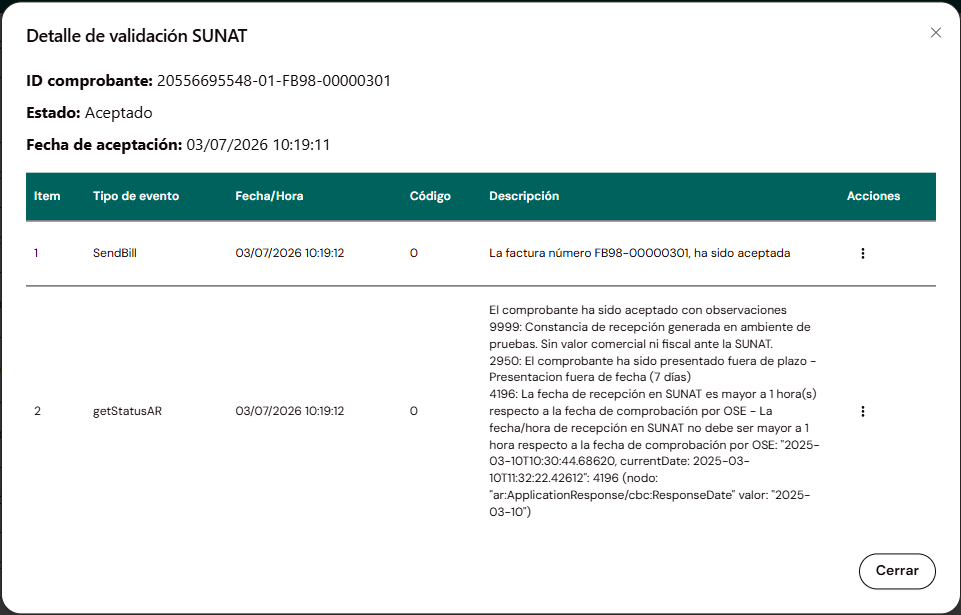
Voucher IDTextIdentifier of the queried voucher.
StatusTextCurrent status with SUNAT.
Acceptance DateDate/TimeMoment of the current status.
Events table
ItemNumberEvent sequential number.
Event TypeTextWeb Service method executed (e.g.: sendBill, getStatusAR).
Date/TimeDate/TimeMoment of the event.
CodeCode0 indicates success. Other codes may accompany warnings in the Description.
DescriptionTextSUNAT response detail for that event.
ActionsIcon (⋮)"Acknowledgement" option to download the SUNAT response for that event.
A voucher may have more than one recorded event if there were retry attempts to send to SUNAT.
Clicking the Summary icon on a row opens a modal with the history of summaries that processed that voucher.
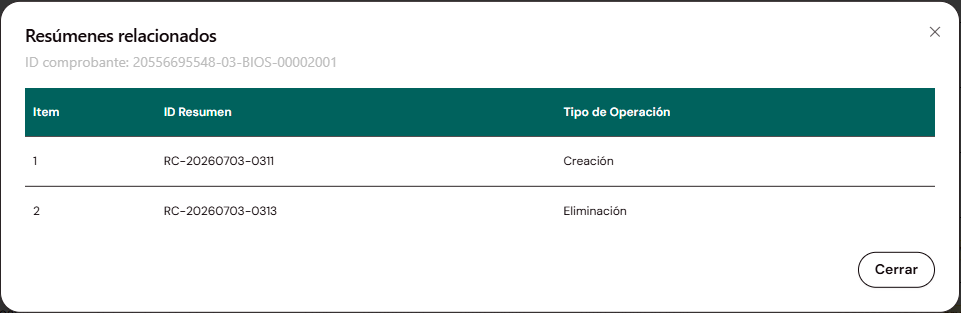
Voucher IDTextQueried voucher (reference, not editable).
ItemNumberRow sequential number.
Summary IDTextSummary identifier. See prefixes below.
Operation TypeTextCreation, Modification, Deletion, Voiding or Reversal according to the summary type and affected voucher.
Summary types and identifiers
Each summary is identified with a prefix according to the type of operation it performs:
RA-YYYYMMDD-NNNNCancellation NoticeVoids Invoices, Notes associated with Invoices, Withholdings, Perceptions and DAE. Operation Type: Voiding.
RC-YYYYMMDD-NNNNDaily Summary of VouchersCreates, modifies or deletes Sales Vouchers and Notes associated with Sales Vouchers.
RR-YYYYMMDD-NNNNReversal SummaryReverses Withholdings and Perceptions.
For Sales Vouchers and Notes associated with Sales Vouchers, the history may have 0 rows (created individually, without a summary) or several: one Creation, zero or more Modifications, and at most one Deletion. When the deletion is accepted, the voucher's OSE Status changes to Voided.
File downloads
The ⋮ menu on each row allows downloading the voucher files. The available options depend on the OSE Status:
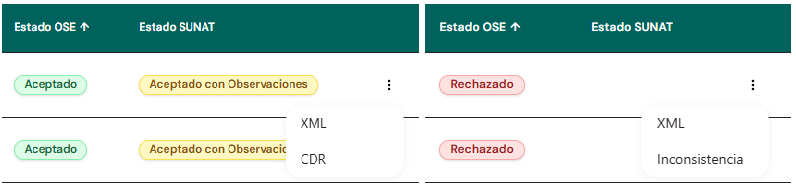
Accepted
Downloads XML and CDR.Accepted with Observations
Downloads XML and CDR.Rejected
Downloads XML and Inconsistency report.For Sales Vouchers or Notes associated with Sales Vouchers created via a Summary, the download corresponds to the XML and CDR of the summary that created them, not the individual document.
Export
The Export button does not download the file directly: it generates a report generation request with the filters applied at that moment.
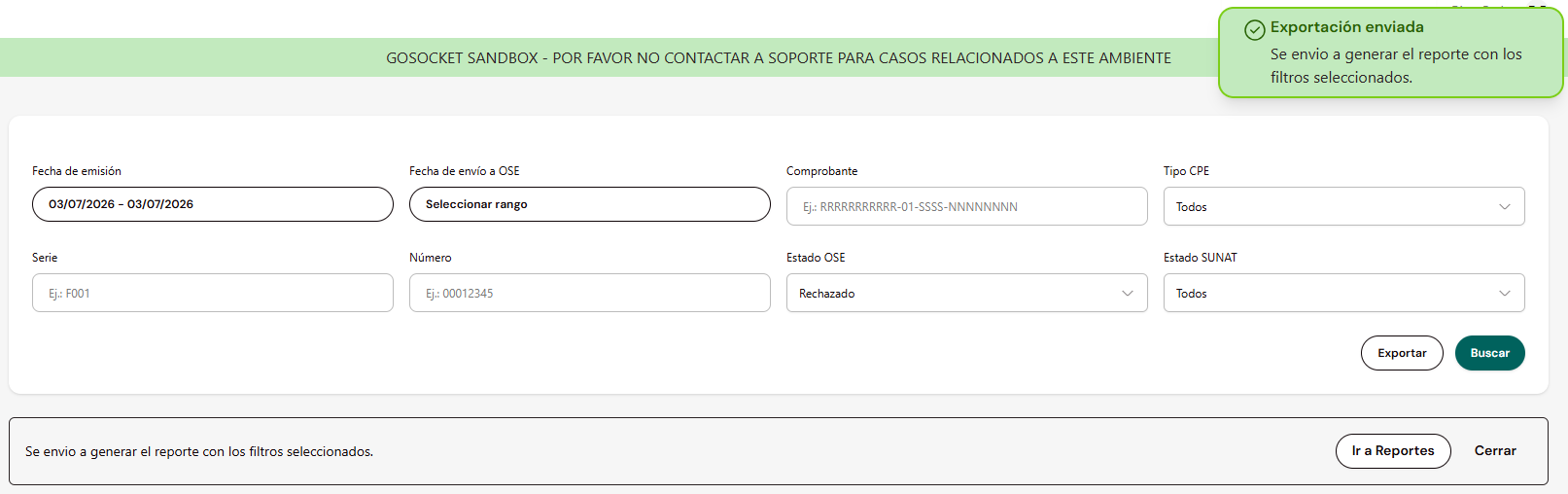
Once the request is confirmed, a notification is displayed with two options:
- Go to Reports — navigates directly to the Reports screen.
- Close — dismisses the notice; the report remains queued for generation.
The final file is downloaded from Reports.