The Spanish version is the authoritative reference. View in Spanish
Reports
The Reports screen is the final destination for export requests generated from Documents and Summaries: here you can track each request and download the file once it has been generated.
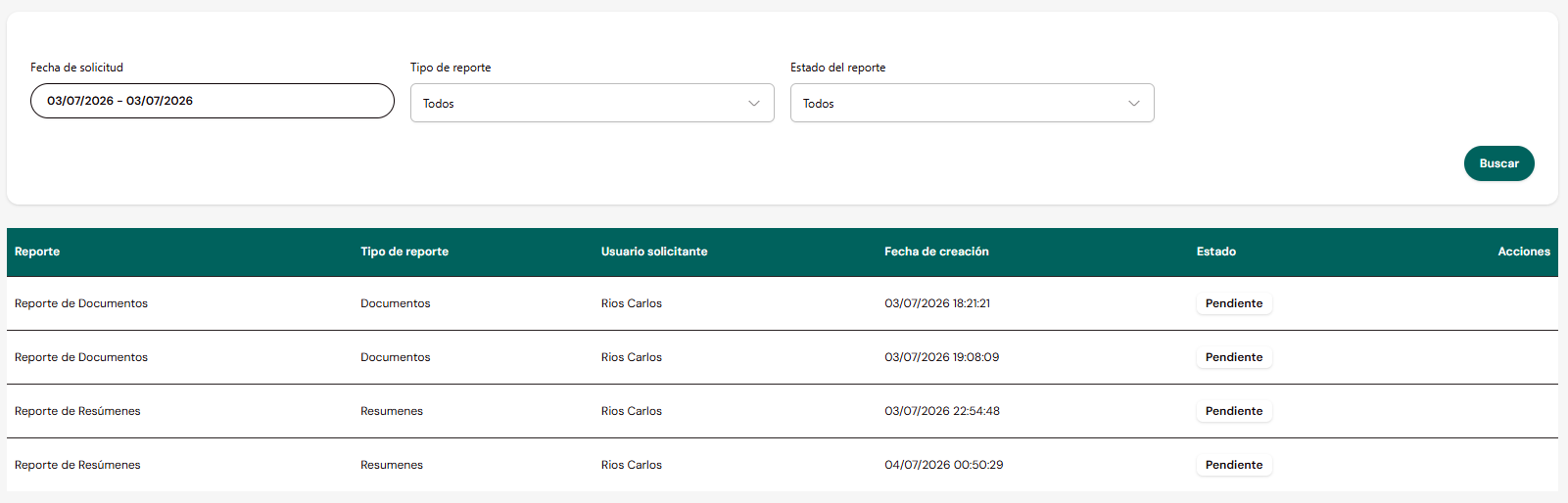
Search filters

AtributoTipoDescripción
Request DateDate rangeDate on which the report generation was requested.
Report TypeSelectorAll, Documents, Summaries, Rejections and Observations.
Report StatusSelectorAll, Pending, In Progress, Completed.
Results table

AtributoTipoDescripción
ReportTextDescriptive name of the report. Not a link, only indicates the type.
Report TypeTextDocuments, Summaries or Rejections and Observations.
Requesting UserTextUser who generated the export request.
Creation DateDate/TimeMoment the report request was created.
StatusBadgePending, In Progress or Completed.
ActionsIconAllows downloading the generated report.
Report lifecycle
Pending
The request was received but has not yet started generating.In Progress
The report is being generated.Completed
The report finished generating and is available for download.Report visibility by user
info
Each user sees only their own requested reports. The administrator can see the reports of all users of the company they manage.