The Spanish version is the authoritative reference. View in Spanish
Technical Manual
Introduction
Gosocket's Single Sign-On (SSO) enables centralized user authentication using the SAML 2.0 protocol, integrating with compatible identity providers (IdP), such as Microsoft Entra ID (Azure AD), Okta, and PingFederate.
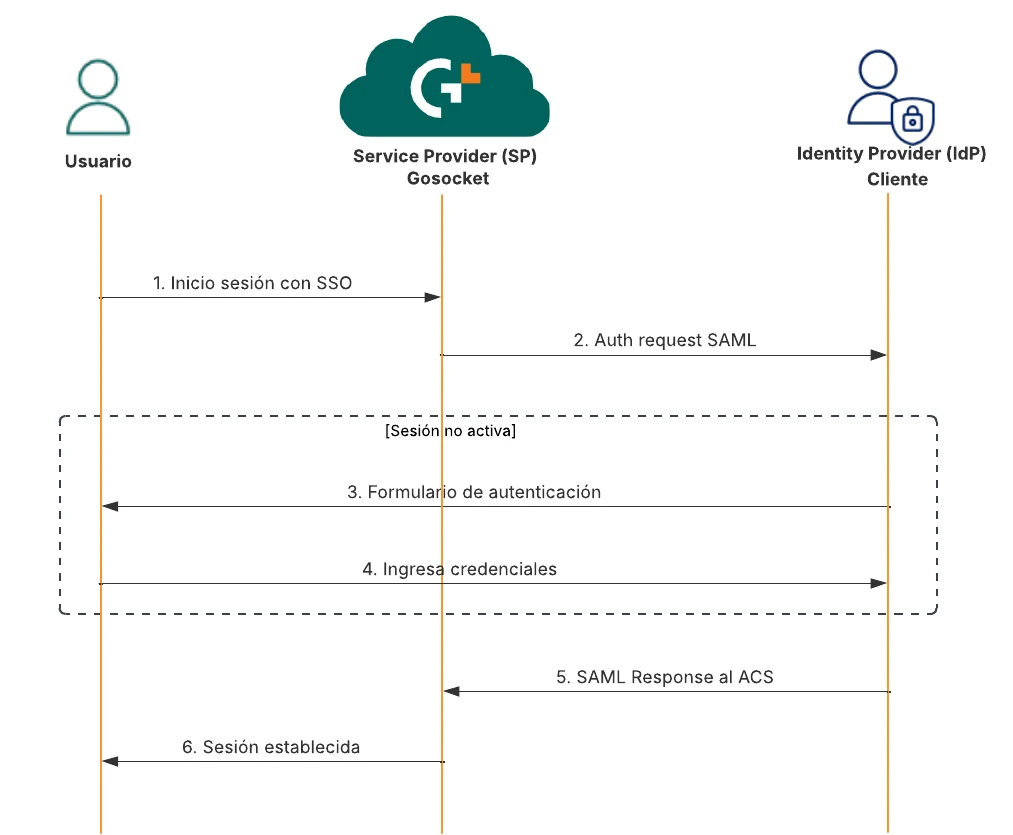
This document presents the prerequisites for implementation, the required information for integration, and the diagram of the authentication flow through SSO.
Prerequisites
Before starting the SSO integration, ensure you meet the following requirements:
Client Requirements
- Have an Identity Provider (IdP) compatible with SAML 2.0.
- Have administrative access to the IdP to create and configure a new application for integration with Gosocket.
- Define the authorized domains for authentication in Gosocket.
- Have the necessary information for metadata exchange between the IdP and Gosocket.
Required information for integration
The client must provide the metadata file URL, which must contain:
- IdP EntityID
- SingleSignOnService (SSO service URL)
The following is an example of the required metadata:
<EntityDescriptor xmlns="urn:oasis:names:tc:SAML:2.0:metadata" entityID="https://idp.cliente.com/entity">
  <IDPSSODescriptor protocolSupportEnumeration="urn:oasis:names:tc:SAML:2.0:protocol">
    <SingleSignOnService
      Binding="urn:oasis:names:tc:SAML:2.0:bindings:HTTP-Redirect"
      Location="https://idp.cliente.com/saml/sso"/>
    <KeyDescriptor use="signing">
      <KeyInfo xmlns="http://www.w3.org/2000/09/xmldsig#">
        <X509Data>
          <X509Certificate>MIIC4DCCAcigAwIBAgI...</X509Certificate>
        </X509Data>
      </KeyInfo>
    </KeyDescriptor>
  </IDPSSODescriptor>
</EntityDescriptor>
In the SAML response, the following attributes must be included:
- Subject
- NameID: in this field the user's email address must always go.
The following is an example of a SAML response:
<saml2p:Response xmlns:saml2p="urn:oasis:names:tc:SAML:2.0:protocol"
                 ID="_123456789"
                 IssueInstant="2024-05-20T10:00:00Z"
                 Destination="https://auth.gosocket.net/core/EmpresaXYZ/Acs">
  <saml2:Issuer>https://ejemplo.com/entity</saml2:Issuer>
  <ds:Signature xmlns:ds="http://www.w3.org/2000/09/xmldsig#">...</ds:Signature>
  <saml2p:Status>
    <saml2p:StatusCode Value="urn:oasis:names:tc:SAML:2.0:status:Success"/>
  </saml2p:Status>
  <saml2:Assertion ID="_abcdef" IssueInstant="2024-05-20T10:00:01Z">
    <saml2:Subject>
      <saml2:NameID Format="urn:oasis:names:tc:SAML:2.0:nameid-format:persistent"
                    SPNameQualifier="https://auth.gosocket.net/">
        usuario@ejemplo.com
      </saml2:NameID>
      <saml2:SubjectConfirmation Method="urn:oasis:names:tc:SAML:2.0:cm:bearer">
        <saml2:SubjectConfirmationData
          NotOnOrAfter="2024-05-20T10:05:00Z"
          Recipient="https://auth.gosocket.net/core/EmpresaXYZ/Acs"/>
      </saml2:SubjectConfirmation>
    </saml2:Subject>
    <!-- Resto de la Assertion -->
  </saml2:Assertion>
</saml2p:Response>
SSO flow diagram
Below is a diagram of the authentication flow through SSO: