The Spanish version is the authoritative reference. View in Spanish
Smart Supply
Smart Supply is the solution that applies business validations and configurable actions to the documents a company receives through Gosocket, such as invoices and purchase orders. This documentation is aimed at the functional user.
- This page: what Smart Supply is, how it integrates with invoice reception, in which countries it operates and the basic terminology.
- Inbox and Smart Supply: document requirements, traffic light statuses and how to view them in Inbox. It includes the use cases: Accepted, Pending and Rejected.
- Manual Upload with Excel: how to upload non-tax documents with the standard template.
Introduction
What is Smart Supply?
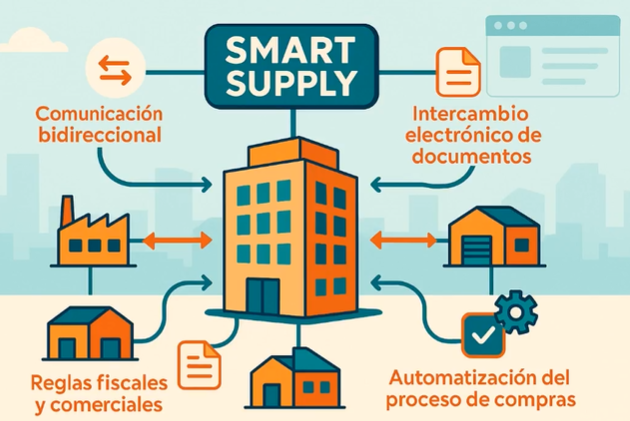
Smart Supply allows large and medium-sized buyers to interact with their digital supplier ecosystem through two-way communication and the electronic exchange of invoices, purchase orders, and other related documents such as goods receipt notifications, payment notices, etc.
It simplifies the processes associated with the reception of electronic invoices, purchase orders, and related documents, by means of an intelligent document manager that unifies, validates, and distributes documents automatically.
In addition, Smart Supply allows validations and actions to be configured and parameterized in line with the specific needs of the business, which optimizes purchasing processes by ensuring strict compliance with tax and commercial rules.
In short, Smart Supply is a digital solution that streamlines management between buyers and suppliers; thanks to its intelligent technology, it automates the exchange of key documents such as invoices and purchase orders, ensuring tax compliance and operational efficiency.
What should not be confused with Smart Supply
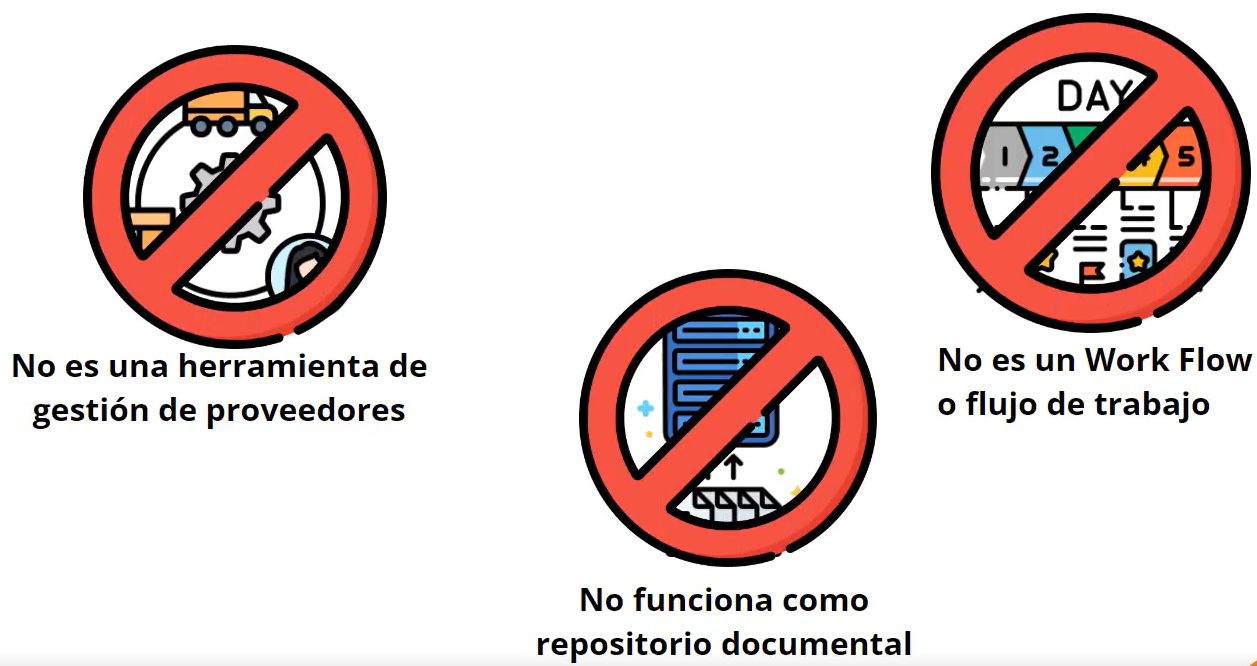
In the process of digital transformation and supply chain automation, it is common for organizations to associate innovative tools such as Smart Supply with other existing or well-known systems. However, it is important to draw clear boundaries around what this solution is not, in order to avoid mistaken expectations and focus its adoption on the right objectives.
- It is not a supplier management tool: although Smart Supply interacts and integrates with supplier data, its main function is not to manage the relationship with them or to centralize their information, as a Supplier Relationship Management system would.
- It is not a workflow: a workflow is a structured sequence of tasks with approvals, validations visible in diagrams, and profile-based control. In contrast, Smart Supply is not limited to this sequence; rather, it acts as an intelligent engine for supply decisions, and it can integrate with these flows to enhance their efficiency.
- It does not work as a document repository: Smart Supply is not intended to store or manage documents such as contracts, records, or other administrative files. The function of Smart Supply is to validate relevant data, use it to execute actions, and interact with the systems where the information resides, but it does not serve as document storage.
Smart Supply operates independently; it does not perform queries or integrate with internal or external databases, nor with the clients' ERP systems.
All information to be validated must be contained directly in the XML of the document. Likewise, in order to compare a document, it must already exist in the Gosocket platform.
How does Smart Supply integrate into the electronic invoicing process?
Smart Supply integrates into the commercial validation phase of invoice reception, automating the complete purchase and payment process.
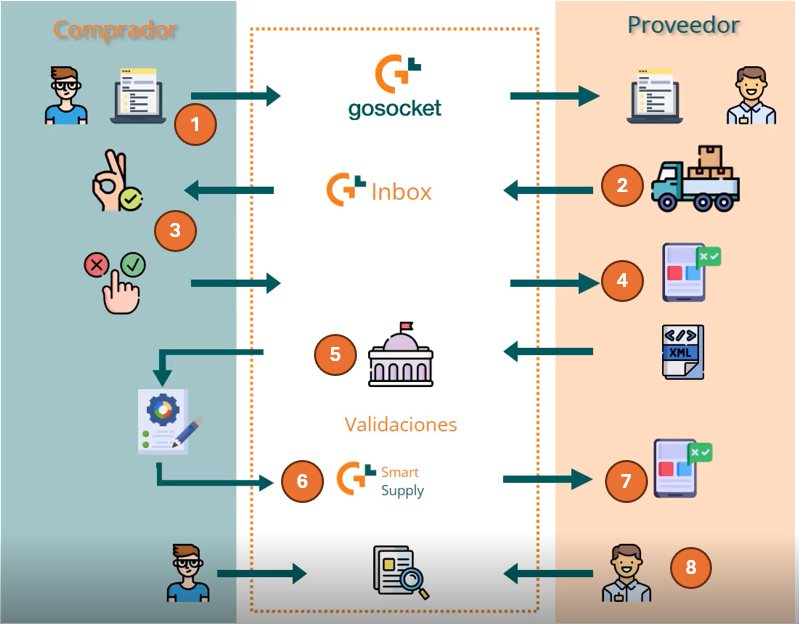
Below is an example of the reception and validation flow:
- Purchase Order Issuance: the Buyer sends a Purchase Order, which is transmitted to the Supplier or made available for consultation on the Gosocket portal.
- Goods Shipment: the Supplier delivers the goods or the service, based on the PO received.
- Acknowledgment of Receipt (Optional): after receiving the product or service, the Buyer may issue an acknowledgment of receipt, which is notified or made available to the Supplier on the portal.
- Invoice Issuance: the Supplier issues the Electronic Invoice corresponding to the Purchase Order.
- Tax Validation: the Inbox module performs the mandatory tax validations of the document (schema, signature, and validation with the Tax Authority, TA).
- Commercial Validation: once the document passes the tax validations, Smart Supply steps in to execute the previously configured commercial validations (e.g., verification of PO data, amounts, dates, etc.).
- Data Adjustment or Modification: at this point, the Supplier can add additional or missing information through the portal so that the invoice successfully completes the validation process.
- Notification and Closure: Smart Supply notifies the result of the validation to the Supplier, and throughout this cycle, both parties (Buyer and Supplier) have continuous access to the Gosocket portal to consult the documents and monitor the exact status of each one.
There are several conditions for Smart Supply to work properly:
- The company must carry out the document reception process with Gosocket.
- Documents must successfully pass the reception validations: schema, signature, and validation with the TA.
- The company must have the Smart Supply feature toggle turned on.
- Smart Supply works on the basis of custom configurations, so it is essential to set up at least one validation along with the corresponding actions for it to function properly.
- The tool adapts to the particular needs of each client, taking into account both their specific requirements and the context of the country where it is used.
Once these conditions are met, Smart Supply will work with the documents that meet all the characteristics that have been configured.
For more detail on how to adjust these settings, you can consult the "Smart Supply Configurations" section.
To learn how Smart Supply relates to the reception module, see Inbox and Smart Supply.
Countries where Smart Supply operates
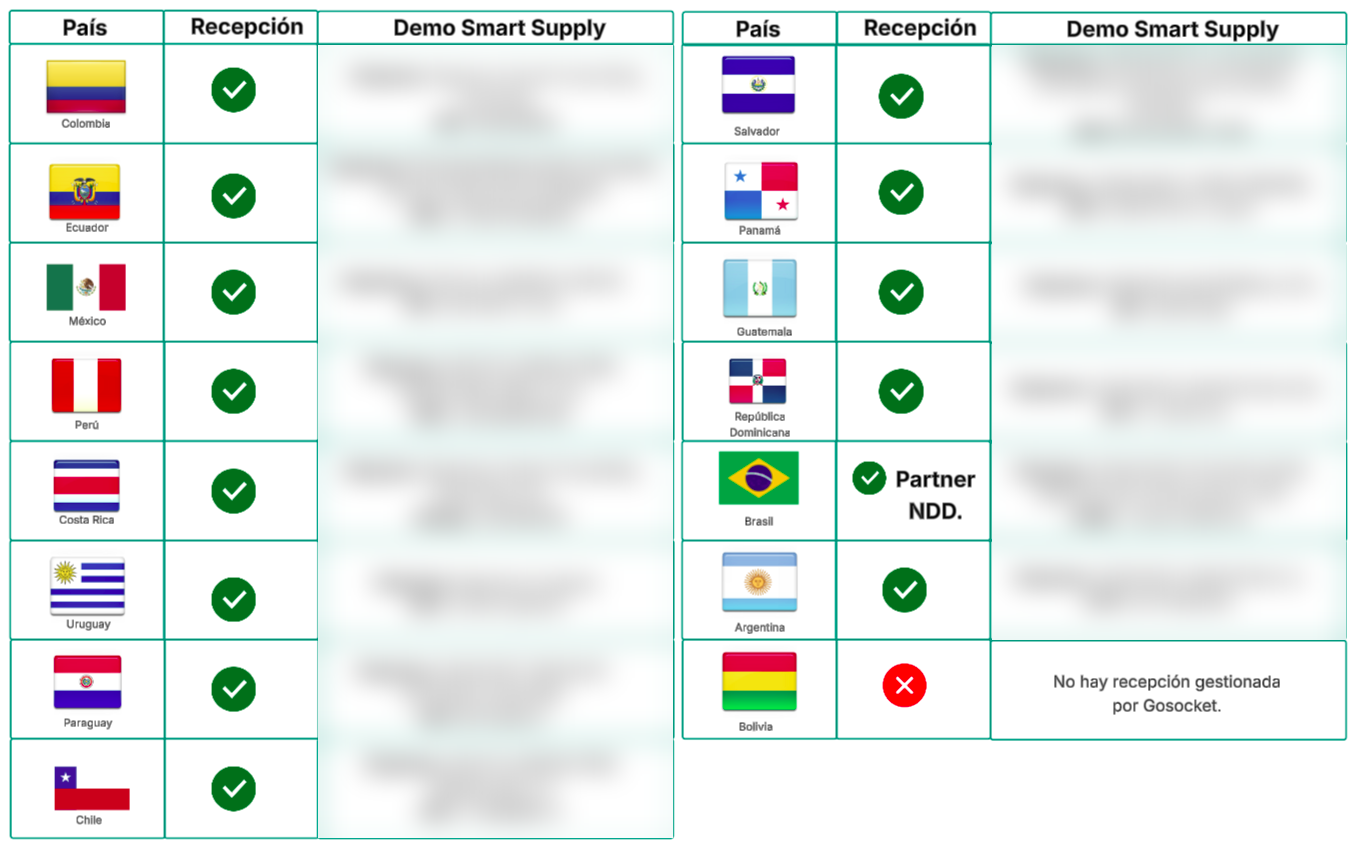
The following table details the locations where Smart Supply is available for implementation and whether document reception is managed by Gosocket.
| Country | Reception managed by Gosocket |
|---|---|
| Argentina | Yes |
| Bolivia | No: there is no reception managed by Gosocket |
| Brazil | Yes, through the partner NDD |
| Chile | Yes |
| Colombia | Yes |
| Costa Rica | Yes |
| Ecuador | Yes |
| El Salvador | Yes |
| Guatemala | Yes |
| Mexico | Yes |
| Panama | Yes |
| Paraguay | Yes |
| Peru | Yes |
| Dominican Republic | Yes |
| Uruguay | Yes |
See the diagram with the flags by country
Benefits of Smart Supply
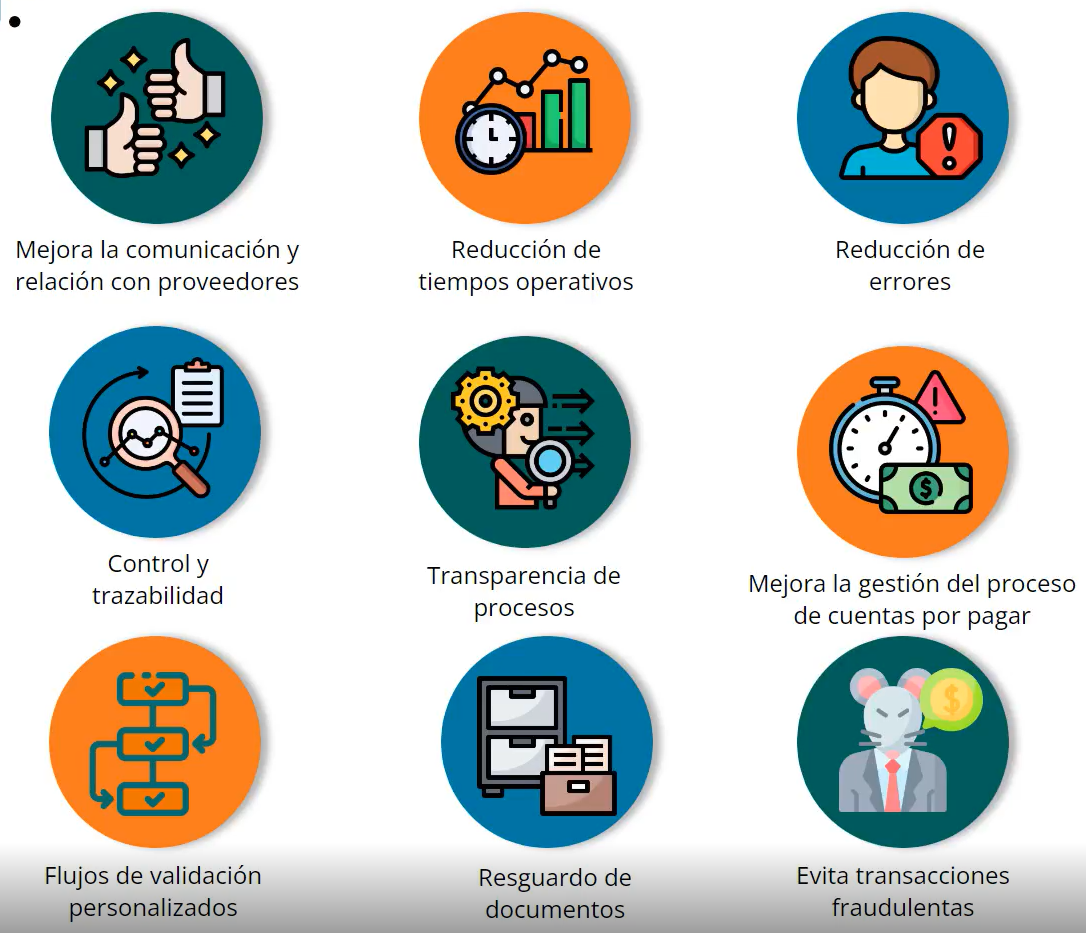
- Improves communication and the relationship with suppliers: facilitating a more fluid, transparent, and efficient interaction, strengthening commercial ties.
- Reduction of operating times: automates repetitive tasks and simplifies workflows, which translates into a notable decrease in operating times.
- Error reduction: by minimizing manual intervention, the possibility of human error in the processing of information and documentation is considerably reduced.
- Control and traceability: Smart Supply makes it possible to monitor every stage of the process in real time, ensuring detailed and accurate tracking of each operation.
- Transparency in processes: guarantees full visibility over every transaction and activity.
- Improves the management of the accounts payable process: automates and organizes the payment cycle, which improves financial planning and prevents delays in commitments to suppliers through the optimization of accounts payable management.
- Custom validation flows: Smart Supply adapts to the internal policies of each organization, allowing validation flows to be configured according to business requirements.
- Document safekeeping: centralizes and protects all documentation related to the validation processes, facilitating its later consultation.
- Prevents fraudulent transactions: Smart Supply incorporates validation and control mechanisms that reduce fraud risks, ensuring the integrity of operations.
Applying the benefits of Smart Supply in economic sectors
How can we apply the benefits of Smart Supply to companies in different economic sectors?
- Manufacturing company
- Pharmaceutical company
- Supermarket chain
- Food and beverage company
- Technology company
| Benefit | Description | Action |
|---|---|---|
| Greater control | Constant visibility of the process from the reception of the document to its payment. | Enables detailed and transparent supervision of all operations, ensuring effective tracking and precise management of each stage. |
| Risk reduction | Avoid late payments, incorrect amounts, fraud, or mismatched invoices. | Minimizes human error, ensures the accuracy of operations, and prevents financial losses. |
Practical example: a manufacturing company implements a Smart Supply system to track the receipt and payment of raw materials. The system automates invoice validation, ensuring that amounts and dates match the contracts and purchase orders existing in the system. This allows constant supervision and the ability to resolve any discrepancy, significantly reducing payment errors and the risk of fraud. The company improves the accuracy and reliability of its financial operations.
| Benefit | Description | Action |
|---|---|---|
| Fewer delays | Reduction of downtime and delays. | Lowers operating costs and improves punctuality in the delivery of products and services. |
| Improved security and compliance | Guarantees compliance with regulations and quality standards. | Ensures that all operations are carried out in accordance with regulations, improving security and avoiding penalties. |
Practical example: a pharmaceutical company uses Smart Supply to optimize its inventory and distribution processes, adopting the system to ensure that all its suppliers comply with industry regulations. Automatic validations ensure that the products received meet the required quality and safety standards. Automation reduces waiting times and improves coordination between different departments and logistics partners, minimizing delays in product delivery. At the same time, high levels of regulatory compliance are maintained, avoiding regulatory penalties and ensuring the safety and quality of the products.
| Benefit | Description | Action |
|---|---|---|
| Greater integration | Transformation of received documents into different structures. | Facilitates compatibility between different systems and platforms, improving communication and the flow of information. |
| Centralization | Communication from a single place for suppliers and customers. | Eliminates the need for multiple exchange methods, simplifying and streamlining communication. |
Practical example: a supermarket chain implements Smart Supply to transform the documents received from its suppliers into a standard format that can be processed by its inventory management system. At the same time, it centralizes all communication with its suppliers and customers on one platform. The seamless integration of data improves inventory efficiency and communication between the parties. Centralization reduces reliance on emails and other scattered methods, improving efficiency and transparency across all operations.
| Benefit | Description | Action |
|---|---|---|
| Management | Allows users to perform queries, downloads, and changes. | Offers flexible and accessible management of processes, increasing responsiveness and adaptability. |
| Notification | Alerts about the status of processes. | Keeps everyone involved informed, ensuring quick problem resolution and effective communication. |
Practical example: a food and beverage company implements an automated notification system that alerts purchasing and finance managers about the status of orders and payments. At the same time, it enables its employees to manage queries, downloads, and changes in the processes that take place. Employees can make quick adjustments and access the necessary information without delays, improving the company's responsiveness. Proactive notifications allow more efficient management and the quick resolution of any problem that arises.
| Benefit | Description | Action |
|---|---|---|
| Distribution | Delivery of files to different connections and/or transformations. | Facilitates the efficient distribution of information, ensuring that all systems receive the necessary data. |
| Efficiency | Monitoring and indicators to anticipate errors and bottlenecks. | Optimizes work processes, improves goods management, and increases overall operational efficiency. |
Practical example: a technology company needs to configure it to distribute documents in different structures and through different channels to its business partners and internal systems. At the same time, it uses the system to monitor and analyze key performance indicators. Constant monitoring makes it possible to anticipate and correct errors and avoid bottlenecks, optimizing the overall operation and improving the efficiency of the supply chain. The ability to adapt to different forms of distribution ensures that all the necessary information is delivered accurately and on time.
Terminology
Use these tables to look up the Tax ID format of each country and its corresponding tax authority.
Types of Tax ID or TaxID by country
| Country | Name | Structure | Tax identity registration format |
|---|---|---|---|
| Bolivia (BO) | NIT (Tax Identification Number) | The taxpayer's or company owner's identity card number plus three digits assigned by national taxes. | |
| Chile (CL) | RUT (Unique Tax Registry) | An 8-digit number + a check character that can be 0 to 9 or a K. | |
| Colombia (CO) | NIT (Tax Identification Number) | 9 digits and one additional check digit. For example, the NIT of the DIAN is 800.197.268-4. | |
| Costa Rica (CR) | Cédula física, Cédula jurídica, DIMEX (Migration and Foreign Status Identification Document), NITE (Special Tax Identification Number) | Varies by identification type; see the Costa Rica details. | General: \d{9,12} |
| Ecuador (EC) | RUC (Unique Taxpayer Registry), Cédula, Passport, Final consumer sale, Foreign identification | Varies by identification type; see the Ecuador details. | — |
| El Salvador (SV) | NIT (Tax Identification Number) | Numeric characters only; the six central digits match the taxpayer's date of birth (day, month and year). Example: XXXX-051180-XXX-X (November 5, 1980). | |
| Guatemala (GT) | NIT (Tax Identification Number) | Numeric characters; the six central digits match the taxpayer's date of birth (day, month and year). Example: XXXX-051180-XXX-X | |
| Mexico (MX) | RFC (Federal Taxpayer Registry) | Legal entities: 3 letters followed by 6 digits and 3 alphanumeric characters = 13. Individuals: 4 letters followed by 6 digits and 3 alphanumeric characters = 13. | [A-Z&Ñ]{3,4}[0-9]{2}(0[1-9]|1[012])(0[1-9]|[12][0-9]|3[01])[A-Z0-9]{2}[0-9A] |
| Panama (PA) | RUC (Unique Taxpayer Registry) | 9 characters. The first two are alphanumeric and mark the start of the commercial numbering in the new system; the last four are numeric and correspond to the year the company was registered. Example: real or electronic folio -2- plus the year the company was incorporated (123456789-X1234). | |
| Paraguay (PY) | RUC (Unique Taxpayer Registry) | 13 digits; it varies according to the type of taxpayer. For individuals, the RUC number is equal to their ID number, followed by the sequence 001. For legal entities, it is a random number depending on the province where they are incorporated. | |
| Peru (PE) | RUC (Unique Taxpayer Registry) | An 11-digit number. It changes according to the type of taxpayer and is assigned by SUNAT as follows: Individuals: the RUC number starts with "10". The following digits are the 8 digits of the National Identity Document (DNI) plus the DNI check digit. Legal entities: the RUC number starts with "20". The following digits are a sequential number assigned by the SUNAT system. | |
| Uruguay (UY) | RUT (Unique Tax Registry) | 12 digits, divided into 4 groups: a group of 2 digits that refers to the locality where the activity takes place, one of 6 that identifies the business, one of 3 that corresponds to the number of branches, and a single digit that is the check digit. |
Costa Rica (CR) details
Identification types: Cédula física, Cédula jurídica, DIMEX (Migration and Foreign Status Identification Document), NITE (Special Tax Identification Number).
- Individual cédula with the format 0 0000 0000 (9 digits, no leading zero or hyphens).
- Legal-entity cédula with the format 0000000000 (10 digits, no leading zero or hyphens).
- Migration and Foreign Status Identification Document (DIMEX) with the format 00000000000 or 000000000000 (11 or 12 digits, no leading zero or hyphens).
- Special Tax Identification Number (NITE) with the format 0000000000 (10 digits, no leading zero or hyphens).
Where: 01 Individual cédula, 02 Legal-entity cédula, 03 DIMEX, 04 NITE.
Registration format:
- General:
\d{9,12}
Ecuador (EC) details
Identification types: RUC (Unique Taxpayer Registry), Cédula, Passport, Final consumer sale, Foreign identification.
- RUC with a 13-digit format.
- Final consumer sale: 13 nines are entered as the customer's identification (9999999999999).
- Foreign identification: corresponds to the identification number issued by the Tax Authority (TA) of the country of tax residence.
- When issuing purchase settlements for goods and services, the final consumer sale identification type is not enabled.
- When issuing credit notes, debit notes and withholding receipts, the recipient or withheld party must be identified with the corresponding identification type (RUC, Cédula, passport or foreign identification).
Registration format:
- RUC:
[0-9]{10}001 - RUC or buyer's Cédula:
[0-9]{10}or[0-9]{10}001