The Spanish version is the authoritative reference. View in Spanish
System requirements
This guide describes the recommendations to meet the minimum requirements that your machine (PC or server) must have to correctly install and operate xDoc Global in a Windows environment, whether on a physical or virtual machine.
Each client installation is unique, so you must consider the conditions of your own environment.
📘 Description of system requirements
Meeting the installation requirements correctly allows xDoc Global to operate properly; however, you should consider additional factors not managed by xDoc Global or Gosocket, such as the operating system's own security components or your own systems, which may affect its operation.
🎯 Scope of system requirements
This information provides general recommendations and best practices related to:
- Operating systems with special updates or configurations.
- Security policy configurations for the operating system, Windows users, systems, antivirus, and network including internet access.
- Systems deployed on physical and/or virtual infrastructure.
- Coexistence of xDoc Global with other applications on the same operating system.
- Availability of dedicated and/or shared resources.
Gosocket will request these requirements, but it is you, as the client, who must configure them in your own environment and/or infrastructure.
🛠️ System requirements table for xDoc Global
| Requirement | Status | Detail |
|---|---|---|
| Operating system | ✅ Supported | Microsoft Windows Server 2019 or higher; Microsoft Windows 11 Home or higher. Important: licensed ("activated") with updates up to date. |
| Operating system | ⛔ Not recommended / not supported | Microsoft Windows Server 2016 or lower; Microsoft Windows 10 (any version); Linux (any version); macOS (any version). |
| Local / domain operating system | ✅ Supported | Local Windows: requires local privileges. Domain Windows: requires domain privileges. |
| Architecture | ✅ Supported | x64, x86. |
| Architecture | ⚠️ Under testing | ARM — not currently released. |
| Privileges or permissions | ‼️ Required | Administrator user to install, run the service and console, read/write/edit files. IIS to create and start the xDoc Global WS (optional). |
| Windows features | ‼️ Required | .NET Framework 4.6.1. |
| Other resources → Printers | ⚠️ Optional | If you use print rules: printers installed locally in the OS and access to the xDoc Global print service user; privileges over printers and print resources. |
| Internet access | ‼️ Required | Required for: installation (component download), servicesmanager (Gosocket administration), xDoc Global services (communication with Inbox). |
| Proxy | ⚠️‼️ Optional | If your infrastructure uses a proxy for internet access: it must be configured in xDoc Global and the xDoc Global services user must have privileges over it. |
| Ports, protocols and services | ‼️ Required | servicesmanager: WebSockets/HTTPS 443 (Gosocket administration). dispatch: HTTP 80 / HTTPS 443 (issuance). |
| Ports, protocols and services | ⚠️‼️ Optional | receiver: HTTP 80 / HTTPS 443 (issuance/reception). alert: SMTP 25 (alert configuration). connector: depends on the connector used. |
| xDoc Global console and Windows services | ‼️ Required | Run/read/write/edit permissions for xDoc Manager and the xdoc@... services. |
| IIS (Internet Information Server) | ⚠️‼️ Optional | If integration is via xDoc Global Web Service: WS/AppPool creation and run/read/write privileges over it in the OS. Important: review the required IIS components for xDoc Global (see next section). |
🪟 Enable/disable Windows features for the xDoc Global WS
You must perform the installation of the specific system requirements for IIS components yourself, from "Turn Windows features on or off" in the operating system.
💡 Example IIS component configuration in Windows 11
-
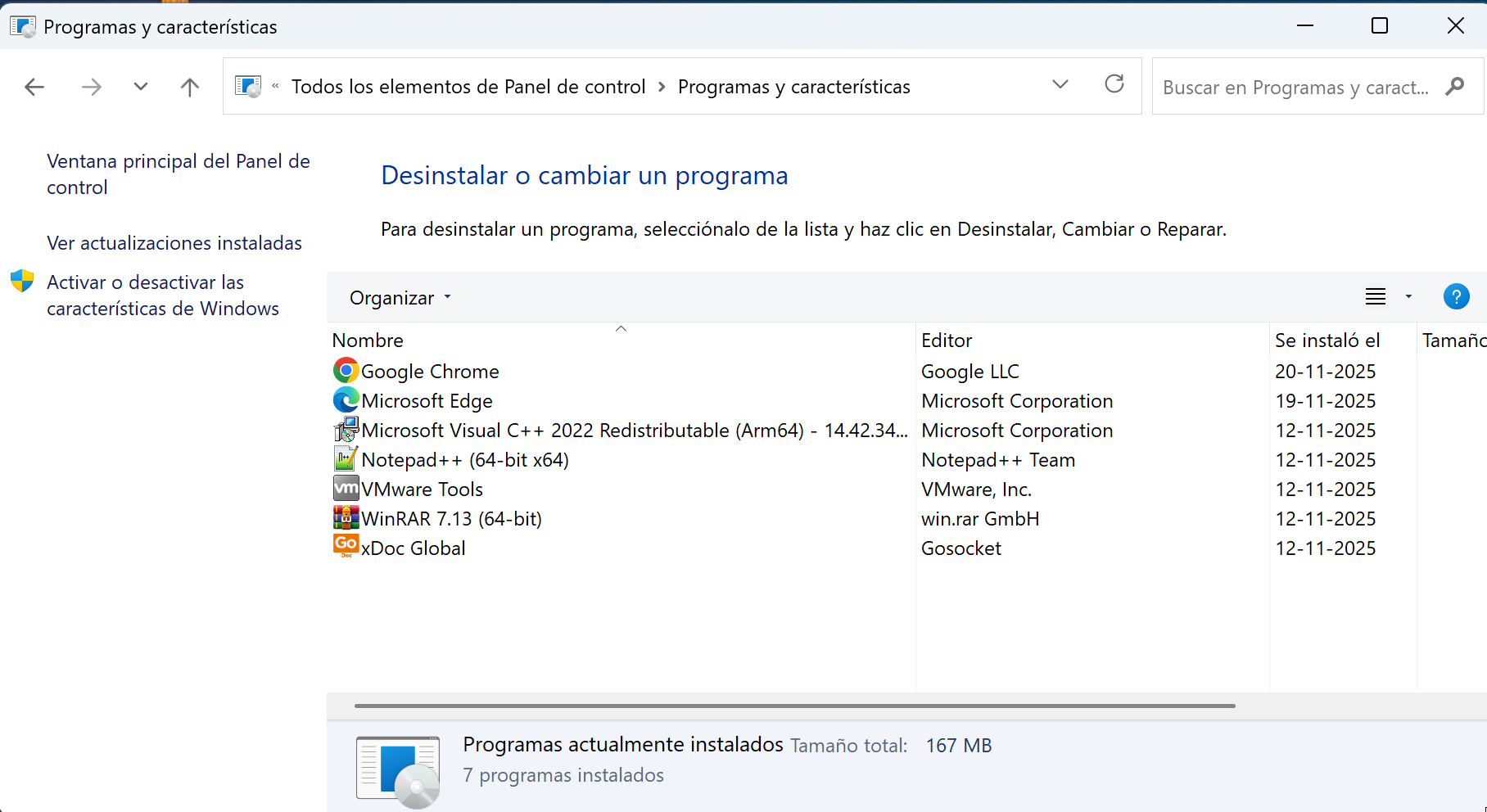
Go to Control Panel → All Control Panel Items → Programs and Features.
-
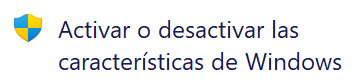
Select Turn Windows features on or off.
-
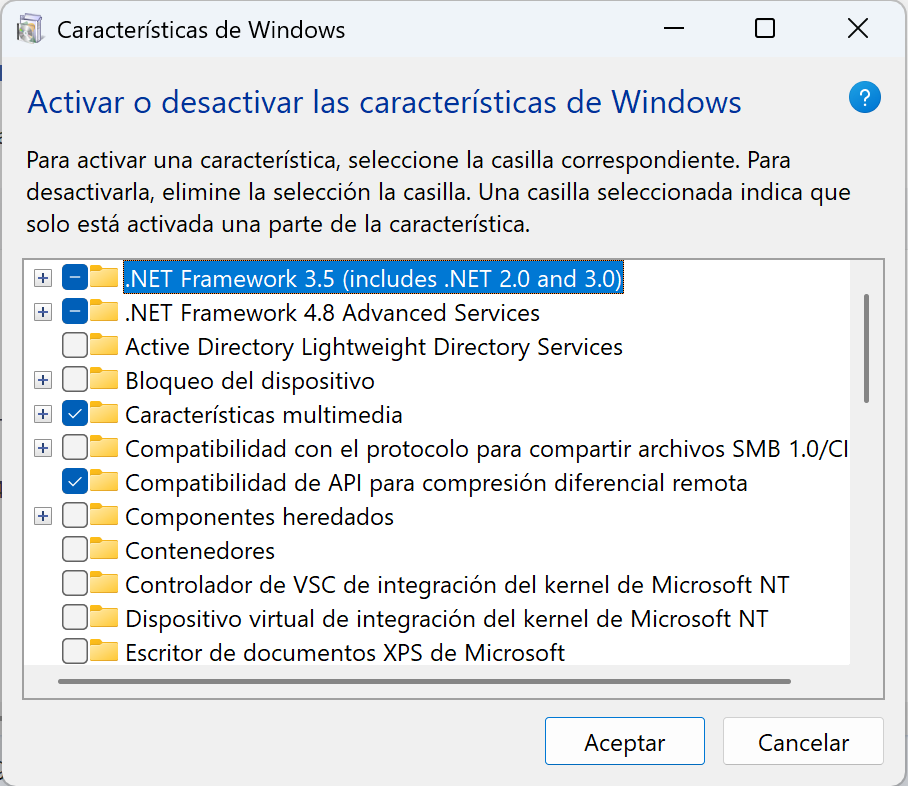
In the Windows features window, expand the view to see the options more clearly.
🔩 .NET and IIS components to run the xDoc Global WS
The view may vary depending on the operating system, but the components to enable are the important ones.
-
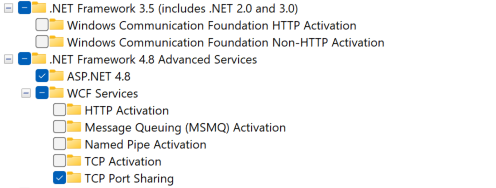
.NET Framework 4.8 Advanced: standard configuration required.
-
Internet Information Services: standard configuration required.
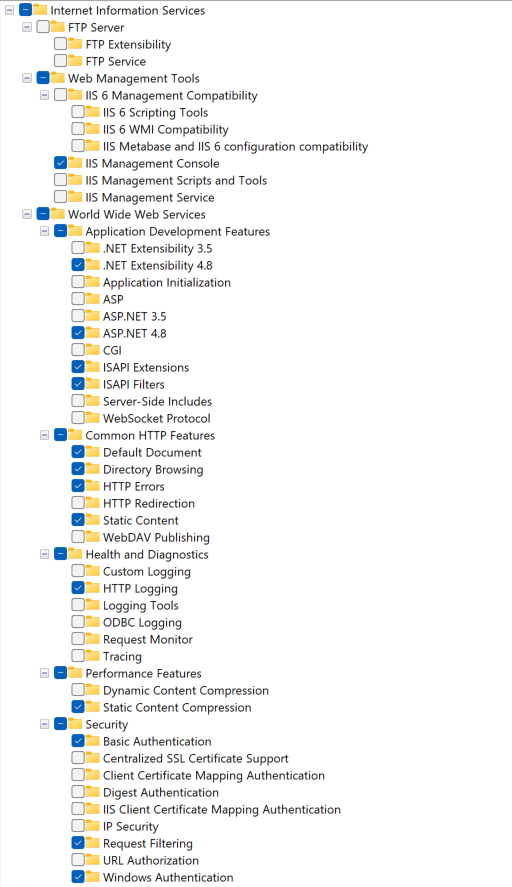
With all standard components selected, confirm so Windows begins the installation.
📊 General hardware requirements estimate
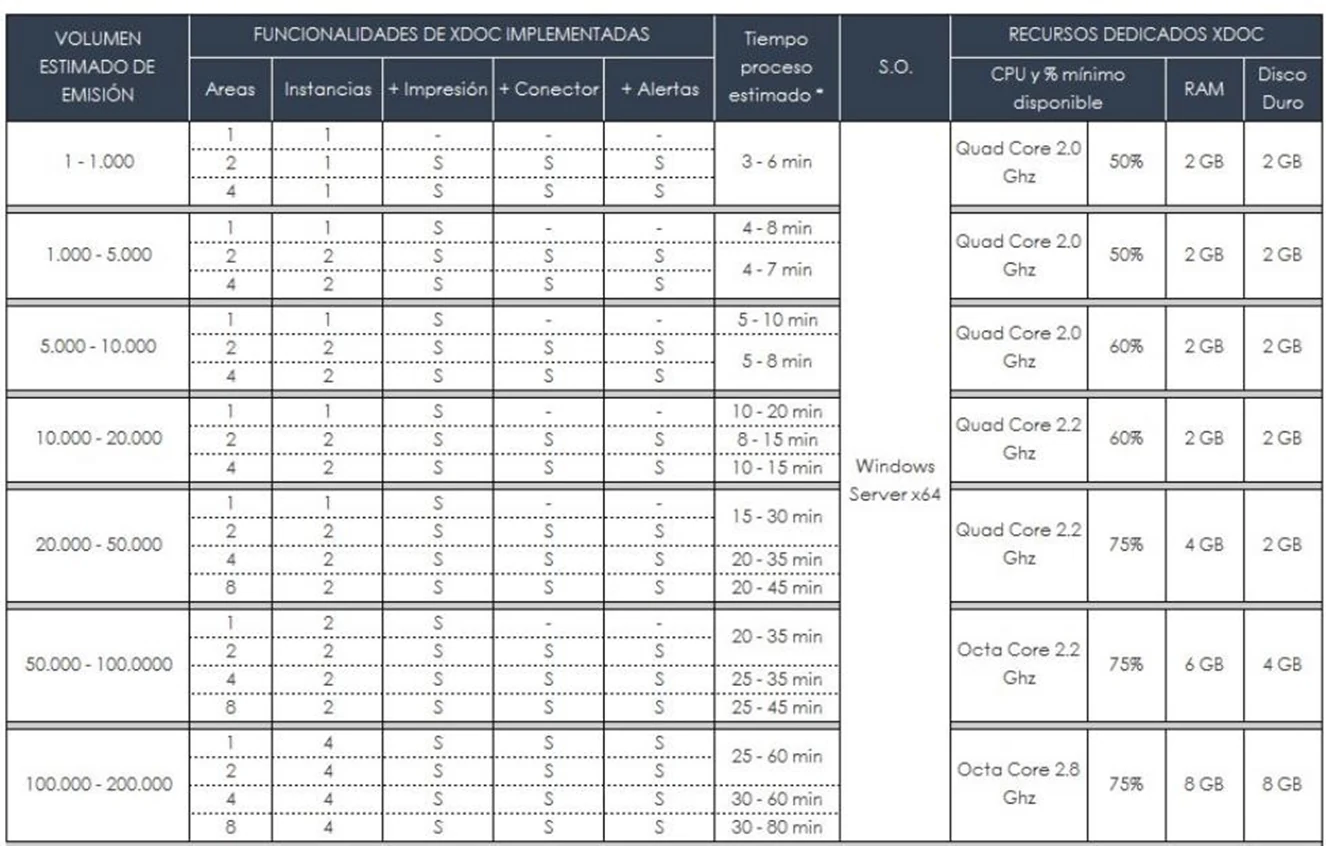
The following table presents a general estimate of hardware requirements for different scenarios where xDoc Global must operate, based on: issuance/reception, areas and area instantiation, features (printing, connectors, alerts), required processing time, and a recommended hardware proposal.
This table is a proposal; there may be differences depending on your infrastructure or topology (dedicated or shared environment with other software).
🔗 See also
- xDoc Global — what the product is and what it solves.
- Installation — step-by-step installation process.