The Spanish version is the authoritative reference. View in Spanish
🚨 Contingencies
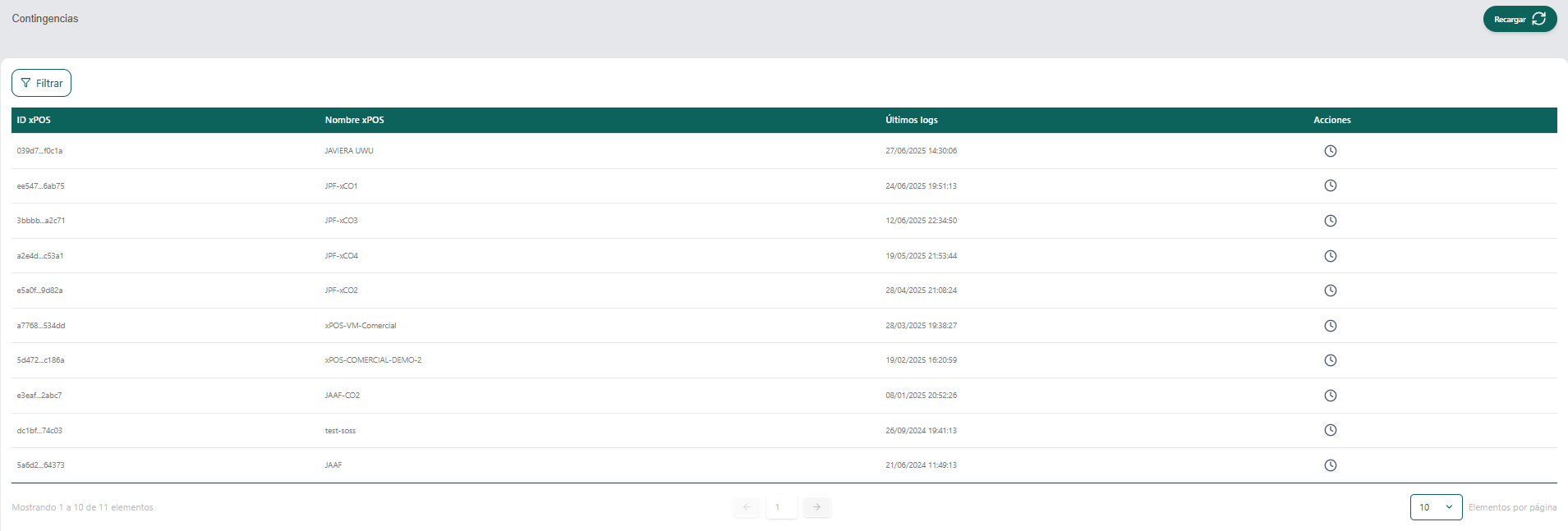
The Contingencies section shows information about the xPOS terminals that have recorded events in contingency mode. This panel helps monitor device behavior during connection failures with the tax authority (for example, DIAN in Colombia) or other critical services.
🧭 Navigation and components
🔍 "Filter" button
Located at the top left. Lets you apply custom filters to the xPOS device list to make searching easier.

🔁 "Reload" button
Located at the top right. Refreshes the table with the latest contingency log information.
📋 Contingencies table
| Column | Description |
|---|---|
| xPOS ID | Unique identifier of the xPOS device (shown abbreviated with an ellipsis). |
| xPOS Name | Name assigned to the device for easy identification (e.g. "Caja Central", "Sucursal Norte"). |
| Latest logs | Date and time of the xPOS's last activity record in contingency mode. |
| Actions | Clock icon 🕒 that opens the detailed log history of the selected device. |
📝 Usage example
- Click the Filter button to look for a specific xPOS (by name, ID or another criterion).
- Check the Latest logs column to identify which terminals have recently reported contingency activity.
- Click the clock icon in the Actions column to view the detailed event history of the selected terminal.
- Press Reload to refresh the displayed information.
💡 Recommendations
- Review this section periodically to anticipate or investigate possible communication failures.
- Contingency events usually mean the system operated without connection to the central system (for example, the tax authority), which may require later review or synchronization.