The Spanish version is the authoritative reference. View in Spanish
🖥️ Monitor
The Monitor section shows the real-time status of the different xPOS devices registered per branch. From here you can check the operational status (active/inactive/blocked), the installed version, processed data, errors and contingencies associated with each xPOS.
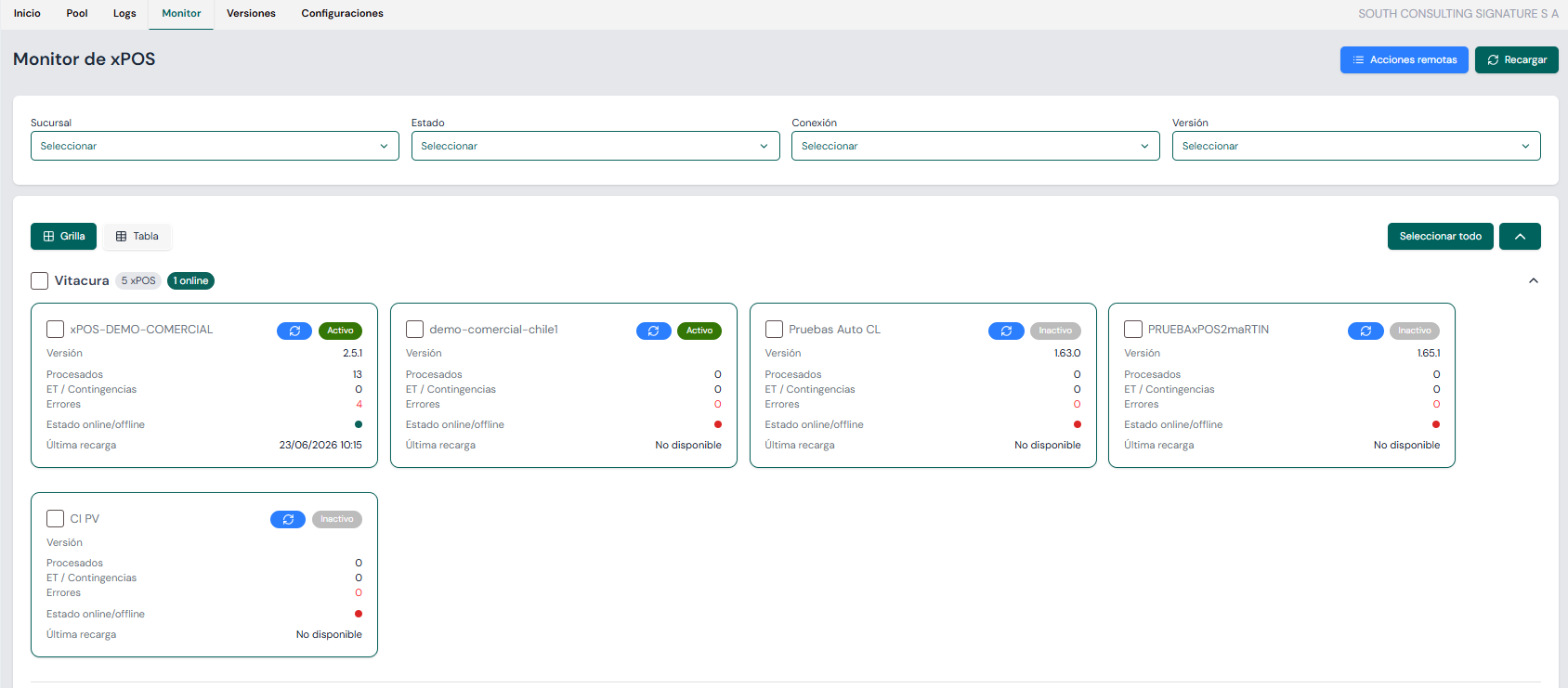
🔍 Top filters
At the top of the screen there are four key filters:
- Branch: select one or more specific branches to show only the associated xPOS devices.
- Status: filter the xPOS devices by status (Active / Inactive).
- Connection: filter the xPOS devices by connection status (Online / Offline).
- Version: shows the active versions of the organization's xPOS devices.
🧱 View modes
You can switch between two view modes:
- Grid: shows the xPOS devices as individual cards with their relevant information, grouped by branch.
- Table: shows the xPOS data in tabular format.
📋 Information per xPOS
Each card contains:
- Branch: branch name.
- xPOS name: unique identifier assigned to the point.
- Status: indicated by a colored tag depending on whether the onboarding is Active, Inactive or Blocked.
- Version: version number of the installed xPOS.
- Processed: number of processed documents.
- ET / Contingencies: number of documents processed under:
- ET (🇨🇱 🇵🇾): documents sent to the SendDocumentToAuthority API for submission to the tax authority.
- Contingencies (🇨🇴 🇨🇷 🇬🇹 🇵🇦): contingency mode, whether issuer or tax-authority contingencies.
- Errors: number of documents processed with detected errors.
- Online/Offline status: visual indicator of the internet connection — green dot for online, red dot for offline.
- Last reload: date of the last time the xPOS reloaded its configurations.
🔄 "Remote actions" button
Located at the top right, it lets you run specific actions on the selected xPOS devices:
- Update xPOS: updates the xPOS version.
- Reload configuration: runs the update process with the latest xPOS configurations.
🔄 "Reload" button
Located at the top right, it refreshes the data of all displayed xPOS devices.